What Is a Technical SEO Audit?
A technical SEO audit examines your site's infrastructure — how search engines crawl, index, and render your pages. Content SEO decides whether you deserve to rank; technical SEO decides whether Google can even access and understand the page. Get the technical layer wrong and the best content in your niche sits invisible.
This is the hub. Each of the 10 steps links out to a focused deep-dive when you need the full walkthrough — treat this page as the map and the linked guides as the terrain.
Why Technical SEO Matters
Google crawls on a finite budget per site. When your site has technical issues, Google may:
- Skip your pages entirely (crawl budget wasted on junk URLs)
- Index the wrong version (duplicate or non-canonical URLs)
- Rank you lower because the page is slow or unstable
- Deindex pages accidentally (a stray
noindexor aDisallowline)
The failure mode that hurts most is silent — nothing errors, traffic just never arrives.
The 10-Step Technical SEO Audit
Step 1: Crawlability
Can Googlebot reach every page that matters? Start at /robots.txt. One overly broad Disallow: / — common after a staging site ships to production with its blocking rules intact — takes the whole site out of the index. Confirm important directories aren't blocked, then check that sitemap.xml returns 200 and lists your canonical URLs, not 404s or redirects. What good looks like: robots.txt allows all indexable sections and points to a live sitemap containing only canonical, 200-status URLs. For directives, wildcards, and the trap of blocking CSS/JS, read the robots.txt guide and XML sitemap guide — or build either faster with the sitemap generator and robots.txt generator.
Step 2: Indexability
Crawlable isn't the same as indexed. Search site:yourdomain.com and compare the count against what you expect — a big gap either way is your first signal. Then open Google Search Console → Pages and read the "Not indexed" reasons. The two that quietly bleed rankings are duplicate content and canonical conflicts: a page that canonicalizes to the wrong URL hands its ranking equity elsewhere. What good looks like: every important URL is indexed or has a deliberate reason not to be, and each canonical points to itself unless you meant otherwise. If several pages target the same query and cannibalize each other, that's its own fix — see canonical URLs explained and keyword cannibalization.
Step 3: Site Architecture
Depth affects both crawl frequency and perceived importance — pages buried five clicks down get crawled less and rank worse. Aim for every important page to be reachable within three clicks of the homepage.
Homepage (depth 0)
├── /products (depth 1)
│   ├── /products/shoes (depth 2)
│   │   └── /products/shoes/nike-air (depth 3) ← maximum
How to check: crawl your own site with Screaming Frog (free up to 500 URLs) and sort by crawl depth — anything past depth 3 needs a shorter path in via navigation or a hub link.
Step 4: Page Speed
Core Web Vitals are confirmed ranking factors, and they're measured on real users, not lab tests:
| Metric | Good | Needs Work | Poor |
|---|---|---|---|
| LCP | < 2.5s | 2.5-4s | > 4s |
| INP | < 200ms | 200-500ms | > 500ms |
| CLS | < 0.1 | 0.1-0.25 | > 0.25 |
How to check: look at the CrUX field data in Search Console's Core Web Vitals report — that's what Google actually uses — then run Lighthouse to reproduce it. What good looks like: the 75th-percentile value for all three metrics sits green. Usual culprits: an unoptimized hero image (LCP), a heavy third-party script (INP), images or ads without reserved dimensions (CLS). The full playbook is in improve Core Web Vitals; the broader latency work — compression, caching, critical CSS — is in website speed optimization.
Step 5: Mobile Friendliness
Google uses mobile-first indexing: the mobile version is the one that gets ranked, so any content you hide on mobile effectively doesn't exist for SEO. How to check: open the page in Chrome DevTools device mode at 360px wide and look for horizontal scroll, tap targets under 48×48px, and body text below 16px. What good looks like: a present <meta name="viewport" content="width=device-width, initial-scale=1">, no sideways scroll, and full content parity with desktop.
Step 6: HTTPS & Security
HTTPS is a confirmed ranking signal, but the audit failure is usually subtler than "no certificate." How to check: load the page and watch the console for mixed-content warnings — a single http:// image or script on an https:// page downgrades the padlock and can block resources. What good looks like: every request is HTTPS, HSTS is set, and your header grade is A or better. SEO Snapshot grades headers A+ to F with fix code; the reasoning behind each one is in the security headers guide.
Step 7: Structured Data
Schema markup helps Google understand the page and, for supported types, earns rich results. How to check: paste your rendered HTML into Google's Rich Results Test and read errors and warnings — missing required fields fail silently. What good looks like: valid JSON-LD, the right type (Article, Product, BreadcrumbList), required properties filled, and markup that only describes content visible on the page. BreadcrumbList is the highest-ROI type — trivial to add, shows on almost every result. Copy-paste templates and the required-vs-recommended breakdown are in how to add JSON-LD.
Step 8: Internal Linking
Internal links pass ranking equity and tell Google which pages matter. How to check: in your Screaming Frog crawl, sort by inlinks — pages with zero internal links are orphans Google may never find. What good looks like: no orphans, no broken internal links (404s waste equity), descriptive anchor text instead of "click here," and your money pages getting the most links.
Step 9: Redirects
How to check: crawl your redirects and look for chains (A→B→C) and loops. Each hop loses a little equity and adds latency; consolidate to a single 301 (A→C). What good looks like: permanent moves use 301 not 302, old URLs point straight to their final destination, and no redirect resolves to a 404.
Step 10: International SEO
If you serve multiple languages or regions, hreflang tells Google which version to show whom — and it's the most error-prone area of technical SEO. How to check: validate that every tag is reciprocal (if EN points to FR, FR must point back) and self-referencing. What good looks like: valid ISO language/region codes, an x-default fallback, and matching return tags across all versions. The full implementation, including the return-tag trap that breaks most setups, is in the hreflang guide.
How to Prioritize What You Find
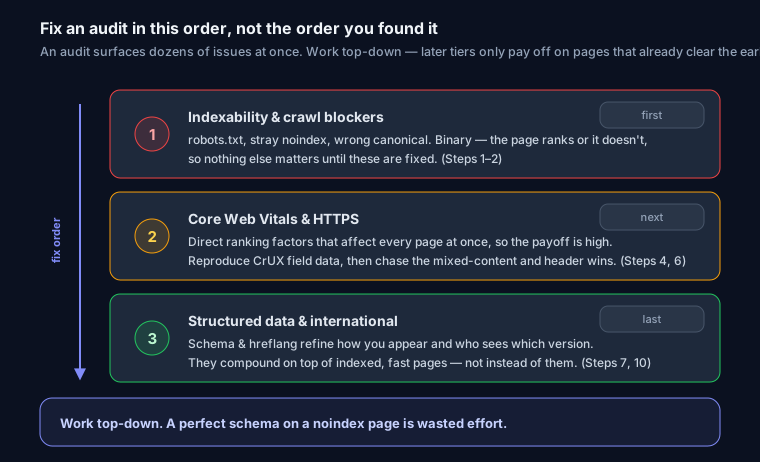
An audit surfaces dozens of issues at once. Fix them in this order:
- Indexability and crawl blockers first. A
noindex, a badDisallow, or a wrong canonical can hide entire sections. These are binary — the page ranks or it doesn't — so nothing else matters until they're fixed. - Core Web Vitals and HTTPS next. Direct ranking factors that affect every page at once, so the payoff is high.
- Structured data and international polish last. Schema and hreflang refine how you appear and who sees which version — they compound on top of pages that are already indexed and fast, not instead of.
Work top-down. A perfect schema on a noindex page is wasted effort.
Automated Audit
Running all ten steps by hand takes an afternoon. SEO Snapshot runs the same checks in seconds — robots.txt, sitemap conflicts, noindex, Core Web Vitals, security headers, structured data, hreflang — with copy-paste fix code for each issue. Use it for the first pass, then dig into the deep-dive guides for anything it flags.
FAQ
Q: How often should I do a technical SEO audit?
A: Monthly for active sites, and always after a redesign, migration, or CMS change — those are exactly when a stray noindex or broken redirect slips in.
Q: What's the most common technical SEO issue? A: Missing or duplicate meta descriptions, followed by missing alt text and slow speed. The most damaging one, though, is an accidental indexability block — it takes whole sections dark silently.
Q: Where should I start if I only have an hour? A: Steps 1 and 2 — crawlability and indexability. Confirm robots.txt isn't blocking anything important, check Search Console's Pages report for surprises, and verify canonicals. That protects more traffic than any speed tweak.
Q: Can I do a technical SEO audit myself? A: Yes. Free tools like SEO Snapshot, Google Search Console, and Lighthouse cover most of it. For sites over a few thousand URLs, add Screaming Frog for crawl-depth and internal-link analysis.