noindex, nofollow, and Disallow sound similar but do completely different things. Confusing them is one of the most common — and most damaging — technical SEO mistakes.
Quick Comparison
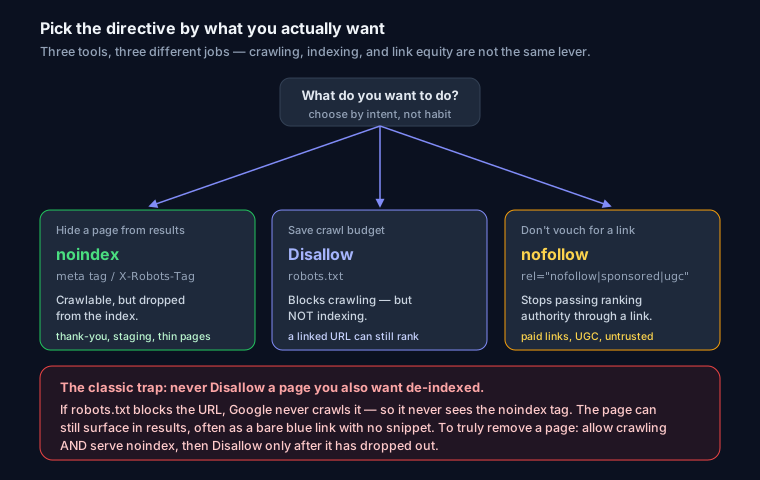
| Directive | Where | What it does |
|---|---|---|
Disallow |
robots.txt | Asks crawlers not to crawl a URL |
noindex |
meta tag / header | Tells Google not to index (show) a page |
nofollow |
meta tag / link attr | Tells Google not to follow / pass authority through links |
Disallow (robots.txt)
Controls crawling, not indexing. It stops well-behaved bots from fetching a URL:
User-agent: *
Disallow: /admin/
The trap: a Disallowed page can still be indexed (without content) if other sites link to it — because Google never crawls it, it never sees a noindex. To truly hide a page, use noindex and let Google crawl it.
noindex (meta tag or header)
Keeps a page out of search results. The page can still be crawled:
<meta name="robots" content="noindex">
Or via HTTP header:
X-Robots-Tag: noindex
Use it for thank-you pages, internal search results, staging pages, and thin filter/pagination URLs.
nofollow (link attribute)
Tells Google not to pass ranking authority through a specific link:
<a href="https://example.com" rel="nofollow">Sponsored link</a>
Use it for paid links, user-generated content, and untrusted destinations. It does not stop indexing of your own page.
The Golden Rules
- To hide a page from search: use
noindex— and do not also Disallow it (Google must crawl the page to see the noindex). - To save crawl budget on worthless URLs: use
Disallow. - To manage link equity: use
nofollow/sponsored/ugc.
Common Mistakes
- Disallowing a page you also
noindexed → Google never sees the noindex → page stays indexed. - Using robots.txt to hide sensitive data (it is public and just lists what to avoid).
nofollow-ing your own internal links and starving pages of authority.
Audit Your Directives
Run your URL through SEO Snapshot — it parses your robots.txt and meta robots tags and flags conflicting or risky indexing directives.
FAQ
Q: Does Disallow in robots.txt remove a page from Google? No. Disallow only blocks crawling, not indexing. If other sites link to the URL, Google can still index and show it in results without a snippet, because it never crawls the page to learn otherwise. To remove a page, allow crawling and serve a noindex tag instead.
Q: Can I use Disallow and noindex together on the same page? You shouldn't. If robots.txt disallows the URL, Google never crawls it and therefore never sees the noindex directive, so the page can remain indexed. Let Google crawl the page so it reads the noindex, and only add a Disallow later once the page has dropped out of the index.
Q: What is the difference between noindex and nofollow? noindex is a page-level directive that keeps the whole page out of search results while still allowing it to be crawled. nofollow is a link-level attribute that tells Google not to pass ranking authority through a specific link; it does not affect whether your page is indexed.
Q: When should I use rel="sponsored" or rel="ugc" instead of nofollow? Use rel="sponsored" for paid or affiliate links and rel="ugc" for links inside user-generated content like comments and forum posts. Plain rel="nofollow" still works for anything you simply don't want to endorse, and you can combine values when a link fits more than one category.