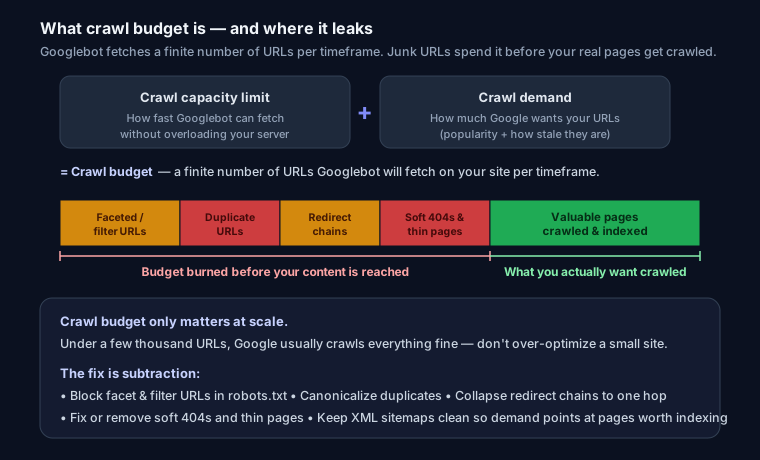
Crawl budget is the number of URLs Googlebot will crawl on your site within a given timeframe. For large sites, wasting it on low-value pages means important content gets discovered and indexed slowly.
Does Crawl Budget Matter for You?
- Small sites (< 1,000 pages): usually not a concern — Google crawls everything.
- Large sites, e-commerce, or sites with many parameters: crawl budget matters a lot.
What Wastes Crawl Budget
- Faceted navigation / URL parameters — infinite filter combinations.
- Duplicate content — same page under multiple URLs.
- Soft 404s and redirect chains.
- Low-value pages — thin tag/archive pages.
- Slow server response — fewer pages crawled per session.
How to Optimize It
1. Block low-value URLs in robots.txt:
User-agent: *
Disallow: /*?sort=
Disallow: /search
2. Fix redirect chains. Point redirects directly to the final URL (one hop).
3. Consolidate duplicates with canonical tags.
4. Keep your sitemap clean — only include indexable, canonical URLs.
5. Improve server speed (TTFB) so Google crawls more per visit.
6. Remove or noindex thin pages that add no value.
Check Your Site
Run your URL through SEO Snapshot — it flags redirect chains, slow response times, and robots.txt issues that waste crawl budget.
FAQ
Q: Does crawl budget matter for small websites? Usually no. Google says sites with fewer than a few thousand URLs are typically crawled efficiently. If your pages get indexed the same day you publish them, crawl budget is not your bottleneck. It becomes a real concern for large sites (tens of thousands of URLs or more) or sites that change very frequently.
Q: What are crawl capacity limit and crawl demand? They are the two inputs Google uses to set crawl budget. Crawl capacity limit is how many simultaneous connections Googlebot can use without overloading your server, based on your site's speed and error rate. Crawl demand is how much Google wants to crawl your URLs, driven by their popularity and how stale Google thinks they are. Budget is roughly the two combined.
Q: How do I check if crawl budget is being wasted? Open the Crawl Stats report in Google Search Console (Settings > Crawl stats). Look at total crawl requests, the response codes, and which file types and URL paths Googlebot hits most. A lot of crawling on parameter URLs, redirects, or 404s signals waste. Server log analysis gives the most precise view of what Googlebot actually fetches.
Q: Does blocking URLs in robots.txt save crawl budget? Yes, for the URLs you block. Googlebot will not fetch paths disallowed in robots.txt, so blocking faceted-navigation and filter URLs stops them from consuming crawls. Note that a robots.txt block prevents crawling, not indexing — a blocked URL can still appear in results if it is linked. To remove a page from the index, allow crawling and use noindex instead.