The Title Tag Is Your Most-Read Line of Copy
The title tag is the one-line <title> in your page's <head>. Google shows it as the blue clickable headline in search results, and it carries more on-page ranking weight than any other single element. Get it right and you win both the ranking and the click. Get it wrong — too long, too vague, keyword-stuffed — and Google quietly rewrites it into something you didn't choose.
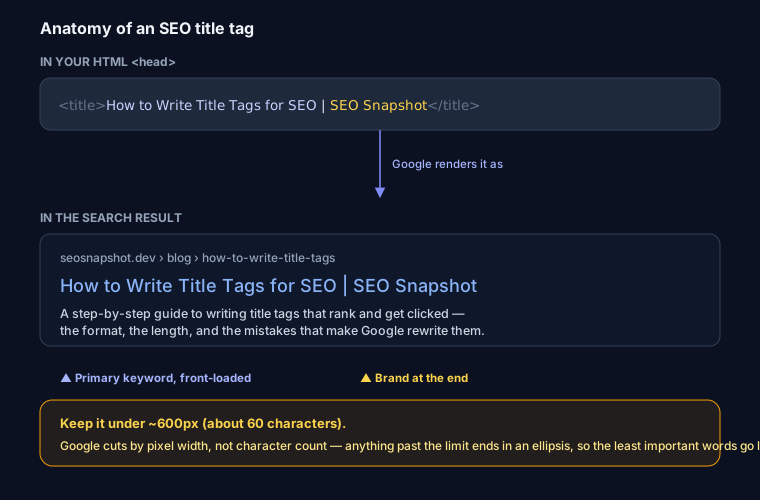
The Formula
Almost every good title fits one shape:
Primary keyword + supporting words + | Brand
- Front-load the keyword. Put the phrase you want to rank for — and the phrase a searcher scans for — at the very start. The first few words do the heavy lifting.
- End with the brand.
| Brandor— Brandat the end builds recognition and is the safest thing to lose if the title truncates. - One title per page, all unique. Duplicate titles across pages muddy relevance and make Google pick for you.
So How to Write Title Tags for SEO | SEO Snapshot beats SEO Snapshot - Home every time: the first tells Google and the reader exactly what the page answers.
Length: Measure Pixels, Not Characters
The famous "50–60 characters" rule is a rough stand-in for the real limit, which is pixel width — roughly 600px on desktop. Google renders your title in a specific font and cuts it where it runs out of room, so a title full of wide letters (W, M, capitals) truncates sooner than one of narrow letters. Two titles of identical character count can behave differently.
Don't guess. Paste your title into the title & meta length checker to see the exact pixel width, or the SERP snippet preview for a full mockup with the URL and description. Build the finished tag with the meta tag generator.
Good vs Bad — Real Examples
| Weak | Better | Why |
|---|---|---|
Home |
Free SEO Report & Analyzer | SEO Snapshot |
Says what the page is and leads with the keyword |
Blog - Our Latest Posts |
How to Write Title Tags for SEO | SEO Snapshot |
Targets a real query instead of a label |
Best Best Cheap SEO Tool Tool 2026 |
Free SEO Audit Tool — 100 Checks in Seconds |
Reads like a human, not a keyword pile |
Product |
Nike Air Zoom Pegasus 41 Running Shoes | Store |
Specific, unique, matches buyer intent |
Five Mistakes That Get Titles Rewritten
Google rewrites roughly a third of titles when it thinks yours is unhelpful. The usual triggers:
- Too long — the important words fall off the end. Fix the length first.
- Keyword stuffing — repeating the term reads like spam and gets replaced by your H1.
- Boilerplate first — leading every title with
Brand |wastes the most valuable space. - Title ≠ H1 — a big mismatch between the
<title>and the on-page<h1>makes Google distrust the title and swap in the H1. - Missing entirely — no
<title>forces Google to invent one from the URL or page text, which rarely reads well.
If your titles keep getting swapped, close the gap: front-load, trim to fit, and keep the title and H1 telling the same story.
Where the Title Fits in the SERP
The title never works alone — it sits above the meta description, the pair that decides your click-through rate. The title earns the ranking and the first glance; the description closes the click. Write them together so they don't repeat each other.
Run any page through the SEO analyzer and it flags missing, duplicate, and over-length titles automatically, with the fix code to paste in.
FAQ
Q: How long should a title tag be? Aim to stay under about 600 pixels on desktop — roughly 50–60 characters, though it depends on the letters. Wide characters truncate sooner. Measure the actual pixel width rather than counting characters.
Q: Should the title tag match the H1? They should tell the same story but don't have to be identical. The title is written for the search result (front-loaded keyword, brand); the H1 is written for the page. A large mismatch makes Google more likely to rewrite your title using the H1.
Q: Why did Google change my title in search results? Google rewrites titles it finds unhelpful — too long, keyword-stuffed, generic, or mismatched with the page. The fix is to write a concise, accurate, front-loaded title so Google has no reason to replace it.
Q: Does the title tag affect rankings? Yes. It's one of the strongest on-page relevance signals and directly shapes click-through, which feeds back into performance. It's the highest-leverage line of copy on the page.