Time to First Byte (TTFB) is the time between a browser requesting a page and receiving the first byte of the response. It is the foundation of page speed — nothing else can start until the server responds.
Why TTFB Matters
TTFB directly affects your Largest Contentful Paint (LCP), a Core Web Vitals metric Google uses for ranking. A slow server means a slow LCP no matter how optimized your frontend is.
| TTFB | Rating |
|---|---|
| Under 200 ms | Excellent |
| 200–500 ms | Good |
| 500–800 ms | Needs improvement |
| Over 800 ms | Poor — fix this first |
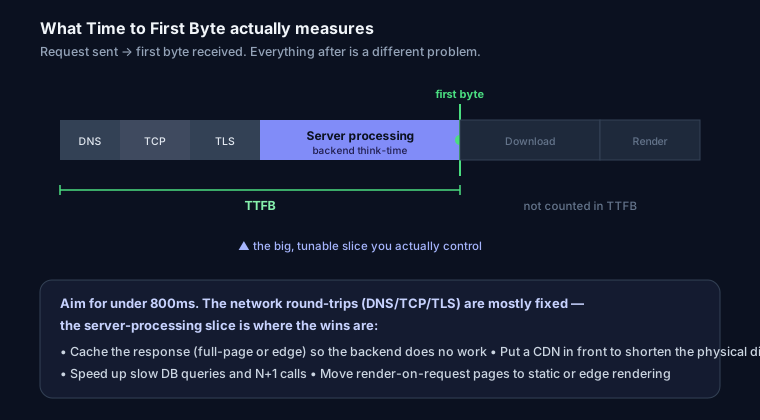
What Causes a Slow TTFB
- Slow server / cheap hosting — shared hosting under load.
- No caching — every request hits the database and rebuilds the page.
- Distance — the server is far from the user with no CDN.
- Heavy backend work — unoptimized queries, blocking API calls.
- No compression / keep-alive — connection overhead per request.
How to Improve TTFB
1. Add a CDN. Cloudflare (free) caches static content at edge locations near your users, cutting network distance dramatically.
2. Cache rendered pages. Serve cached HTML instead of rebuilding on every request:
# Nginx micro-cache example
proxy_cache_path /tmp/cache levels=1:2 keys_zone=micro:10m;
location / {
  proxy_cache micro;
  proxy_cache_valid 200 1m;
}
3. Use static or incremental rendering. In Next.js, prefer static generation or ISR over server rendering for pages that do not change per-request:
export const revalidate = 3600; // regenerate at most hourly
4. Optimize the database. Add indexes for frequent queries, and avoid N+1 queries.
5. Enable compression and keep-alive at the server level (gzip/brotli).
Measure It First
You can measure TTFB in Chrome DevTools → Network → click the document request → Timing tab. Or run your URL through SEO Snapshot — it reports server-measured response time and flags a slow TTFB as a Core Web Vitals risk.
FAQ
Q: What is a good TTFB? Under 800ms is Google’s “good” threshold, and under 200ms is excellent. Between 800ms and 1.8s needs work; over 1.8s is poor and holds back your Core Web Vitals.
Q: Does TTFB affect SEO? Indirectly, but it is real. TTFB is not a ranking factor on its own, but it is the first thing that happens on every request — a slow TTFB delays LCP (a Core Web Vital) and every paint after it, and a slow server also wastes crawl budget.
Q: What causes a high TTFB? Almost always server-side work: rendering pages on every request instead of caching, slow database queries, no CDN so requests travel far, or an overloaded origin. Slow DNS or TLS is an occasional secondary cause.
Q: How do I reduce TTFB quickly? Cache the response (full-page or at the edge) so the backend does little work, put a CDN in front to shorten the distance, speed up slow queries, and move render-on-request pages to static or edge rendering.