Copy-paste JSON-LD, then make it correct
This is the hands-on version: templates you can drop in today, plus the rules that decide whether Google actually uses them. If you want the why first — what structured data is, how Linked Data works, why JSON-LD beats microdata — read the structured data (JSON-LD) guide for beginners and come back. Everything below assumes you just want working markup.
One thing to get straight before you paste anything: only mark up content that's actually visible on the page. Google's structured data guidelines are explicit about this. If your FAQ answers live in the JSON-LD but not in the rendered HTML, that's a manual-action risk, not a shortcut. Schema describes the page; it doesn't replace it.
What still earns rich results in 2024-2025
Structured data got a big reset. In August 2023 Google removed FAQ rich results for the vast majority of sites — FAQ and HowTo rich results are now shown only for a narrow set of authoritative government and health domains. So if you add FAQPage markup expecting the accordion in search, you almost certainly won't get it anymore.
That doesn't make the markup useless. It still helps Google understand the page and feeds other surfaces. But be honest about the payoff.
What reliably still produces rich results:
- Article — headline, author, dates in Top Stories and Discover
- BreadcrumbList — the breadcrumb trail under your title (high value, trivial to add)
- Product — price, availability, ratings
- Recipe, Event, Review/AggregateRating, Video, JobPosting — all still supported
If you only add one new thing, add BreadcrumbList.
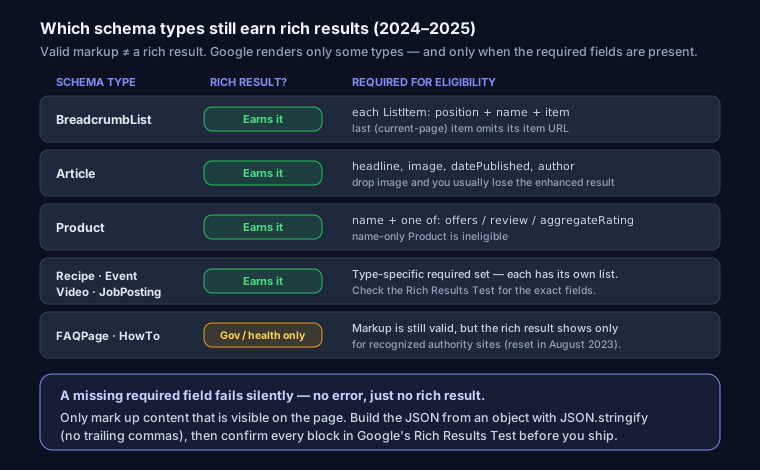
Required vs recommended properties
Every type has properties Google requires for eligibility and others it merely recommends. Miss a required one and you get no rich result — silently. The big ones:
- Product needs
nameplus eitheroffers,review, oraggregateRating. A Product with just a name and description is ineligible. - Article wants
headline,image,datePublished, andauthor. Skip the image and you often lose the enhanced treatment. - BreadcrumbList needs each
ListItemwithpositionand either aname+itemor a linked entity.
Don't guess. Paste your output into the validators (below) and read the warnings — "recommended" fields are flagged separately from errors.
The templates
Improved versions. Note WebPage is the least useful of the set — it rarely produces anything visible — so lead with the ones that pay off.
BreadcrumbList (add this first)
<script type="application/ld+json">
{
  "@context": "https://schema.org",
  "@type": "BreadcrumbList",
  "itemListElement": [
    { "@type": "ListItem", "position": 1, "name": "Home", "item": "https://yoursite.com/" },
    { "@type": "ListItem", "position": 2, "name": "Blog", "item": "https://yoursite.com/blog" },
    { "@type": "ListItem", "position": 3, "name": "This Article" }
  ]
}
</script>
The last item is the current page — leave off its item URL so Google treats it as the endpoint.
Article
<script type="application/ld+json">
{
  "@context": "https://schema.org",
  "@type": "Article",
  "headline": "Your Article Title",
  "description": "Article summary",
  "image": "https://yoursite.com/cover.jpg",
  "author": { "@type": "Person", "name": "Author Name", "url": "https://yoursite.com/about" },
  "publisher": {
    "@type": "Organization",
    "name": "Your Site Name",
    "logo": { "@type": "ImageObject", "url": "https://yoursite.com/logo.png" }
  },
  "datePublished": "2026-03-22",
  "dateModified": "2026-07-11"
}
</script>
The author.url matters more than it looks — a real author entity with a bio page is part of demonstrating experience and expertise (E-E-A-T), which Google leans on for YMYL content.
Product
<script type="application/ld+json">
{
  "@context": "https://schema.org",
  "@type": "Product",
  "name": "Product Name",
  "description": "Product description",
  "image": "https://yoursite.com/product.jpg",
  "offers": {
    "@type": "Offer",
    "price": "29.99",
    "priceCurrency": "USD",
    "availability": "https://schema.org/InStock",
    "url": "https://yoursite.com/product"
  },
  "aggregateRating": {
    "@type": "AggregateRating",
    "ratingValue": "4.6",
    "reviewCount": "128"
  }
}
</script>
Only include aggregateRating if those reviews are real and on the page. Faking them is a fast track to a manual action.
FAQPage
<script type="application/ld+json">
{
  "@context": "https://schema.org",
  "@type": "FAQPage",
  "mainEntity": [{
    "@type": "Question",
    "name": "What is SEO?",
    "acceptedAnswer": { "@type": "Answer", "text": "Improving a site to increase visibility in search results." }
  }]
}
</script>
Still valid, still worth adding for understanding — just don't expect the accordion unless you're a recognized authority site.
Organization
<script type="application/ld+json">
{
  "@context": "https://schema.org",
  "@type": "Organization",
  "name": "Your Company",
  "url": "https://yoursite.com",
  "logo": "https://yoursite.com/logo.png",
  "sameAs": ["https://twitter.com/yourhandle", "https://linkedin.com/company/yourcompany"]
}
</script>
Connect entities with @graph
A blog post is usually several things at once: an Article, a BreadcrumbList, an Organization, an author. Instead of separate scripts that repeat each other, put them in one @graph and wire them together with @id:
{
  "@context": "https://schema.org",
  "@graph": [
    { "@type": "Organization", "@id": "https://yoursite.com/#org", "name": "Your Site", "logo": "https://yoursite.com/logo.png" },
    { "@type": "Person", "@id": "https://yoursite.com/#author", "name": "Author Name" },
    {
      "@type": "Article",
      "headline": "Your Article Title",
      "author": { "@id": "https://yoursite.com/#author" },
      "publisher": { "@id": "https://yoursite.com/#org" }
    }
  ]
}
Define the Organization once, reference it by @id everywhere else. This is what Yoast and Rank Math generate under the hood in WordPress — and why their output validates cleanly.
The Next.js pattern
Render it in a Server Component so the JSON is in the initial HTML, not injected client-side:
export default function ArticlePage() {
  const schema = {
    "@context": "https://schema.org",
    "@type": "Article",
    headline: "Your Article Title",
    datePublished: "2026-03-22",
  };
  return (
    <>
      <script
        type="application/ld+json"
        dangerouslySetInnerHTML={{ __html: JSON.stringify(schema) }}
      />
      {/* page content */}
    </>
  );
}
JSON.stringify on an object is the key move — it guarantees valid JSON with no trailing commas and correct escaping. Never hand-build the string. dangerouslySetInnerHTML sounds scary but is correct here: it stops React from HTML-escaping the quotes, which would break the JSON.
Validate before you ship
Two tools, two jobs:
- Rich Results Test — tells you whether Google will show a rich result and which required fields are missing.
- Schema Markup Validator — checks schema.org correctness for any type, including ones Google doesn't render.
For a quick pass on live pages, SEO Snapshot parses your JSON-LD and flags missing required fields when you run your URL. Generating from scratch? The schema generator outputs valid blocks you can paste straight in.
Mistakes that cost you the rich result
- Trailing commas. JSON-LD is strict JSON —
"a": 1,}is invalid and Google drops the whole block. Stringify from an object and this never happens. - Marking up hidden content. FAQ answers, prices, or ratings that aren't in the visible HTML.
- Wrong
@type. UsingWebPagewhere you meantArticle, orThingas a catch-all. - Missing required fields. Product without
offers/review/aggregateRating; Article with no author. - Stale
dateModified. Update it when you actually edit, or you're lying to the crawler.
Structured data is one line in a bigger checklist — see the technical SEO audit guide for where it fits.
FAQ
Does structured data boost rankings? Not directly. It can win rich results and improve how Google understands the page, and that lifts CTR — which helps indirectly.
Can I use multiple JSON-LD scripts on one page?
Yes. Google merges them. But a single @graph with @id references is cleaner and avoids duplicating the same Organization five times.
Why is my valid schema not showing a rich result? Usually a missing required field, or a type Google no longer renders (FAQ/HowTo for most sites). Run the Rich Results Test — it tells you specifically which.