What Is Structured Data?
Structured data is a standardized way to describe your page's content so a machine can read it without guessing. A human sees a headline, an author byline, and a date. A search engine sees a blob of HTML. Structured data hands the machine a labeled map: this is the headline, this is the author, this is the datePublished. The vocabulary everyone uses is schema.org, a shared dictionary maintained by Google, Microsoft, and others.
Why bother? Because Google can turn that labeled data into rich results — the enhanced listings that stand out in search. Instead of a plain blue link, you might get star ratings under a product, expandable FAQ questions, or a recipe card with cook time and calories. Rich results don't guarantee higher rankings, but they take up more space and pull more clicks.
What Rich Results Actually Look Like
A few common ones, so the abstract idea gets concrete:
- FAQ — your questions appear as collapsible dropdowns directly in the results, so the listing takes up several extra lines.
- Product — price, availability ("In stock"), and a star rating with review count show under the title.
- Recipe — a thumbnail, star rating, total time, and calorie count in a card, often inside a carousel.
- Breadcrumbs — instead of
example.com/blog/2026/03/slug, Google showsHome › Blog › Structured Data. - Article — larger thumbnail and clearer publish date in Top Stories and news surfaces.
Google decides whether to show any of these. Valid markup makes you eligible; it isn't a switch you flip.
Which Schema Types Support Rich Results
You can mark up almost anything with schema.org, but only a subset triggers a visual rich result in Google. The ones worth knowing as a beginner:
- Article / BlogPosting — blog posts and news.
- FAQPage — question-and-answer content you own on the page.
- Product — e-commerce items, usually paired with
OfferandAggregateRating. - Recipe — cooking content.
- BreadcrumbList — your page's position in the site hierarchy.
- Organization — your brand, logo, and social profiles (feeds knowledge panels).
- LocalBusiness — a physical business with address, hours, and phone.
- Event — dated events with a location and start time.
There are dozens more (Review, VideoObject, JobPosting…), but start with the type that matches your page. A blog post is an Article. A store page is a Product. Don't stack five types onto one page hoping something sticks — mark up what's genuinely there.
JSON-LD vs Microdata vs RDFa
There are three ways to write structured data. Microdata and RDFa interleave attributes into your HTML tags (itemscope, itemprop, vocab), so the markup is scattered across the visible content. JSON-LD keeps everything in a single <script> block, separate from your HTML.
Google explicitly recommends JSON-LD, and for good reason. It sits in one place, so you can generate it server-side, template it, and diff it in code review without touching your markup. Microdata forces you to keep attributes in sync with the DOM every time a designer moves an element. Unless you're maintaining a legacy site already full of Microdata, use JSON-LD and don't look back.
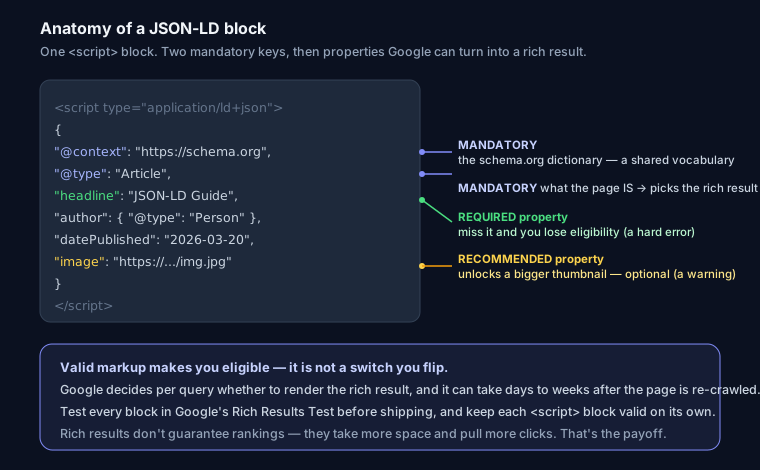
Here's the same Article in JSON-LD:
<script type="application/ld+json">
{
  "@context": "https://schema.org",
  "@type": "Article",
  "headline": "Structured Data (JSON-LD) Guide for Beginners",
  "author": { "@type": "Person", "name": "Author Name" },
  "datePublished": "2026-03-20",
  "image": "https://yoursite.com/image.jpg"
}
</script>
Ready-to-Use Templates
Website + Organization
<script type="application/ld+json">
{
  "@context": "https://schema.org",
  "@type": "WebSite",
  "name": "Your Site Name",
  "url": "https://yoursite.com",
  "description": "Your site description"
}
</script>
FAQ Page
<script type="application/ld+json">
{
  "@context": "https://schema.org",
  "@type": "FAQPage",
  "mainEntity": [
    {
      "@type": "Question",
      "name": "Your question?",
      "acceptedAnswer": {
        "@type": "Answer",
        "text": "Your answer."
      }
    }
  ]
}
</script>
Every block starts the same: @context points at schema.org, @type names what you're describing. Get those two right and the rest is filling in properties. For more copy-paste blocks — Product, LocalBusiness, BreadcrumbList — see how to add JSON-LD structured data with examples, or generate one for your page with the schema generator.
Where to Put the Script
The <script type="application/ld+json"> tag can go in <head> or at the end of <body> — both are valid, and Google reads either. <head> is the conventional home. On a framework like Next.js, render it server-side so it's in the initial HTML; Google does execute JavaScript, but static output is one less thing to go wrong.
Required vs Recommended Properties
Each rich-result type has a spec in Google's documentation splitting properties into required and recommended. Miss a required property and you lose eligibility entirely — Search Console flags it as an error. Miss a recommended one and you're still eligible, but you leave a possible enhancement on the table (a warning, not an error).
Example: a Product result needs a name. To show a price you need an Offer with price and priceCurrency. To show stars you need review or aggregateRating. Skip the rating and you still get a valid Product — just no stars. Read the spec for your type once and keep the required fields straight.
How to Test It
Never trust markup you haven't validated. Three tools:
- Rich Results Test — Google's own checker. Tells you which rich result you're eligible for and lists errors and warnings.
- Schema Markup Validator — checks schema.org syntax generally, beyond just rich-result types.
- Search Console — the Enhancements reports show errors across your whole live site over time, not just one URL.
To confirm your markup is present and parseable on a live page, run the URL through the SEO Snapshot analyzer — it detects and validates the common schema types automatically, which is a fast first pass before you open the Google testers.
Common Beginner Mistakes
- Invalid JSON. A trailing comma or a smart quote pasted from a doc breaks the whole block silently. Validators catch this instantly.
- Marking up content that isn't on the page. Google's guidelines require the structured data to reflect visible content. Inventing FAQ answers users can't see, or claiming a rating you don't display, is a spam violation that can trigger a manual action.
- Wrong
@type. Tagging a category listing asProduct, or a blog index asArticle, gives Google contradictory signals. Match the type to what the page really is. - Missing required fields. The most common Search Console error. Check the spec.
- Fake or self-serving reviews.
AggregateRatingon your own site, unmoderated, is exactly what Google's reviews policy targets.
Structured data is one layer of a healthy site. Pair it with the fundamentals in a technical SEO audit and back it with the credibility signals covered in the E-E-A-T guide — schema tells Google what the content is; those tell it whether to trust it.
FAQ
Does adding structured data improve my rankings? Not directly. It makes you eligible for rich results, which can raise click-through rate. Better CTR can indirectly help, but schema itself isn't a ranking factor.
Do I need to submit structured data to Google anywhere? No. Google picks it up when it crawls the page. You can request re-indexing in Search Console to speed things up, but there's no separate submission step.
Why isn't my rich result showing even though the test passes? Passing the Rich Results Test means you're eligible, not guaranteed. Google chooses per query, and it can take days to weeks after the page is re-crawled. It may also withhold rich results from sites with quality or policy issues.
Can I use more than one JSON-LD block on a page?
Yes. Multiple <script type="application/ld+json"> blocks are fine — for example one for BreadcrumbList and one for Article. Just keep each valid on its own.