What an XML sitemap actually does
An XML sitemap is a list of URLs you want Google to know about. That's it. It doesn't force indexing, it doesn't boost rankings, and it won't rescue thin pages. What it does well is help crawlers discover URLs that internal linking might miss — deep pages, fresh posts, pages orphaned by a bad nav. On a small, well-linked site the impact is marginal. On a large site, or one where new content outpaces Google's recrawl, it's how discovery keeps up.
The most common mistake: treating the sitemap as a dump of every URL that returns HTML. A sitemap is a set of recommendations, and Google reads one full of junk as a signal your site quality is low.
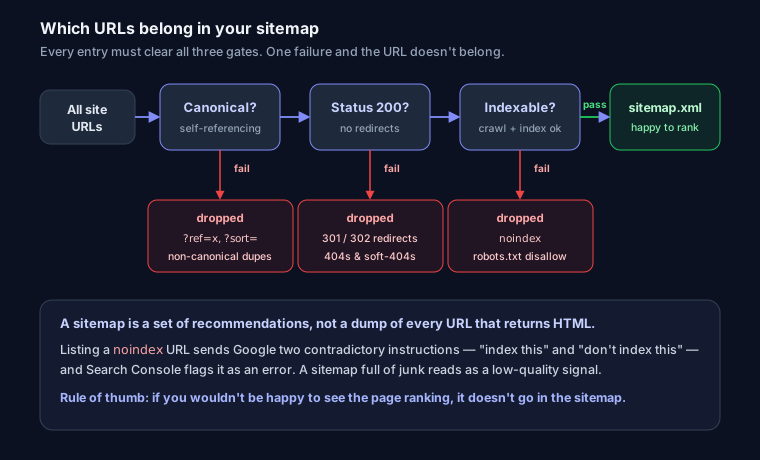
What belongs in a sitemap (and what doesn't)
Every URL in your sitemap should be a page you'd be happy to see ranking. Concretely, each entry must be:
- Canonical — the version you consider authoritative. Never list a URL whose
<link rel="canonical">points somewhere else. - Status 200 — no redirects, no 404s, no soft-404s. If
/old-page301s to/new-page, list/new-page. - Indexable — not blocked by
noindex(meta tag orX-Robots-Tag), not disallowed in robots.txt.
Putting a noindex URL in your sitemap sends Google two contradictory instructions: "index this" and "don't index this." Search Console flags exactly this as an error. Same story with canonicalized-away duplicates — if ?ref=twitter canonicalizes to the clean URL, only the clean URL goes in the sitemap.
For a full pass over which pages should be indexable in the first place, work through the technical SEO audit guide; the sitemap is downstream of those decisions. And if you're unsure which URL is canonical, the canonical URLs explainer covers how Google picks a representative when signals conflict.
The limits: 50,000 URLs, 50MB, and sitemap index files
A single sitemap file caps at 50,000 URLs or 50MB uncompressed, whichever you hit first. Gzip is allowed and recommended (sitemap.xml.gz), but the 50MB limit is measured before compression.
Cross either limit and you split into multiple sitemaps referenced by a sitemap index — a sitemap of sitemaps:
<?xml version="1.0" encoding="UTF-8"?>
<sitemapindex xmlns="http://www.sitemaps.org/schemas/sitemap/0.9">
  <sitemap>
    <loc>https://yoursite.com/sitemaps/posts-1.xml</loc>
    <lastmod>2026-07-10</lastmod>
  </sitemap>
  <sitemap>
    <loc>https://yoursite.com/sitemaps/products.xml</loc>
    <lastmod>2026-07-09</lastmod>
  </sitemap>
</sitemapindex>
Splitting by content type (posts, products, categories) is smarter than splitting arbitrarily — Search Console reports coverage per sitemap, so a logical split tells you which section has indexing problems.
lastmod, priority, and changefreq — what Google reads
<url>
  <loc>https://yoursite.com/blog/xml-sitemaps</loc>
  <lastmod>2026-07-08T14:20:00+00:00</lastmod>
</url>
lastmod is the one field worth getting right. Google uses it to prioritize recrawls — but only if it trusts you. If every URL shows today's date on every regeneration, or lastmod never matches an actual content change, Google learns to ignore the field entirely across your whole site. Set it to the real last-meaningful-modification time (a fixed typo doesn't count; a rewritten section does). Use W3C datetime format — a full timestamp with timezone is fine, or just YYYY-MM-DD.
priority and changefreq are effectively dead. Google has publicly said it ignores both. They were meant to hint relative importance and update cadence, but sites gamed them (everything priority 1.0, changefreq always) until the signals were worthless. You can include them for other consumers, but don't spend a minute tuning them for Google. The before/after below reflects this.
Before — a hand-crafted 2019-era entry:
<url>
  <loc>https://yoursite.com/about/</loc>
  <lastmod>2026-07-11</lastmod>
  <changefreq>daily</changefreq>
  <priority>0.8</priority>
</url>
That changefreq>daily on an about page that hasn't changed in two years is a small lie Google notices. After — honest and lean:
<url>
  <loc>https://yoursite.com/about/</loc>
  <lastmod>2024-11-03</lastmod>
</url>
Generating sitemaps
Next.js (App Router) — app/sitemap.ts generates /sitemap.xml at build or request time. Pull real routes and real modification dates instead of hardcoding:
import type { MetadataRoute } from 'next'
import { getAllPosts } from '@/lib/posts'

export default async function sitemap(): Promise<MetadataRoute.Sitemap> {
  const posts = await getAllPosts()
  const postUrls = posts.map((post) => ({
    url: `https://yoursite.com/blog/${post.slug}`,
    lastModified: post.updatedAt, // real date from your CMS/DB
  }))

  return [
    { url: 'https://yoursite.com', lastModified: new Date() },
    { url: 'https://yoursite.com/about', lastModified: new Date('2024-11-03') },
    ...postUrls,
  ]
}
Past 50,000 URLs, Next.js supports generateSitemaps() to shard automatically into an index. Filter before the map — drafts, noindex pages, and non-canonical variants should never reach the array.
WordPress — don't hand-write anything. Yoast SEO and Rank Math both generate an index at /sitemap_index.xml and keep it current as you publish, correctly excluding noindex posts and (usually) archive pages you've told them to hide. WordPress core also ships a basic /wp-sitemap.xml; the plugins are better because they respect your indexing rules.
Static sites — most generators (Astro, Hugo, next-sitemap, Gatsby plugins) emit a sitemap at build. Verify it excludes the same URLs your robots rules do. For a one-off or a quick sanity check, the free XML sitemap generator crawls a URL and produces a valid file.
Sitemap extensions: image, video, news
Standard sitemaps handle pages. Three extensions add media context:
- Image —
<image:image>entries help image discovery, useful for galleries and product shots. Pairs with the fundamentals in image SEO optimization. - Video —
<video:video>carries thumbnail, duration, and title for video-heavy pages. - News — a separate Google News sitemap for URLs published in the last 48 hours; only relevant if you're in a News-approved publication.
For multilingual sites, hreflang can be declared inside the sitemap with xhtml:link alternates instead of on-page tags — see the hreflang tags guide for the annotation pattern.
Submitting: Search Console AND robots.txt
Do both. They're independent discovery paths.
- Search Console → Sitemaps → paste
https://yoursite.com/sitemap.xml→ Submit. This gives you the coverage report, which is the actual reason to bother. - robots.txt — add a
Sitemap:line so any crawler finds it without Search Console:
Sitemap: https://yoursite.com/sitemap.xml
The directive takes an absolute URL and can appear anywhere in the file. Full syntax is in the robots.txt guide.
Debugging the two errors you'll actually see
"Couldn't fetch" — Google couldn't retrieve the file. Check, in order: the URL returns 200 (not a redirect to a login or a 404), robots.txt isn't blocking the sitemap path, the Content-Type is application/xml or text/xml, and the XML is well-formed (one stray unescaped & breaks the whole file — encode it as &). "Couldn't fetch" often resolves itself on the next crawl; if it persists after a day, the file is genuinely broken or blocked.
"Discovered – currently not indexed" — Google found the URL (often via the sitemap) but chose not to index it yet. The sitemap did its job; this is a quality/crawl-budget signal, not a sitemap bug. Adding the URL again won't help. Improve internal links to it, strengthen the content, and confirm it isn't a near-duplicate of a page already indexed.
You can confirm a site exposes a sitemap and references it correctly in robots.txt by running the URL through SEO Snapshot — it checks presence and configuration in one pass.
FAQ
Do I need a sitemap if my site is small? Not strictly. Google can crawl a well-linked 30-page site fine without one. It doesn't hurt to have it, and Search Console's coverage report is worth the two minutes regardless.
Will a sitemap get my pages indexed faster? It speeds discovery, not the indexing decision. A newly published post in the sitemap gets found sooner, but Google still decides independently whether to index it.
How often should I regenerate it? Automatically, whenever content changes — which is what the CMS and framework approaches above do for free. Don't schedule daily rebuilds if nothing changed daily; that just produces fake lastmod dates Google learns to distrust.