What hreflang tags do (and who actually reads them)
Hreflang tags tell a search engine which language and regional version of a page to show a given user. Without them, Google might serve your English page to a French reader, or the US pricing page to someone in London.
One thing most guides skip: hreflang is a limited-support signal. Google and Yandex use it. Bing does not — Bing relies on the older content-language header plus its own geo signals (ccTLD, server location, links). Treat hreflang as a hint to Google, not a universal directive. Google can and does override it when its own signals disagree.
When you need hreflang
You need it if:
- Your site has the same content in multiple languages (English + Spanish + German).
- You have regional variants of one language —
en-USvsen-GB,pt-BRvspt-PT, different currencies or shipping copy. - You want a fallback for users whose language you don't specifically target.
If you have one language and one region, skip it. It adds maintenance for no benefit.
Basic syntax
<link rel="alternate" hreflang="en" href="https://example.com/page">
<link rel="alternate" hreflang="es" href="https://example.com/es/page">
<link rel="alternate" hreflang="fr" href="https://example.com/fr/page">
<link rel="alternate" hreflang="x-default" href="https://example.com/page">
The 5 rules of hreflang
Rule 1: Always include x-default
x-default is the fallback for users whose language or region you don't cover. Use it for a language selector page, or to point at your primary version. If a Norwegian user hits a site that has only English, Spanish, and French, x-default decides what they get.
<link rel="alternate" hreflang="x-default" href="https://example.com/">
It's optional per the spec, but in practice you almost always want it. A common pattern: point x-default at a country/language chooser, or at the English/global version.
Rule 2: Self-reference
Every page must include a hreflang pointing to itself. The English page lists en → its own URL. Miss this and Google frequently ignores the whole annotation set.
<!-- On the English page -->
<link rel="alternate" hreflang="en" href="https://example.com/page">
Rule 3: Reciprocity (return tags) — where most setups break
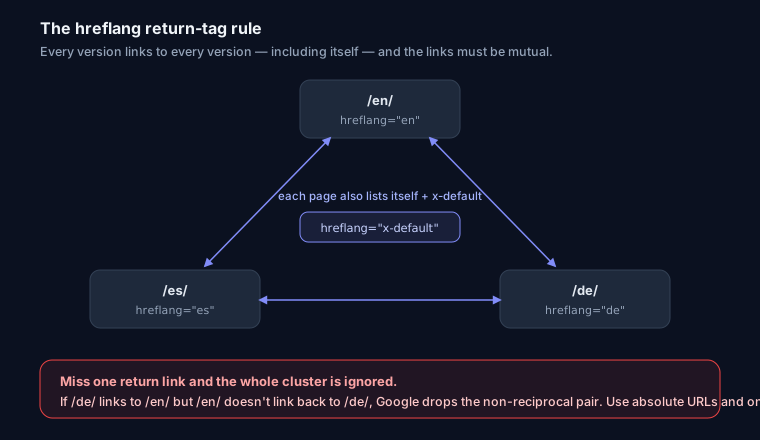
If page A points to page B as an alternate, page B must point back to A. These are called return tags. Hreflang is confirmed only when both sides agree — it's a handshake, not a one-way announcement.
This is the single most common failure. Google Search Console's old International Targeting report used to flag it directly as "no return tags," and while that specific report was retired, the underlying rule is unchanged.
To debug missing return tags:
- Fetch the target page as Googlebot sees it —
curl -A "Googlebot" https://example.com/es/page— and confirm theenreturn link is present in the rendered HTML, not injected later by client-side JS Google may not run. - Check the URL matches exactly.
httpvshttps, trailing slash,wwwvs apex, or a URL that 301-redirects all count as mismatches. The return tag must point at the exact canonical URL the other page self-references. - Confirm the target isn't
noindex. A blocked or redirecting alternate can't return the handshake.
Rule 4: Valid language[-region] codes
The format is ISO 639-1 language, optionally a dash and an ISO 3166-1 Alpha-2 region. Region is optional; if present it comes after the language.
- Correct:
en,es,fr,en-GB,pt-BR,zh-TW - Wrong:
english,eng,en_US(underscore),us(region alone — invalid) - Classic trap:
en-UKis wrong. The country code for the United Kingdom isGB, so it'sen-GB.UKisn't a valid ISO 3166-1 region.
Region alone (hreflang="us") is never valid — you need a language. If you want "English for the US," it's en-US.
Rule 5: Absolute URLs
Always full URLs. https://example.com/page, never /page.
hreflang is not canonical — you usually need both
This trips up a lot of people. Hreflang does not consolidate ranking signals the way a canonical tag does. Rel-canonical says "these are the same page, credit this one." Hreflang says "these are equivalent pages for different audiences, keep them all indexed."
So on a multilingual site each language version should carry a self-referencing canonical and the hreflang set. Never canonicalize the Spanish page to the English one — that tells Google to drop the Spanish page from the index entirely, which defeats the point. Self-canonical + hreflang is the correct combination. If you're fuzzy on the canonical side, see Canonical URLs explained.
<!-- On the Spanish page -->
<link rel="canonical" href="https://example.com/es/page">
<link rel="alternate" hreflang="es" href="https://example.com/es/page">
<link rel="alternate" hreflang="en" href="https://example.com/page">
<link rel="alternate" hreflang="x-default" href="https://example.com/page">
The scale problem — pick the right delivery method
Hreflang is quadratic. With N pages and M languages, every page needs M <link> tags, so a 500-page site in 6 languages is 3,000 alternate URLs to keep in sync. Inline HTML gets heavy fast and any drift breaks return tags.
Method 1: HTML head
Fine for small sites. Simple, visible, easy to inspect.
<head>
  <link rel="alternate" hreflang="en" href="https://example.com/">
  <link rel="alternate" hreflang="tr" href="https://example.com/tr/">
  <link rel="alternate" hreflang="x-default" href="https://example.com/">
</head>
Method 2: HTTP header (for non-HTML)
Required for PDFs and other non-HTML files — you can't put a <link> in a PDF. Also handy when you can't edit <head>.
Link: <https://example.com/en.pdf>; rel="alternate"; hreflang="en",
      <https://example.com/tr.pdf>; rel="alternate"; hreflang="tr"
Method 3: XML sitemap (best at scale)
Put every alternate in the sitemap and you keep hreflang out of your page weight and in one auditable file. This is the method to prefer once you pass a few dozen pages.
<url>
  <loc>https://example.com/</loc>
  <xhtml:link rel="alternate" hreflang="en" href="https://example.com/"/>
  <xhtml:link rel="alternate" hreflang="tr" href="https://example.com/tr/"/>
  <xhtml:link rel="alternate" hreflang="x-default" href="https://example.com/"/>
</url>
Each <url> entry must still list all alternates including its own self-reference. Combine this with a clean XML sitemap setup.
Worked example: 3 languages
English (/), Spanish (/es/), German (/de/). The identical block goes on all three pages (self-canonical changes per page):
<link rel="alternate" hreflang="en" href="https://example.com/">
<link rel="alternate" hreflang="es" href="https://example.com/es/">
<link rel="alternate" hreflang="de" href="https://example.com/de/">
<link rel="alternate" hreflang="x-default" href="https://example.com/">
That's the whole trick — every page carries the full set, so every return tag is present by construction.
Generating it in a CMS / Next.js
Don't hand-write these. Drive them from a single locale map and render on every page:
const locales = {
  en: 'https://example.com/',
  es: 'https://example.com/es/',
  de: 'https://example.com/de/',
} as const;

// Next.js App Router — app/[lang]/layout.tsx
export function generateMetadata() {
  return {
    alternates: {
      canonical: locales[currentLang],
      languages: { ...locales, 'x-default': locales.en },
    },
  };
}
WordPress does this through Polylang or WPML once you link translations. Whatever the platform: one source of truth, generated output, no manual editing.
Debugging a broken setup
- Nothing indexed correctly? Confirm self-reference and return tags first — 90% of issues.
- Codes rejected? You almost certainly have
en-UK, an underscore, or a bare region. - Tags present but ignored? Check they're server-rendered, that alternates return 200 (not 301/404/noindex), and that you didn't canonicalize across languages.
Paste any URL into the SEO Snapshot analyzer to check x-default presence, self-reference, and valid ISO codes, and use the hreflang tag generator to build a correct set from your locale map. For the wider picture, the technical SEO audit guide covers where hreflang fits among your other signals.
FAQ
Does hreflang boost rankings? No. It doesn't add ranking power or consolidate signals like canonical. It routes the right existing page to the right user, which improves CTR and cuts bounce.
Does Bing use hreflang?
No. Only Google and Yandex. Bing uses content-language and its own geo signals.
Do I still need canonical tags? Yes — a self-referencing canonical on each language version, alongside hreflang. Never canonical one language to another.
What if I only have two languages?
Still needed. Put both languages plus x-default on every page.