What a Canonical URL Actually Is
Canonicalization is the process search engines use to pick one representative URL when the same (or nearly the same) content is reachable at several addresses. The rel="canonical" tag is how you tell Google which version you consider primary.
The part most guides get wrong: rel="canonical" is a hint, not a directive. Google treats it as one signal among several. If your canonical says one thing but your internal links, sitemap, and redirects say another, Google can and will override your choice and pick a different canonical. A directive (like a noindex tag or a Disallow in robots.txt) has to be obeyed. A hint gets weighed.
That distinction explains almost every canonical problem people run into.
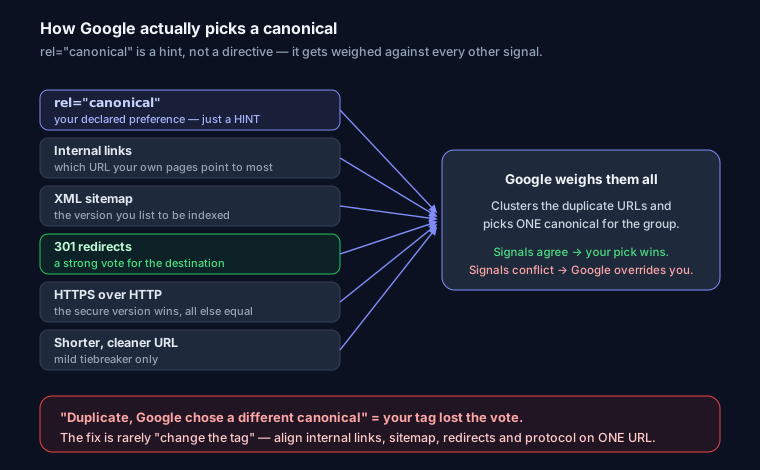
The Signals Google Weighs to Pick a Canonical
When duplicates exist, Google clusters them and chooses one canonical for the group. The signals it uses include:
- The
rel="canonical"you declared — your stated preference. - Internal links — which version do your own pages link to most?
- The URL in your XML sitemap — sitemaps imply "this is the one I want indexed."
- Redirects — a 301 is a strong vote for the destination.
- HTTPS over HTTP — Google prefers the secure version, all else equal.
- Shorter, cleaner URLs — mild tiebreaker.
hreflangand other on-page consistency.
When these agree, canonicalization just works. When they conflict, Google trusts the weight of the evidence over your tag. That's why the fix is almost never "just change the tag" — it's making every signal point at the same URL.
Where Duplicate URLs Come From
Most sites generate duplicates without anyone deciding to. The usual suspects:
- www vs non-www —
example.comandwww.example.comserve the same content. - http vs https — both protocols resolve.
- Trailing slash —
/pageand/page/. index.html—/dir/and/dir/index.html.- Query parameters —
/productsvs/products?sort=price. Sorting and filtering create near-infinite variants. - UTM and faceted params —
?utm_source=newsletteris the same page; faceted navigation (?color=red&size=m) can spawn thousands of crawlable URLs. - Pagination —
/blog?page=2. Each page is distinct content, so it should usually self-canonicalize, not canonical back to page 1 (that hides the deeper pages' links). - Print / AMP versions — a
/printor AMP copy should canonical to the main article. - Syndication — when a partner republishes your article, they should point a cross-domain canonical at your original so you keep the credit.
For www/non-www, http/https, trailing slash, and index.html, the right primary fix is a 301 redirect to one form — canonical is the backup. For query-param duplicates you usually can't redirect (the params do real work), so canonical is the main tool.
How to Set the Canonical
HTML <head> — the common case. Always absolute, always the protocol you actually serve:
<head>
  <link rel="canonical" href="https://yoursite.com/page" />
</head>
HTTP Link header — for non-HTML files (PDFs, images) where there's no <head> to put a tag in. Set it at the server:
location ~* \.pdf$ {
  add_header Link '<https://yoursite.com/files/whitepaper.pdf>; rel="canonical"';
}
Next.js metadata — the App Router exposes canonical through alternates:
export const metadata = {
  alternates: {
    canonical: 'https://yoursite.com/page',
  },
};
For dynamic routes, build it per-page in generateMetadata so every URL self-references correctly instead of every page inheriting one hardcoded value.
Self-Referencing Canonicals
Even a page with zero duplicates should point a canonical at itself:
<!-- On https://yoursite.com/about -->
<link rel="canonical" href="https://yoursite.com/about" />
This inoculates the page against accidental duplicates — tracking params, a stray index.html, a CMS that adds a slash. It costs nothing.
Fixing "Duplicate, Google chose a different canonical"
This is the Search Console status that sends people digging. It means: Google found your page, saw your rel="canonical", and decided a different URL is the real canonical anyway. Your declared preference lost the vote.
It's a hint-vs-signals problem: your other signals contradict your tag. To fix it, align all of them on ONE URL:
- Pick the winner — decide the single canonical URL for the cluster.
- Fix internal links — make sure your nav, footer, and in-content links point to that exact URL (right protocol, right slash). This is usually the biggest lever.
- Fix the sitemap — list only the canonical URL, never the duplicates. See the XML sitemap guide for keeping sitemaps to canonical URLs only.
- Fix redirects — 301 the alternates to the chosen URL where you can.
- Confirm the tag — the
rel="canonical"matches the chosen URL and is served in the raw HTML, not injected late by JavaScript.
Then request validation and wait a crawl cycle. When the signals stop fighting, Google's pick flips to yours.
Canonical vs 301 vs noindex vs hreflang
These get mixed up constantly. Quick decision guide:
- 301 redirect — you want one URL to exist. Users and bots both land on the destination. Use for www/https consolidation, moved pages, killed duplicates. It's a directive and passes the strongest signal. Generate config with the redirect generator.
- rel=canonical — you need both URLs to stay reachable (filters, tracking params, syndication) but want only one indexed. A hint.
- noindex — keep the page live and crawlable but out of the index entirely (thank-you pages, thin tag archives, internal search results). A directive. Don't combine
noindexwith a canonical to another page — the mixed signal confuses Google. - hreflang — the pages are the same content in different languages/regions and should all be indexed, each shown to the right audience. It's not a duplicate-handling tool. Details in the hreflang tags guide.
Canonical is also one lever for fixing keyword cannibalization — when two of your pages compete for the same query, canonicalizing the weaker one to the stronger consolidates the signals. For the full crawl-and-index picture, the technical SEO audit guide covers where canonicals fit alongside redirects and sitemaps.
Before / After
Before — signals fighting, params indexed separately:
<!-- served at https://shop.com/shoes?utm_source=fb -->
<link rel="canonical" href="http://shop.com/shoes/" />
Protocol mismatch (http on an https page), trailing slash the site doesn't use, and the sitemap listing the param version. Google picks its own canonical.
After — one clean, self-consistent target:
<!-- served at https://shop.com/shoes?utm_source=fb -->
<link rel="canonical" href="https://shop.com/shoes" />
Same protocol, no stray slash, param stripped, and the sitemap plus internal links all point at https://shop.com/shoes.
FAQ
Does a canonical pass link equity like a 301? Roughly, yes — consolidated signals flow to the canonical. But it's weaker and slower than a 301 because it's a hint. If you don't need both URLs live, redirect instead.
Can I canonical to a different domain? Yes — cross-domain canonicals are the correct way to handle syndication. The republisher points at your original.
Should paginated pages canonical to page 1? No. Let each page self-canonicalize so Google can crawl the links on pages 2, 3, and beyond. Pointing them all at page 1 buries that content.
My canonical is ignored — why? Usually conflicting signals (internal links or sitemap pointing elsewhere), a canonical injected by JavaScript that the crawler doesn't see, or a canonical to a URL that redirects or 404s.
Run your URL through SEO Snapshot to check that a canonical exists, that it uses the right protocol, and that it matches your og:url — three of the most common quiet mistakes.