Do Security Headers Actually Help SEO?
Let's be straight about this: security headers are not a ranking factor. Google has confirmed exactly one security-related signal — HTTPS — and that's it. No amount of X-Frame-Options or Content-Security-Policy will nudge your position in the SERP by itself.
So why does a technical-SEO article cover them? Because SEO is downstream of trust, and headers protect the things trust is built on. A cross-site scripting hole that injects spam links, a clickjacked login form, a defaced homepage flagged by Safe Browsing — those will wreck your rankings, earn you a "this site may be hacked" label in results, and torch the reputation you spent years building. Headers are cheap insurance against the incidents that undo real SEO work. Defense for the asset, not a boost to the score.
To see where you stand right now, the SEO Snapshot analyzer grades your headers A+ to F and lists which ones are missing — treat this article as a checklist against your own result.
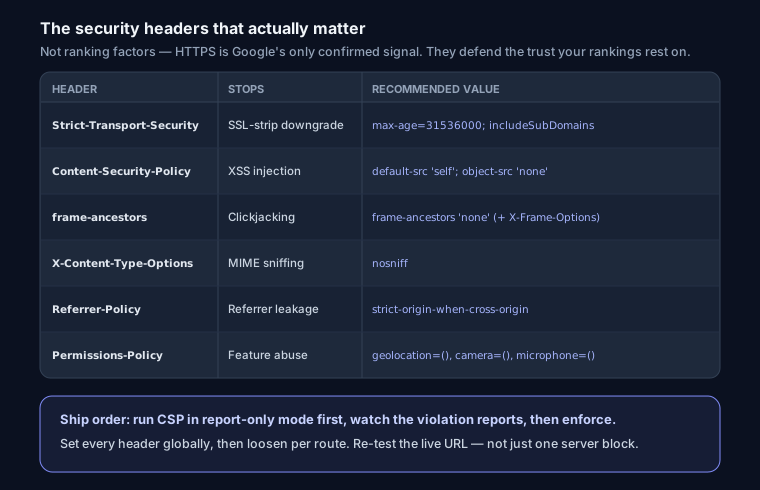
The Headers That Actually Matter
Strict-Transport-Security (HSTS)
HSTS tells the browser "only ever talk to me over HTTPS, no exceptions." It closes the SSL-stripping gap — the window where a user types example.com, the browser tries HTTP first, and an attacker on the network downgrades the connection before your redirect fires.
Strict-Transport-Security: max-age=31536000; includeSubDomains; preload
The preload directive is where people hurt themselves. Adding it and submitting to the HSTS preload list hardcodes your domain into browsers themselves — Chrome, Firefox, Safari ship a baked-in list, so those browsers never attempt HTTP to your domain, even on a first visit. That's great, until you realize it's semi-permanent. Removal takes months to propagate, and includeSubDomains means every subdomain must serve valid HTTPS forever, including that legacy blog. box someone forgot about. Roll it out in stages: start with a short max-age (say 300 seconds), confirm nothing breaks, raise it to a year, and only add preload once you're certain HTTPS is universal across your domain and subdomains.
Content-Security-Policy (CSP)
This is the powerful one and the hard one. CSP whitelists which sources a page may load scripts, styles, images, and frames from. A strict policy is the single best defense against XSS — even if an attacker injects a <script>, the browser refuses to run it because the source isn't allowed.
The mistake almost everyone makes:
Content-Security-Policy: default-src 'self'; script-src 'self' 'unsafe-inline'
That 'unsafe-inline' on script-src defeats the entire point. It re-permits inline scripts, which is exactly the vector XSS uses. A CSP with 'unsafe-inline' for scripts is decorative.
Two things make CSP survivable. First, deploy in report-only mode before you enforce anything:
Content-Security-Policy-Report-Only: default-src 'self'; report-uri /csp-report
The browser evaluates the policy, logs violations, but blocks nothing. You collect real reports for a week or two, see what legitimately breaks (analytics, embedded fonts, that one marketing widget), then tighten and flip to the enforcing header.
Second, use nonces or hashes instead of 'unsafe-inline'. Generate a random nonce per request, put it on both the header and your inline scripts:
Content-Security-Policy: script-src 'self' 'nonce-r4nd0m123'; object-src 'none'; base-uri 'self'
<script nonce="r4nd0m123">/* this runs, others don't */</script>
If your scripts are static, a 'sha256-...' hash of the script body works without per-request generation. Either way you get inline scripts and real protection.
X-Frame-Options vs. frame-ancestors
X-Frame-Options: DENY stops your pages being loaded in an <iframe>, which blocks clickjacking — the trick where your real login form is layered invisibly under a decoy the victim clicks.
X-Frame-Options: DENY
The modern equivalent lives inside CSP and is more flexible:
Content-Security-Policy: frame-ancestors 'none'
frame-ancestors supersedes X-Frame-Options, supports allow-lists (frame-ancestors 'self' https://partner.example), and is honored by current browsers. Send both — the legacy header covers ancient clients, the CSP directive covers everyone else. Use SAMEORIGIN / 'self' instead of DENY / 'none' only if you genuinely embed your own pages.
X-Content-Type-Options
One value, no downside, always set it:
X-Content-Type-Options: nosniff
It stops browsers from second-guessing your Content-Type and "sniffing" a response into something executable — e.g. treating an uploaded .txt as JavaScript.
Referrer-Policy
Controls how much of the current URL leaks in the Referer header when users click away. The sensible default:
Referrer-Policy: strict-origin-when-cross-origin
Same-origin requests get the full path; cross-origin requests get only your bare domain; downgrades to HTTP get nothing. This keeps query-string tokens and private paths out of third-party logs without breaking your own analytics attribution.
Permissions-Policy
The successor to Feature-Policy. It disables browser features you don't use, shrinking the attack surface and blocking rogue scripts from grabbing the camera, mic, or location:
Permissions-Policy: geolocation=(), camera=(), microphone=(), interest-cohort=()
An empty allow-list () means "no origin, including me." Add origins only for features you actually need.
Two Easy Wins Beyond Headers
Set your cookies properly. Session cookies need all three flags — HttpOnly keeps JavaScript (and therefore XSS) from reading them, Secure refuses to send them over HTTP, SameSite blunts CSRF:
Set-Cookie: session=abc; HttpOnly; Secure; SameSite=Lax; Path=/
And strip X-Powered-By. Announcing X-Powered-By: PHP/7.4 or Express just hands attackers your version numbers for free. Remove it (server_tokens off; in nginx, app.disable('x-powered-by') in Express, poweredByHeader: false in Next.js).
Configuration by Platform
Nginx — note always so headers are sent on error responses too:
add_header Strict-Transport-Security "max-age=31536000; includeSubDomains" always;
add_header Content-Security-Policy "default-src 'self'; object-src 'none'; frame-ancestors 'none'" always;
add_header X-Content-Type-Options "nosniff" always;
add_header Referrer-Policy "strict-origin-when-cross-origin" always;
add_header Permissions-Policy "geolocation=(), camera=(), microphone=()" always;
server_tokens off;
Full copy-paste block with gotchas in the complete nginx security headers config.
Apache (.htaccess or vhost, needs mod_headers):
Header always set Strict-Transport-Security "max-age=31536000; includeSubDomains"
Header always set Content-Security-Policy "default-src 'self'; frame-ancestors 'none'"
Header always set X-Content-Type-Options "nosniff"
Header unset X-Powered-By
Next.js (next.config.js) — one place, applies everywhere:
module.exports = {
  poweredByHeader: false,
  async headers() {
    return [{
      source: '/(.*)',
      headers: [
        { key: 'Strict-Transport-Security', value: 'max-age=31536000; includeSubDomains' },
        { key: 'Content-Security-Policy', value: "default-src 'self'; frame-ancestors 'none'" },
        { key: 'X-Content-Type-Options', value: 'nosniff' },
        { key: 'Referrer-Policy', value: 'strict-origin-when-cross-origin' },
      ],
    }];
  },
};
Vercel (vercel.json) and Cloudflare both do the same job at the edge. Vercel reads a headers array; Cloudflare lets you set them via a Transform Rule or a Worker so you don't touch origin config at all:
{ "headers": [{ "source": "/(.*)", "headers": [
  { "key": "X-Content-Type-Options", "value": "nosniff" },
  { "key": "Content-Security-Policy", "value": "default-src 'self'; frame-ancestors 'none'" }
]}]}
Common Mistakes
- Headers on some routes but not others. A CSP on
/but not/loginleaves the page that matters most unprotected. Apply headers globally (/(.*),location /), then loosen specific paths if needed. - CSP that silently kills analytics. Google Analytics, Tag Manager, and most pixels inject scripts from their own domains. Enforce a strict CSP without allow-listing them and your tracking goes dark with no error page — you just stop getting data. This is exactly why report-only mode exists.
- HSTS preload before you're ready. Preloading with
includeSubDomainswhile a subdomain still can't do HTTPS makes that subdomain unreachable for months. Earn the preload, don't rush it. - Trusting a single spot check. Headers set in one server block or one environment often don't match production. Re-test the live URL.
FAQ
Will adding these headers change my Google ranking? Not directly. Only HTTPS is a confirmed signal. Headers protect you from the hacks and warnings that do tank rankings, which is the real payoff.
Is CSP worth the effort for a small site?
Yes, but start minimal. Even default-src 'self'; object-src 'none'; frame-ancestors 'none' in report-only mode catches most XSS while you learn what your site loads.
How do I check I got it right? Run your live URL through the SEO Snapshot analyzer for an A+-to-F grade, and read the website security check guide to interpret each result. Headers are one slice of a broader technical SEO audit worth doing end to end.