What these headers do (and why nginx trips people up)
Security headers tell the browser how to treat your page: force HTTPS, block iframing, restrict which scripts can run. They protect against XSS, clickjacking, MIME sniffing, and protocol downgrades. If you want the full case for why each one matters across every stack, read security headers every website needs. This guide is the nginx-specific part — the exact directives, the gotchas that make headers silently disappear, and how to roll them out without breaking your site.
Two nginx quirks bite almost everyone, so cover them before you copy any config: add_header inheritance and the always flag. Get those wrong and your headers look fine in the config file but never reach the browser.
The six headers, one directive each
Strict-Transport-Security (HSTS)
Forces HTTPS for the whole domain and blocks downgrade attacks.
add_header Strict-Transport-Security "max-age=31536000; includeSubDomains; preload" always;
max-age=31536000 is one year in seconds. Read the HSTS rollout warning below before you ship preload — it is not casually reversible.
Content-Security-Policy (CSP)
Controls which resources the page may load. The single strongest defense against XSS, and the hardest to get right.
add_header Content-Security-Policy "default-src 'self'; script-src 'self'; style-src 'self' 'unsafe-inline'; img-src 'self' data: https:; font-src 'self';" always;
X-Frame-Options
Stops your pages being embedded in an iframe (clickjacking).
add_header X-Frame-Options "DENY" always;
X-Content-Type-Options
Stops the browser guessing (sniffing) content types.
add_header X-Content-Type-Options "nosniff" always;
Referrer-Policy
Limits how much URL data leaks when users click away.
add_header Referrer-Policy "strict-origin-when-cross-origin" always;
Permissions-Policy
Turns off browser features you don't use.
add_header Permissions-Policy "camera=(), microphone=(), geolocation=()" always;
The add_header inheritance gotcha
This is the one that wastes an afternoon. In nginx, add_header directives are not cumulative across block levels. If a location (or nested block) defines any add_header, nginx uses only that block's headers and drops every add_header inherited from the parent server or http block.
So this config looks complete but is broken:
server {
    add_header X-Frame-Options "DENY" always;
    add_header X-Content-Type-Options "nosniff" always;

    location /api/ {
        add_header Cache-Control "no-store" always;
        # X-Frame-Options and X-Content-Type-Options are GONE here.
    }
}
Requests to /api/ ship Cache-Control and nothing else. Your security headers vanish for exactly the routes that often need them most.
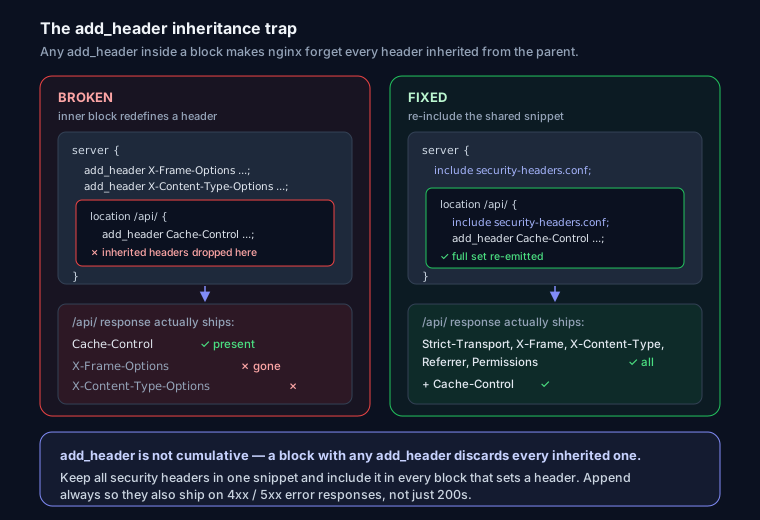
The clean fix: put all security headers in one file and include it in every block that needs headers. Create snippets/security-headers.conf:
add_header Strict-Transport-Security "max-age=31536000; includeSubDomains; preload" always;
add_header X-Frame-Options "DENY" always;
add_header X-Content-Type-Options "nosniff" always;
add_header Referrer-Policy "strict-origin-when-cross-origin" always;
add_header Permissions-Policy "camera=(), microphone=(), geolocation=()" always;
Then include it wherever you also add a location-level header:
server {
    include snippets/security-headers.conf;

    location /api/ {
        include snippets/security-headers.conf;
        add_header Cache-Control "no-store" always;
    }
}
The include re-emits the full set inside the inner block, so nothing is lost. One file, one source of truth — change a header once and every block picks it up.
Why the always flag matters
Without always, nginx only adds the header on "successful" responses (200, 201, 204, 301, 302, 304). Error responses — your 403, 404, 500, 502 pages — go out naked. An attacker probing for a clickjacking or MIME-sniffing vector on an error page gets an unprotected response. Adding always sends the header on every status code, including 4xx and 5xx. Use it on all security headers, every time.
HSTS rollout: measure twice
HSTS is a one-way door. Once a browser sees the header, it refuses plain HTTP for your domain for the full max-age. If HTTPS breaks — expired cert, misconfigured subdomain — users get hard errors with no bypass. Roll it out in stages:
# Stage 1: short window while you confirm everything works
add_header Strict-Transport-Security "max-age=300" always;
Confirm every subdomain serves valid HTTPS, then raise max-age to a week, then a year, then add includeSubDomains. Only add preload last. preload bakes your domain into the browser source itself; removing it means submitting a removal request and waiting for browser releases to roll out — months, realistically. Don't preload a domain until you're certain every current and future subdomain will always be HTTPS.
CSP is the hard one — start in report-only
Ship a strict CSP straight to enforce and you'll break inline scripts, third-party widgets, and analytics on page one. Deploy it as report-only first. The browser evaluates the policy and reports violations but blocks nothing:
add_header Content-Security-Policy-Report-Only "default-src 'self'; script-src 'self'; report-uri /csp-report;" always;
Watch the reports (or your DevTools console), add the origins you actually use, then switch the header name to Content-Security-Policy to enforce.
The big compromise is 'unsafe-inline'. Allowing it on script-src largely defeats CSP's XSS protection — the whole point is to block injected inline scripts. The proper fix is a per-request nonce, but nginx makes it awkward: it has no native nonce generator, so people reach for sub_filter to inject a random value into both the header and the <script nonce="..."> tags. That's fragile — sub_filter doesn't run on gzipped upstream responses. If your app renders HTML, generate the nonce in the app and set CSP there. For static sites, hash-based CSP ('sha256-...') is the more reliable nginx-friendly path.
Removing the Server / version banner
server_tokens off; stops nginx advertising its exact version, which shrinks what an attacker learns from a quick probe:
server_tokens off;
That only hides the version number — responses still send Server: nginx. Removing the header entirely isn't possible with stock nginx; you need the third-party headers-more module (ngx_headers_more), then:
more_clear_headers Server;
# or spoof it: more_set_headers "Server: web";
On Debian/Ubuntu the module ships in nginx-extras. On a stock build you'd have to recompile, so most people accept Server: nginx and move on — it's low value either way.
Reload safely and verify
Never reload a config you haven't tested. nginx -t parses the config and catches syntax errors before they take down the running server:
sudo nginx -t && sudo systemctl reload nginx
The && means reload only runs if the test passes. reload is graceful — it swaps in the new config without dropping live connections.
Then confirm the headers actually land, using curl -I to see response headers:
curl -sI https://yourdomain.com | grep -i -E 'strict-transport|content-security|x-frame|x-content-type|referrer|permissions'
Check an error path too, to prove always is working:
curl -sI https://yourdomain.com/this-page-does-not-exist | grep -i x-frame-options
If the header shows on the 200 but not the 404, an add_header is missing always somewhere.
Verify and troubleshoot
- Header missing on some routes only — the inheritance gotcha. A
locationblock added its ownadd_headerand dropped the inherited set.includethe snippet there. - Header missing on error pages — add
always. - Duplicate headers — you set the same header in both
httpandserver, or in an included file and inline. nginx sends both; dedupe. - CSP blocking your own assets — read the browser console's CSP violation messages and add the reported origins. Stay in report-only until it's quiet.
- Changes not taking effect — you edited a file that isn't included, or forgot to reload. Re-run
nginx -t && systemctl reload nginx.
For a graded read on what's live right now, grade your headers with a website security check or drop your URL into the analyzer on the homepage — it scores your live headers A+ to F, flags missing ones, and catches cookie flags and mixed content. Headers are one line item in a broader technical SEO audit, so it's worth checking the rest while you're in there.
FAQ
Q: Do security headers help SEO? A: HTTPS (which HSTS enforces) is a confirmed Google ranking factor. The other headers don't move rankings directly, but they prevent attacks and build the trust signals a secure site depends on.
Q: My headers show in the config but not in the browser. Why?
A: Almost always the add_header inheritance rule — an inner location block redefined a header and dropped the inherited ones. Use a shared include snippets/security-headers.conf; in every block that sets headers.
Q: Why aren't my headers on 404/500 pages?
A: add_header skips error responses unless you append the always flag. Add it to every security header.
Q: How do I test a CSP without breaking the site?
A: Deploy it as Content-Security-Policy-Report-Only first. The browser reports violations but blocks nothing. Fix the reported origins, then rename the header to Content-Security-Policy to enforce.