What a Security Grade Actually Measures
A security grade (A+ to F) rates how well your site protects visitors through HTTP response headers — the instructions a browser reads before it renders a single byte of your page. Those headers decide whether an injected script can run, whether your site can be framed inside a phishing page, and whether a downgraded HTTP request can be intercepted on public Wi-Fi. SEO Snapshot is one of the few audit tools that returns this grade alongside the usual SEO checks, and it hands back the exact config to fix each gap.
Below is how the grade is computed, what separates a header that's present from one that's correct, and how to actually fix a low score on whatever platform you run.
How the Grade Is Computed
| Grade | Score | Meaning |
|---|---|---|
| A+ | 95-100 | All headers configured optimally |
| A | 85-94 | Most headers present, minor gaps |
| B | 70-84 | Good baseline, some headers missing |
| C | 50-69 | Basic protection only |
| D | 30-49 | Significant gaps |
| F | 0-29 | Little to no protection |
The score is a weighted sum. HSTS and CSP carry the most weight because they close the highest-impact holes (protocol downgrade and cross-site scripting). The lighter headers each contribute a point or two, and the bonus checks nudge you into A+ territory or drag you out of it.
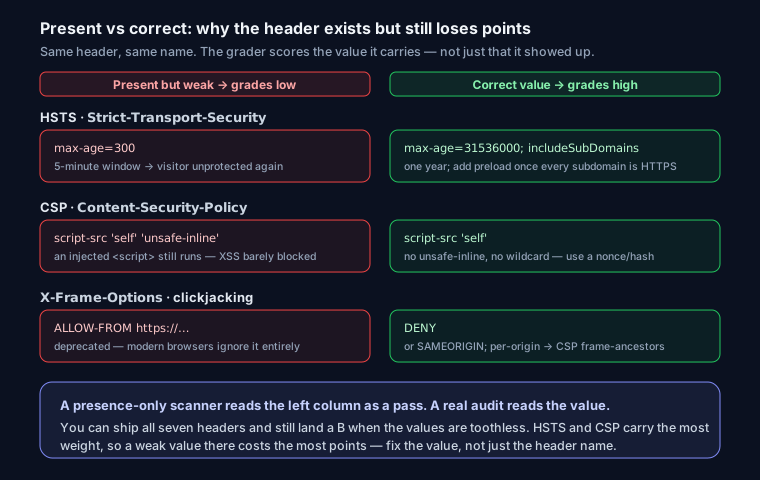
An A+ is not just "all seven headers exist." It requires each header to be configured to a strong value. You can ship all seven and still land a B if your CSP is toothless or your HSTS max-age is a token 60 seconds. The grader inspects values, not just presence.
The 7 Headers, and What Each One Actually Closes
- HSTS (
Strict-Transport-Security) — forces every future request over HTTPS, defeating SSL-strip downgrade attacks. Good value:max-age=31536000; includeSubDomains; preload(one year, all subdomains). - CSP (
Content-Security-Policy) — controls which scripts, styles, and resources may load, which is your strongest defense against XSS. Good value: an explicit allowlist likedefault-src 'self'; script-src 'self'with no wildcard or'unsafe-inline'on scripts. - X-Frame-Options — stops your pages being embedded in an attacker's iframe (clickjacking). Good value:
DENY, orSAMEORIGINif you legitimately frame your own pages. - X-Content-Type-Options — blocks MIME-sniffing, so a browser won't execute an uploaded "image" as a script. Good value:
nosniff(the only value). - Referrer-Policy — limits how much of your URL leaks to third parties. Good value:
strict-origin-when-cross-originor tighter. - Permissions-Policy — disables browser features you don't use (camera, mic, geolocation) so a compromised script can't reach them. Good value:
camera=(), microphone=(), geolocation=(). - Mixed content — no HTTP resources loaded on an HTTPS page. Good value: every script, image, and stylesheet on
https://. Onehttp://asset and the browser flags the padlock.
For a deeper walkthrough of each header's syntax and the SEO angle, see security headers every website needs.
"Present" vs "Correct" — Where Most Sites Lose Points
This is the distinction that trips people up. A scanner that only checks presence will happily give you an A. A real audit reads the value.
CSP full of 'unsafe-inline'. A CSP that allows inline scripts barely limits XSS at all — an injected <script> still runs. It exists, but it scores poorly:
Content-Security-Policy: default-src 'self'; script-src 'self' 'unsafe-inline' 'unsafe-eval'
That header is present and is weak. The fix is to move inline scripts into files, or use a nonce/hash, so you can drop 'unsafe-inline' from script-src.
HSTS with a short max-age. Strict-Transport-Security: max-age=300 technically enables HSTS, but a five-minute window means a user who hasn't visited in five minutes is unprotected again. Anything under a few months is weak; aim for 31536000 (one year). Only add preload once you're confident every subdomain serves HTTPS — preload is hard to reverse.
X-Frame-Options set to a bogus value. ALLOW-FROM is deprecated and ignored by modern browsers. If you need per-origin framing control, use CSP's frame-ancestors instead.
The Bonus Checks
These are what separate a plain A from an A+, and they're the ones people forget:
- Cookie flags. Session cookies should carry
HttpOnly(JS can't read them),Secure(HTTPS only), andSameSite=LaxorStrict(CSRF protection). ASet-CookiemissingHttpOnlyis a stolen-session waiting to happen. - Subresource Integrity (SRI). Any third-party
<script>or<link>should carry anintegrity="sha384-..."hash so a compromised CDN can't swap in malicious code. - Version leakage. Headers like
X-Powered-By: ExpressorServer: Apache/2.4.29hand attackers a version number to look up known CVEs against. Strip them. - Mixed content on HTTPS. Covered above, but worth repeating because it's the most common single point lost.
Fixing a Low Grade, by Platform
Add the headers once, at the edge, so every response inherits them.
nginx (in your server block). This is the short version — for the full hardened config including map blocks and per-location overrides, see the nginx security headers config:
add_header Strict-Transport-Security "max-age=31536000; includeSubDomains; preload" always;
add_header Content-Security-Policy "default-src 'self'; script-src 'self'; object-src 'none'; frame-ancestors 'none'" always;
add_header X-Content-Type-Options "nosniff" always;
add_header Referrer-Policy "strict-origin-when-cross-origin" always;
add_header Permissions-Policy "camera=(), microphone=(), geolocation=()" always;
server_tokens off;
Apache (in your vhost or .htaccess):
Header always set Strict-Transport-Security "max-age=31536000; includeSubDomains; preload"
Header always set Content-Security-Policy "default-src 'self'; script-src 'self'; frame-ancestors 'none'"
Header always set X-Content-Type-Options "nosniff"
Header always set Referrer-Policy "strict-origin-when-cross-origin"
Header always set Permissions-Policy "camera=(), microphone=(), geolocation=()"
Header unset X-Powered-By
Next.js — set them in next.config.js so they apply to every route:
module.exports = {
  poweredByHeader: false,
  async headers() {
    return [{
      source: '/:path*',
      headers: [
        { key: 'Strict-Transport-Security', value: 'max-age=31536000; includeSubDomains; preload' },
        { key: 'Content-Security-Policy', value: "default-src 'self'; script-src 'self'" },
        { key: 'X-Content-Type-Options', value: 'nosniff' },
        { key: 'Referrer-Policy', value: 'strict-origin-when-cross-origin' },
        { key: 'Permissions-Policy', value: 'camera=(), microphone=(), geolocation=()' },
      ],
    }]
  },
}
Vercel — add a headers array in vercel.json with the same key/value pairs (Vercel serves them at the edge, no server needed).
Cloudflare — Rules → Transform Rules → Modify Response Header → Set static, one rule per header. Handy when you don't control the origin config, though origin-level headers are easier to version-control.
How to Verify Your Fix
Editing the config isn't the finish line — a typo or a caching layer can silently drop a header. Two checks:
- Re-scan. Run your URL through SEO Snapshot again and confirm the grade moved.
- Read the live headers with curl. This shows exactly what the browser receives, including values:
curl -I https://yourdomain.com
-I fetches headers only. Scan the output for each header and its value — confirm HSTS shows a long max-age, your CSP has no stray 'unsafe-inline', and there's no X-Powered-By or verbose Server line. To check a redirect chain (HTTP → HTTPS), add -L:
curl -IL http://yourdomain.com
If a header shows up in curl but not in the browser, a CDN or proxy is stripping it — fix it at the layer closest to the user.
Security headers are one slice of a broader technical health check; pair this with a full technical SEO audit so crawlability and indexing don't quietly regress while you're hardening headers.
FAQ
Do security headers affect SEO? HTTPS is a confirmed Google ranking factor, so HSTS supports it indirectly. The other headers aren't direct ranking signals, but they protect the trust and integrity that keep users (and your reputation) intact.
Why is my CSP scored low even though it's present?
Almost always 'unsafe-inline' or 'unsafe-eval' in script-src, or a wildcard * source. Those keep the header from actually blocking injected scripts. Tighten the allowlist and the score jumps.
What's the single highest-impact header to add first? HSTS if you're already on HTTPS, then a real CSP. Those two carry the most weight and close the most dangerous holes. The one-point headers are quick wins you can batch in afterward.
How do I add security headers on Cloudflare without touching my server? Transform Rules → Modify Response Header → Set static, one per header. It applies at Cloudflare's edge before the response reaches the browser.