What Keyword Cannibalization Actually Is
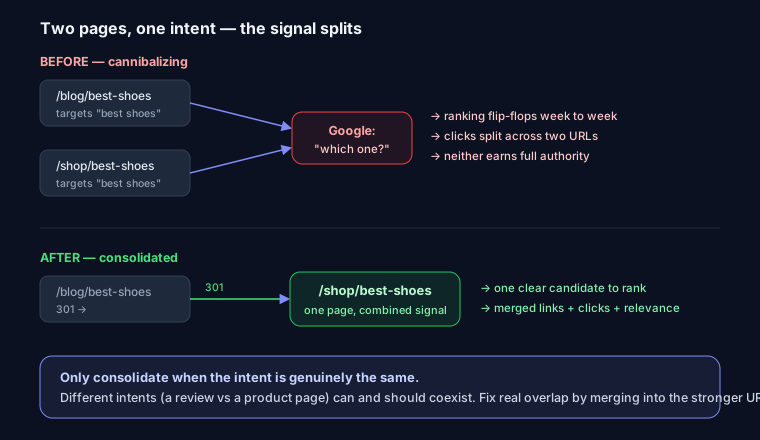
Keyword cannibalization happens when two or more pages on your site compete for the same search intent, and Google can't decide which to rank. The result is usually worse than one page: rankings wobble, clicks split between URLs, and neither page earns the authority it would have alone.
That definition matters, because the term is badly overdiagnosed. Multiple URLs from your domain appearing for one query is not automatically cannibalization. Google routinely ranks two or three pages from the same site when they serve different needs — a product page and a review, a category and a how-to guide. That's healthy coverage.
Cannibalization is only a problem when pages target the same intent and dilute each other. If you can't articulate why a searcher would want page A instead of page B, you probably have a real overlap. If you can, you likely don't.
The Symptoms That Confirm It's Real
Before consolidating anything, look for the signals that two pages are actually fighting:
- Position flip-flopping in Search Console. The ranking URL keeps swapping — page A ranks Monday, page B ranks Thursday, back to A the next week. Google is uncertain, and that uncertainty costs you.
- A weaker page outranking your money page. A thin blog post outranks the landing page you actually want to convert on — the wrong page is absorbing the signals.
- Split clicks and impressions. One query shows two URLs each pulling a slice of impressions and a mediocre average position. Combined, they'd likely rank higher.
- Overlapping titles and H1s. Two pages with near-identical titles targeting the same phrase are asking Google to choose.
If none of these show up — if two URLs both rank and both get steady, non-overlapping traffic — leave them be.
How to Detect It
Method 1: The Search Console workflow (the reliable one)
This is where you confirm cannibalization instead of guessing.
- Open Performance → Search results in Google Search Console.
- Click + New → Query and filter to the exact keyword you're worried about.
- With that filter active, switch to the Pages tab.
- If more than one URL shows impressions for that single query, you have overlap. Now check whether it's harmful.
- Add a date comparison (last 3 months vs. the previous 3) and watch the position column per page. If the ranking URL keeps changing or both sit at mediocre positions, that's the flip-flop pattern — real cannibalization.
Two pages ranking steadily at positions 3 and 9 for related-but-distinct reasons? Not a problem. Two pages trading position 6 every few days? Fix it.
Method 2: The site: search
Quick sanity check from the SERP: site:yoursite.com "email marketing tips". If several pages surface for the phrase, note which ones — but treat this as a lead, not a verdict. Confirm with the GSC data above.
Method 3: Content, title, and H1 overlap
Pull the competing URLs side by side and compare their titles, H1s, and opening paragraphs — near-identical framing is the root cause most of the time. The analyzer at SEO Snapshot checks title, H1, and keyword placement per page, so you can run each URL and see whether two pages are built around the same phrase.
The Fix: A Decision Tree
No single fix works. Pick based on why the pages overlap.
1. Consolidate + 301 — when pages are near-duplicates
Two posts saying basically the same thing? Merge them. Keep the stronger URL (more backlinks, more history), fold the useful parts of the weaker one into it, then 301-redirect the weaker URL to the survivor so its link equity transfers. Generate the redirect for your stack with the redirect generator — nginx, Apache, and Next.js syntax:
// next.config.js
module.exports = {
  async redirects() {
    return [
      {
        source: '/blog/email-marketing-tips-for-beginners',
        destination: '/blog/email-marketing-tips',
        permanent: true, // 301
      },
    ];
  },
};
2. Differentiate intent — when both topics deserve a page
If both pages should exist but were written to chase the same phrase, rewrite them to target distinct queries. Re-map titles, H1s, and body focus so each answers a different question — the fix that keeps the most value.
3. Canonical — when you need both live, one is primary
Printer-friendly versions, syndicated copies, or a landing page that mirrors a guide: keep both, but tell Google which is canonical.
<link rel="canonical" href="https://yoursite.com/primary-page">
Canonical is a hint, not a redirect — the non-primary page stays reachable. See canonical URLs explained for how Google interprets these and when it ignores them.
4. Noindex / merge — when one page is thin
If the weaker page has no independent value and no backlinks worth keeping, noindex it (or delete and 301). Use follow so it still passes link signals:
<meta name="robots" content="noindex, follow">
The robots meta generator builds the tag and the equivalent X-Robots-Tag header for server-side use.
5. Internal linking — to concentrate signals
Even without merging, you can nudge Google toward your primary page: link to it from the competing pages using consistent, descriptive anchor text, and make sure your strongest internal links point at the page you want to rank.
Worked Example: Two Posts Targeting "Email Marketing Tips"
You have /blog/email-marketing-tips (a broad guide from 2023 with some backlinks) and /blog/email-marketing-tips-for-beginners (newer, thinner, mostly overlapping advice). You filter GSC to "email marketing tips," switch to the Pages tab, and both URLs show up. Over the last 90 days the ranking URL flip-flops between them and average position sits at 8. Textbook harmful overlap.
Steps:
- Decide the survivor. The 2023 guide has backlinks and history — keep it.
- Salvage content. Move genuinely unique sections from the beginner post (a starter checklist, example subject lines) into the guide, so the merge adds real depth. Consolidating shouldn't just delete words — see content depth in SEO for what "comprehensive" means to Google.
- 301 the beginner post to
/blog/email-marketing-tips. - Fix titles and H1s so the survivor clearly owns the phrase and no other page reuses it.
- Re-point internal links that used to go to the beginner post.
- Resubmit the survivor in GSC — within a few weeks the flip-flopping should settle and position climb.
Prevention: A Keyword-to-URL Map
Most cannibalization is created at publish time. Two habits kill it:
- Keep a keyword-to-URL map — a spreadsheet assigning one primary query per page, so you always know what each URL is supposed to own.
- Check before publishing. Run
site:yoursite.com "your phrase"and glance at your map. If a page already targets that intent, update it or pick a distinct angle.
Distinct titles and clean internal linking do the rest. Cannibalization is far cheaper to prevent than to untangle after both pages have accumulated links and rankings. For a broader cleanup, the technical SEO audit guide covers where this fits alongside duplicate content and indexation.
FAQ
Q: Is it always bad for two of my pages to rank for one keyword? A: No. If they serve different intent and both pull steady traffic, that's good coverage. It's only a problem when they target the same intent and dilute each other — watch for position flip-flopping and split clicks.
Q: Consolidate or canonical — how do I choose? A: Consolidate + 301 when the pages are near-duplicates and only one deserves to exist. Use canonical when you have a legitimate reason to keep both reachable but want one treated as primary.
Q: How long until rankings recover? A: Usually a few weeks for Google to recrawl, process the redirect or canonical, and settle on one URL — faster if you resubmit the surviving page in Search Console.
Run your competing URLs through SEO Snapshot to compare title, H1, and keyword placement side by side and confirm which pages overlap.