Mixed content happens when an HTTPS page loads resources (images, scripts, styles) over insecure HTTP. Browsers block or warn about these, breaking the padlock and often the page itself.
Why It Matters
- Browsers block active mixed content (scripts, iframes) outright — your page can break.
- The secure padlock disappears, hurting user trust and conversions.
- It is a negative trust/security signal for SEO.
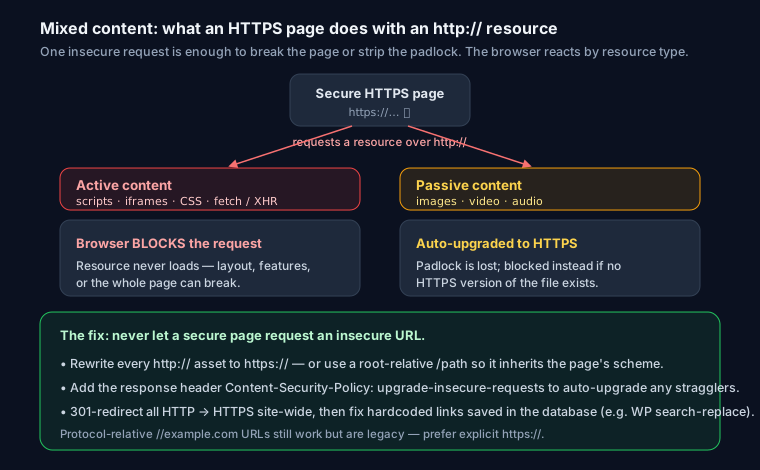
Two Types
| Type | Examples | Browser behavior |
|---|---|---|
| Active | <script>, <iframe>, CSS |
Blocked |
| Passive | <img>, <video>, <audio> |
Warned / may be upgraded |
How to Find It
Open Chrome DevTools → Console. Mixed content shows as:
Mixed Content: The page at 'https://…' was loaded over HTTPS,
but requested an insecure resource 'http://…'. This request has been blocked.
How to Fix It
1. Update hardcoded HTTP URLs to HTTPS in your templates and content:
<!-- Before -->
<img src="http://example.com/logo.png">
<!-- After -->
<img src="https://example.com/logo.png">
2. Use protocol-relative or relative URLs where possible:
<img src="/images/logo.png">
3. Add a catch-all upgrade header to auto-upgrade insecure requests:
<meta http-equiv="Content-Security-Policy" content="upgrade-insecure-requests">
Or as an HTTP header:
Content-Security-Policy: upgrade-insecure-requests
4. Fix the database (WordPress). Old posts often store http:// URLs. Use a search-and-replace plugin or WP-CLI:
wp search-replace 'http://yoursite.com' 'https://yoursite.com'
Prevent It From Coming Back
- Add
upgrade-insecure-requeststo your CSP permanently. - Ensure third-party embeds (maps, videos, ads) use HTTPS URLs.
- Redirect all HTTP to HTTPS at the server level with a 301.
Verify the Fix
Run your URL through SEO Snapshot — it checks your HTTPS setup and security headers, including whether a Content-Security-Policy is present to prevent mixed content.
FAQ
Q: What is mixed content on an HTTPS page? Mixed content is when a page served over HTTPS loads one or more resources — images, scripts, stylesheets, iframes, fonts, or media — over insecure HTTP. The main document is encrypted, but those sub-resources are not, so the connection is only partially secure and the browser flags it.
Q: Does mixed content hurt SEO? Indirectly, yes. Google does not have a specific mixed-content ranking penalty, but active mixed content that gets blocked can break page functionality and layout, and browsers strip the secure padlock, which lowers user trust and conversions. A broken or insecure-looking page also risks worse engagement signals, so fixing it protects both usability and search performance.
Q: What is the difference between active and passive mixed content? Active mixed content — scripts, iframes, stylesheets, and fetch/XHR requests — can change the whole page, so browsers block it outright and it never loads. Passive mixed content — images, video, and audio — cannot alter the rest of the page, so modern browsers auto-upgrade it to HTTPS, but the padlock is still removed and the resource is blocked if no HTTPS version exists.
Q: How does Content-Security-Policy: upgrade-insecure-requests fix mixed content? Adding the response header Content-Security-Policy: upgrade-insecure-requests tells the browser to automatically rewrite any http:// resource request on the page to https:// before it is sent. It is a safety net that catches stragglers you missed, but you should still fix the hardcoded HTTP URLs in your templates and database rather than relying on it alone.