Duplicate content is when the same or very similar content is available at multiple URLs. It confuses search engines about which version to rank and splits your ranking signals.
Common Causes
http://andhttps://versions both accessible.wwwand non-wwwversions.- URL parameters (
?ref=,?sort=) creating duplicate pages. - Printer-friendly or AMP versions.
- The same product in multiple categories.
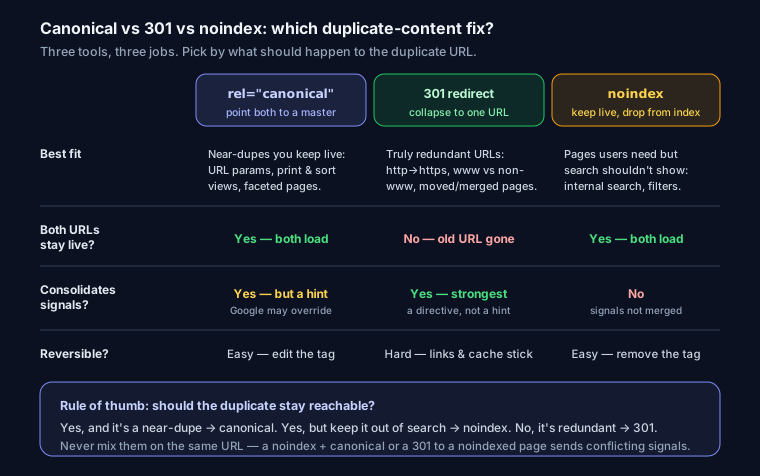
The Three Fixes
1. Canonical Tag (most common)
Tells Google which version is the "master" to index. Keep all versions accessible but point them to one canonical:
<link rel="canonical" href="https://example.com/product">
Use when: pages are similar but you want all accessible (e.g., parameter variations).
2. 301 Redirect
Permanently sends users and search engines to the canonical URL. The duplicate stops existing.
Use when: you want to fully merge two URLs (e.g., http→https, www→non-www).
# Nginx: force https + non-www
return 301 https://example.com$request_uri;
3. noindex
Keeps the page accessible but out of search results.
Use when: a page must exist for users but should never rank (e.g., internal search results).
<meta name="robots" content="noindex,follow">
Quick Decision Guide
| Situation | Fix |
|---|---|
| Two URLs, want to merge | 301 redirect |
| Similar pages, keep both | Canonical |
| Needed for users, not search | noindex |
Find Duplicates
Run your URL through SEO Snapshot — it checks your canonical tags and HTTPS/redirect setup to surface duplicate-content risks.
FAQ
Q: Does a canonical tag guarantee Google indexes the version I choose? No. rel=canonical is a strong hint, not a directive. Google usually honors it, but it can pick a different canonical if your signals conflict — for example if internal links, the sitemap, or redirects point elsewhere. Keep every signal (links, sitemap, hreflang) pointing at the same canonical URL to make it stick.
Q: Should I use a canonical tag or a 301 redirect? Use a 301 when the duplicate URL is redundant and nobody needs it to load, such as http-to-https, www versus non-www, or a page you merged. Use a canonical when both URLs should stay reachable but only one should rank, such as URL parameters, print views, or faceted pages. A 301 consolidates signals most strongly because it is a directive; canonical is a hint.
Q: Can duplicate content get my site penalized? There is no specific duplicate-content penalty for ordinary cases. The real cost is that Google splits ranking signals across the copies and may index the version you did not want, wasting crawl budget. Consolidating with canonical, 301, or noindex fixes that. Deliberately scraped or spun content is a different, manual-action problem.
Q: What is the fastest way to find duplicate content on my site? Crawl the site and look for pages with identical or near-identical titles, meta descriptions, and body text, plus URL variants that resolve to the same page (trailing slash, uppercase, parameters, http and https, www and non-www). SEO Snapshot flags duplicate-content risks and missing canonicals automatically, or you can check Google Search Console's Pages report for URLs marked as duplicates.