Why Speed Matters
Google uses page experience as a ranking signal, and speed is the part users feel first. A one-second delay measurably cuts conversions, and mobile visitors bail when a page drags past three seconds. But "make it faster" is useless advice on its own. The fifteen techniques below work — the trick is knowing which three of them your site actually needs.
Measure First, Then Optimize
Before you touch a config file, find your bottleneck. Guessing wastes hours on fixes that move nothing.
There are two kinds of data, and you want both:
- Field data is what real visitors experienced. Google's Chrome User Experience Report (CrUX) feeds the Core Web Vitals report in Search Console. This is what actually affects rankings — it's the ground truth.
- Lab data is a controlled single run: Lighthouse (in Chrome DevTools or PageSpeed Insights) and WebPageTest. Lab tools are for diagnosis because they hand you a waterfall and a filmstrip. They don't decide your ranking, but they show you why the field numbers are bad.
Open the waterfall and ask one question: where is the time going? A slow TTFB (Time to First Byte) means the problem is your server or origin — no amount of image tweaking will help. A late LCP with a fast TTFB usually means your largest element (often a hero image) loads too late. A janky, unresponsive feel points at JavaScript — main-thread work blocking interaction. The full breakdown of LCP, INP, and CLS explains what each metric measures and what "good" looks like.
You can get a fast read on the mechanical stuff — TTFB, compression, cache headers, render-blocking resources, lazy-load usage, and page weight — by running your URL through SEO Snapshot. It flags the low-hanging fruit before you dig into a waterfall.
The 15 Techniques, Grouped by What They Fix
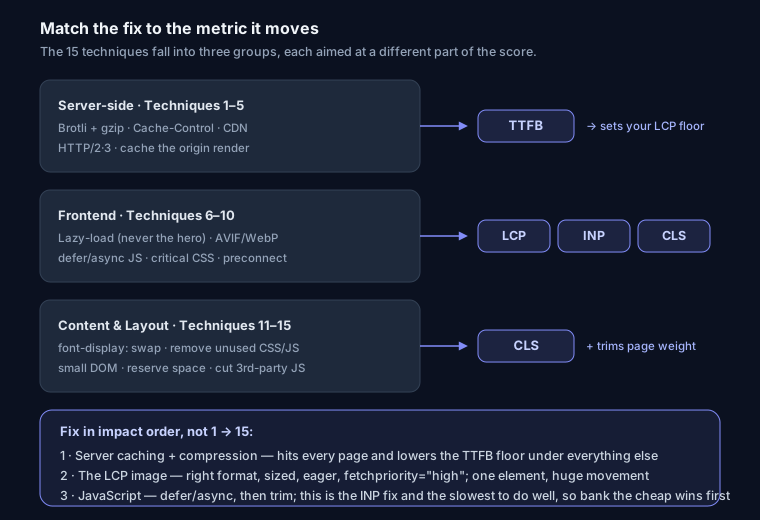
Server-Side (1–5): moves TTFB, which caps your LCP
Your LCP can never be faster than your TTFB — the browser can't paint anything until the first byte arrives. These five shrink that floor.
1. Enable compression. Text assets (HTML, CSS, JS, SVG) compress dramatically. Prefer Brotli — it typically beats gzip by 15–20% on the same files and every modern browser supports it. Keep gzip as the fallback.
# Nginx — Brotli first, gzip fallback
brotli on;
brotli_types text/plain text/css application/json application/javascript image/svg+xml;
gzip on;
gzip_vary on;
gzip_min_length 256;
gzip_types text/plain text/css application/json application/javascript text/xml;
2. Set Cache-Control headers. Fingerprinted static assets should be cached forever, so repeat visits skip the network entirely.
location ~* \.(css|js|jpg|png|svg|woff2)$ {
    add_header Cache-Control "public, max-age=31536000, immutable";
}
3. Use a CDN. Cloudflare (free tier works) or CloudFront serves bytes from an edge near the user, cutting round-trip latency. On WordPress this is often the single biggest TTFB win; on Vercel or Netlify it's already built in.
4. Upgrade to HTTP/2 or HTTP/3. Multiplexing lets many files share one connection. This also kills the old "concatenate everything into one bundle" advice — under HTTP/1.1 every request paid a connection tax, so bundling helped. Over HTTP/2+ that tax is gone, and smaller cache-friendly chunks are usually better. Don't fight your framework's code-splitting to force one megabundle.
5. Optimize TTFB at the origin. Cache rendered output (Redis, Varnish, or a full-page cache plugin), fix slow database queries, and prefer static generation. A Next.js page built with getStaticProps or the App Router's static rendering serves from cache in single-digit milliseconds instead of rendering per request.
Frontend (6–10): protects LCP and prevents CLS
6. Lazy-load images — but never the LCP one. loading="lazy" defers offscreen images. The common mistake: lazy-loading the hero. That delays your LCP element and tanks the metric. Lazy-load everything below the fold; leave the hero eager.
<!-- below the fold: lazy -->
<img src="photo.jpg" loading="lazy" alt="Description" width="800" height="600">
<!-- LCP hero: eager, and hint the browser to fetch it early -->
<img src="hero.jpg" fetchpriority="high" alt="Hero" width="1600" height="900">
7. Use modern image formats. AVIF and WebP are far smaller than JPEG at the same quality. Since the LCP element is frequently an image, this is often your biggest LCP win. More detail in the image SEO guide.
<picture>
  <source srcset="photo.avif" type="image/avif">
  <source srcset="photo.webp" type="image/webp">
  <img src="photo.jpg" alt="Description" width="800" height="600">
</picture>
8. Defer non-critical JavaScript. defer runs scripts after HTML parses; async runs them whenever they arrive. Getting JS off the critical path is what improves INP and TBT (Total Blocking Time) — the responsiveness metrics.
<script src="analytics.js" defer></script>
<script src="chat-widget.js" async></script>
9. Inline critical CSS. Extract above-the-fold CSS into the <head> and load the rest asynchronously so the first paint doesn't wait on a full stylesheet. This is the core of fixing render-blocking resources.
10. Preconnect to third-party origins. Warm up the connection to domains you'll definitely hit.
<link rel="preconnect" href="https://fonts.googleapis.com" crossorigin>
<link rel="dns-prefetch" href="https://www.google-analytics.com">
Content & Layout (11–15): mostly CLS, plus cleanup
11. Optimize font loading. font-display: swap shows text immediately in a fallback while the web font loads, so content isn't invisible. Self-hosting the .woff2 avoids an extra connection.
@font-face {
  font-family: 'Inter';
  src: url('/fonts/inter.woff2') format('woff2');
  font-display: swap;
}
12. Remove unused CSS/JS. The DevTools Coverage tab shows exactly how much of each file goes unexecuted on load — often 40%+ on template-heavy sites.
13. Keep the DOM small. Aim under ~1,500 elements; deep nesting slows style and layout.
14. Prevent layout shift. Always set width and height (or aspect-ratio) on images, iframes, and ad slots. Reserved space is what keeps CLS near zero — content stops jumping as things load.
15. Cut third-party scripts. Each one adds 50–200ms plus a connection. Audit the tag manager; most sites carry scripts nobody uses anymore.
Prioritize: Biggest Wins First
Don't work top to bottom. Sequence by impact:
- Server caching + compression (Brotli, Cache-Control, a CDN). These hit every page at once and lower the TTFB floor under all your other work.
- The LCP image — correct format, correct size, eager-loaded,
fetchpriority="high". One element, huge metric movement. - JavaScript — defer/async, then trim. This is the INP fix, and it's the slowest to do well, so do it after the cheap wins are banked.
If Lighthouse still isn't where you want it after those three, the path to a Lighthouse score of 100 covers the remaining polish.
FAQ
Which optimization has the biggest impact? Server-side caching and compression, because they change every page instantly and set the ceiling for everything else. After that, the LCP image.
Field data or lab data — which should I trust? Field data (CrUX / Search Console) decides your ranking; that's your scoreboard. Lab data (Lighthouse, WebPageTest) is your diagnostic — use it to find why the field numbers look the way they do.
Is Brotli really better than gzip? For text assets, yes — usually 15–20% smaller at comparable CPU cost, with universal browser support. Keep gzip configured as a fallback and you lose nothing.
Should I still bundle all my JavaScript into one file? No. That was an HTTP/1.1 workaround. Over HTTP/2 and HTTP/3, several smaller, independently cacheable chunks generally beat one giant bundle.