SEO is mostly your job
Marketers pick keywords and write copy. But the things that actually decide whether a page can rank live in the code: the HTML the server sends, the response headers, the build output, how fast the largest element paints. A marketer can't fix a missing <title>, a 404 canonical, or a render-blocking bundle. You can.
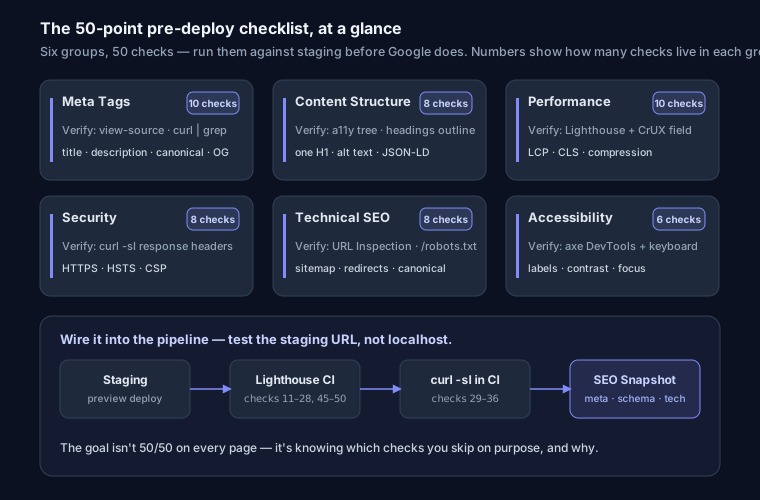
This is a pre-deploy checklist — 50 things to verify before a site ships, grouped into six areas. Each group starts with why it matters and how to check it fast, then the concrete items. Run it against your staging URL, not production, so you catch problems before Google does.
Meta Tags (10 checks)
This is what search engines and social platforms read first. Get the title and description wrong and you either don't rank or you rank with a snippet nobody clicks. Verify by viewing source (not the DevTools Elements panel — that shows the hydrated DOM, which can differ from what the crawler receives) and confirming each tag is present in the raw HTML. If you're on a JS framework, check the server-rendered response with curl -s https://staging.example.com | grep -i '<meta'. For the two that cause the most tickets, see fix missing meta description; to draft a full set quickly, use the meta tag generator.
- Title tag exists and is 30-60 characters
- Meta description exists and is 120-160 characters
- Canonical URL points to the correct page
- Viewport meta tag is set for responsive design
- Language attribute on html tag (
lang="en") - Charset is UTF-8
- Favicon exists (ICO + SVG)
- robots meta is index,follow (unless intentionally noindex)
- No duplicate title or description tags
- Open Graph + Twitter Card tags for social sharing
Content Structure (8 checks)
Structure is how a crawler understands what a page is about before it reads a word of prose. A clean heading outline and real alt text also feed accessibility and featured snippets. Verify with the accessibility tree in DevTools, or a headings-outline extension — if the outline reads like a table of contents, you're fine. The two items that bite most often are broken heading order and images with no alt text; full detail in heading hierarchy and image SEO.
- Exactly one H1 tag per page
- Heading hierarchy — H1 → H2 → H3 (no skipping)
- No empty headings — every heading has text
- Word count above 300 for content pages
- Alt text on all meaningful images
- Internal links to related pages
- Descriptive anchor text (not "click here")
- Structured data (JSON-LD) for rich snippets
Performance (10 checks)
Speed is a ranking factor and, more importantly, a bounce factor — Core Web Vitals (LCP under 2.5s, INP under 200ms, CLS under 0.1) measure what users actually feel. Verify with Lighthouse in DevTools or a lab run, but confirm with field data in Search Console, because your dev laptop is faster than your users' phones. Most performance failures trace back to two causes: too much blocking CSS/JS, and unoptimized images. Work through fix render-blocking resources and the broader Core Web Vitals guide for the fixes behind these checks.
- Gzip/Brotli compression enabled
- Cache-Control headers set for static assets
- Images lazy loaded below the fold
- Images in WebP/AVIF format
- Critical CSS inlined or preloaded
- JavaScript deferred or async
- No render-blocking resources
- Font-display: swap on custom fonts
- Preconnect to critical third-party domains
- Total page weight under 1.5MB
Security (8 checks)
Security headers don't directly lift rankings, but HTTPS is a confirmed signal, and a missing HSTS or a permissive CSP is exactly the kind of thing an audit flags and a browser warns users about. A "Not Secure" warning kills conversions faster than any ranking drop. Verify by inspecting response headers — curl -sI https://staging.example.com — or by grading the site against a headers scanner. The security headers guide walks through each one with copy-paste config for nginx, Apache, and Vercel.
- HTTPS everywhere
- HSTS header with max-age ≥ 31536000
- CSP header without unsafe-inline
- X-Frame-Options set to DENY
- X-Content-Type-Options nosniff
- Referrer-Policy strict-origin-when-cross-origin
- No X-Powered-By header exposed
- Cookies have HttpOnly + Secure + SameSite flags
Technical SEO (8 checks)
This is the crawl-and-index plumbing. If robots.txt blocks the wrong path, or the sitemap lists dead URLs, or redirects chain three hops deep, Google wastes crawl budget and may never index your best pages. Verify with the URL Inspection tool in Search Console and by fetching /robots.txt and /sitemap.xml directly. The three that trip up most teams have dedicated guides: robots.txt, XML sitemap, and hreflang for multi-language sites. Generate the first two cleanly with the sitemap generator and robots.txt generator.
- robots.txt exists and allows important pages
- sitemap.xml lists all important URLs
- No redirect chains (max 1 hop)
- 301 redirects for permanent URL changes (not 302)
- Clean URLs — lowercase, hyphens, short
- Hreflang tags for multi-language sites
- Canonical doesn't point to 404
- No noindex on important pages
Accessibility (6 checks)
Accessibility and SEO overlap more than most developers expect: the same semantic HTML that a screen reader needs is what a crawler parses, and Google increasingly rewards pages that are usable for everyone. Verify with axe DevTools or Lighthouse's accessibility audit, then tab through the page with the keyboard alone — if you can't reach a control without a mouse, neither can a lot of your users. The full overlap is covered in the accessibility & SEO checklist.
- Form labels on all inputs
- Skip navigation link
- ARIA landmarks (header, nav, main, footer)
- Sufficient color contrast (WCAG 4.5:1)
- Keyboard navigable — all interactive elements focusable
- Heading hierarchy (also an SEO factor)
How to actually run this before a deploy
A checklist you have to click through by hand won't survive contact with a Friday release. Wire it into the pipeline instead:
- Test the staging URL, not localhost. Localhost skips your CDN, your real headers, and your production build minification. Point checks at the deployed staging environment so you're testing what users will actually receive.
- Add Lighthouse CI to the pipeline. Run
lhci autorunagainst a preview deploy and set assertions — fail the build if performance drops below a threshold or an accessibility violation appears. That catches regressions in checks 11-28 and 45-50 automatically, on every PR, before anyone reviews it. - Fetch the raw response in CI. A short script that
curl -sIs the staging URL and greps for HSTS, CSP, andX-Content-Type-Optionscovers most of the security group. - Spot-check the rest with the analyzer. For the meta, structured-data, and technical-SEO items that are tedious to script, paste your staging URL into SEO Snapshot — it runs all of these checks on a live URL in seconds and hands back copy-paste fix code, so a failed check comes with the exact HTML or header to add.
The goal isn't 50/50 on every page. It's knowing which checks you're intentionally skipping and why — a noindex on staging is correct; a noindex that ships to production by accident is an outage.
FAQ
Q: Should developers learn SEO? A: Yes. Roughly 60% of common SEO problems are technical — server config, markup, speed, crawlability — and only a developer can fix those correctly. You don't need to learn keyword research; you need to own the technical foundation.
Q: What's the single most impactful item on this list?
A: A correct, unique <title> on every page (checks 1 and 9). A page with no title, or one duplicated across the site, is competing with one hand tied behind its back — the title is the strongest on-page relevance signal you control.
Q: My framework renders everything client-side. Does this still apply?
A: More than ever. Confirm your meta tags, headings, and structured data appear in the server-rendered HTML (curl the URL and look). If they only exist after JavaScript runs, some crawlers and every social scraper will miss them. Server-side rendering or static generation of your <head> is the fix.
Q: How do I test SEO before deploying?
A: Run the analyzer or Lighthouse against your staging URL, add Lighthouse CI to your pipeline so regressions fail the build, and script the security-header checks with a curl in CI. Catch it in review, not in Search Console three weeks later.