What headings actually do
Headings aren't decoration. <h1>–<h6> build a machine-readable outline, and three consumers read it: search engines, screen readers, and your own future self skimming a 2,000-word article.
For SEO, headings are a strong on-page relevance and structure signal. They tell Google what each section is about and how sections relate. That structure powers featured snippets and the "jump to" links Google sometimes shows under a result — both pulled straight from clear heading text. A page that reads as one undifferentiated wall gives the crawler nothing to latch onto.
One myth worth killing early: multiple <h1> tags will not tank your rankings. Google's John Mueller has said several times that the crawler handles multiple H1s fine, and HTML5's sectioning rules technically allow them. So this isn't a penalty situation. But "won't break you" and "best practice" differ. One clear H1 that names the page topic is still the cleaner signal, and it matters more for accessibility than for rankings.
The accessibility angle (this is the real reason)
Screen-reader users almost never read a page top to bottom. They pull up a list of headings and navigate by it — JAWS, NVDA, and VoiceOver all have a "next heading" shortcut and a heading-list dialog. Your outline is their table of contents and their navigation menu at the same time.
Two things break that experience:
- Skipped levels. Jumping from
<h2>to<h4>makes the assistive tech announce a level that has no parent. The user hears "heading level 4" and wonders what section they fell into. - Headings used for font size. If a designer picks
<h4>because it "looks the right size," a screen-reader user gets a nesting cue that's a lie. Meanwhile a visually-styled<div class="big-text">that should be a heading is invisible to the heading list entirely.
This is why heading hierarchy shows up in accessibility audits, not just SEO tools. The two overlap heavily — a page that outlines cleanly for Googlebot usually outlines cleanly for NVDA. If you want the full picture, our web accessibility and SEO checklist walks through headings alongside alt text, landmarks, and contrast.
The document-outline rules
Three rules cover 90% of real problems.
One H1 = the page topic. On an article, that's almost always the article title. On a product page, the product name. It's the one thing the whole page is about.
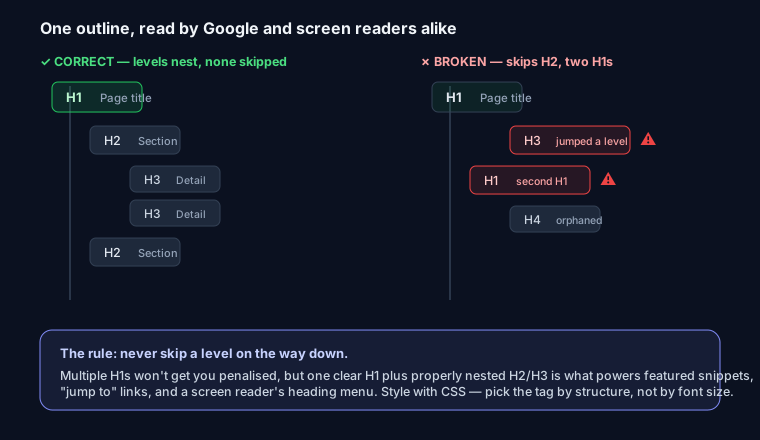
Descend one level at a time. H1 → H2 → H3. An H3 means "sub-section of the H2 above me." Don't skip.
Nest by meaning, not by looks. If section B is a peer of section A, they're both H2. If it's part of A, it's an H3 inside A.
Here's a clean outline versus a broken one:
<!-- Good: reads as a proper tree -->
<h1>How to Bake Chocolate Cake</h1>
  <h2>Ingredients</h2>
    <h3>Dry Ingredients</h3>
    <h3>Wet Ingredients</h3>
  <h2>Instructions</h2>
    <h3>Mixing</h3>
    <h3>Baking</h3>
  <h2>Storage Tips</h2>
<!-- Bad: two H1s, a skipped level, and a styling heading -->
<h1>My Recipe Blog</h1>        <!-- site name as H1 -->
<h1>Chocolate Cake</h1>        <!-- real topic, but second H1 -->
  <h4>Ingredients</h4>         <!-- skipped H2 and H3 for size -->
  <h2>Instructions</h2>
The bad version has no single "what is this page about" signal, and a screen reader announces an orphaned level-4 heading straight after the H1s.
Keywords in headings — natural, not stuffed
Your H1 and the important H2s should contain the terms people actually search for, because heading text is weighted more than body copy for on-page relevance. But there's a fast diminishing return. Write the heading a human would want to click, then check that the keyword is in it — don't reverse the order and jam the keyword in first.
<!-- Natural: keyword present, reads like English -->
<h2>How long does chocolate cake stay fresh?</h2>

<!-- Stuffed: same keyword three times, reads like spam -->
<h2>Chocolate cake fresh: keep chocolate cake fresh and store chocolate cake</h2>
Vary your phrasing across H2s instead of repeating the exact same term. Google understands synonyms and related concepts, and near-duplicate headings can actually blur which page should rank for what — the same root problem behind keyword cannibalization.
Using headings to win People-Also-Ask and featured snippets
This is the highest-impact move with headings, and most sites skip it. Google builds a lot of featured snippets and People-Also-Ask answers by matching a question to a heading and lifting the text right after it. So write H2s (or H3s) as the actual question, then answer it concisely in the first sentence or two below — before you elaborate.
<h2>What is heading hierarchy?</h2>
<p>Heading hierarchy is the ordered nesting of H1–H6 tags that
   forms a page's outline, descending one level at a time.</p>
<!-- ...then expand with detail, examples, edge cases -->
The pattern that works: question-style heading, 40–60 word direct answer immediately after, then depth. If your answer is a process, use an ordered list; if it's options, a table. Both formats get pulled into snippets cleanly. This dovetails with writing genuinely thorough sections — see content depth in SEO for how structure and substance work together.
The CMS reality
Most broken heading structures aren't authored by hand — they leak out of the platform.
- WordPress themes frequently wrap the site logo or title in an
<h1>on every page, so your article title becomes an H2 and each page has two H1s. Check your theme'sheader.php, or the site-title element in the Customizer. - Page builders (Elementor, Divi, WPBakery, Squarespace, Wix) expose a "heading" widget with a dropdown for level and a separate size control — but authors almost always change the level to hit a font size. Set the level by meaning and style it with the size/typography controls.
- Next.js / React component libraries hardcode heading levels inside reusable components. A
<Card>that renders an<h2>internally will emit an H2 wherever it's dropped, regardless of surrounding context. Pass the level as a prop (<Card as="h3">) so the component fits its place in the outline. The fix is the same everywhere: audit the rendered HTML, not the editor. Open DevTools, or run the URL through a crawler that reports levels. Our analyzer at SEO Snapshot counts every H1–H6, flags multiple H1s, and warns when a level is skipped — run your URL and read the outline it reports before you trust the CMS. If you're shipping a site from scratch, the SEO checklist for developers folds heading checks into a broader pre-launch pass.
Before / after
A real cleanup of a typical themed blog post:
BEFORE (rendered outline)
  H1  Acme Blog                 ← site name
  H1  10 Baking Tips            ← post title, second H1
  H4  Tip 1: Room-temp butter   ← skipped H2/H3 for size
  H4  Tip 2: Weigh your flour
  H2  Comments

AFTER
  H1  10 Baking Tips            ← single H1, the topic
  H2  Tip 1: Room-temp butter
  H2  Tip 2: Weigh your flour
  H2  Comments
Same visual design, corrected structure — the site name moved to a styled <div>, and the tips became true H2 peers.
Common mistakes
- No H1 at all — every page needs exactly one.
- Site logo as H1 on every page — the logo isn't your page topic.
- Multiple H1s — won't get you penalized, but muddies the signal; keep it to one.
- Headings chosen for font size — set level by meaning, size with CSS.
- Skipped levels — H2 straight to H4 breaks the screen-reader outline.
- Empty heading tags — a heading with no text (often an icon-only element) is noise in the outline.
FAQ
Do multiple H1 tags hurt SEO? No. Google has repeatedly said it handles multiple H1s without any penalty. One H1 is still the cleaner practice — mainly for accessibility and for a single unambiguous topic signal — but it's not a ranking problem on its own.
Does the H1 have to match the title tag exactly?
No, and they serve different jobs. The <title> is for the search result and browser tab; the H1 is the on-page headline. They should cover the same topic and can differ in wording — the title is often shorter to fit SERP pixel limits.
How many H2s should a page have? As many as it has genuine major sections — there's no magic number. A 1,500-word article naturally lands around 4–8 H2s. If you have twenty, some are probably really H3s.
Do headings need keywords to rank? It helps, because heading text carries on-page weight, but forcing keywords into every heading backfires. Write clear, human headings; the keywords that belong there will show up on their own.