What "Render-Blocking" Actually Means
When the browser parses your HTML and hits a <link rel="stylesheet"> or a plain <script src>, it can't just keep going. Those resources sit on the critical rendering path — the sequence of work the browser must finish before it can paint a single pixel.
CSS blocks rendering because the browser refuses to paint content it might have to restyle. It builds the DOM from HTML and the CSSOM from your stylesheets, then combines them into the render tree. Until the CSSOM is complete, there's no render tree, so there's nothing to show. A stylesheet in the <head> therefore holds back First Contentful Paint (FCP) for as long as it takes to download and parse.
Synchronous JavaScript blocks for a different reason: it can call document.write() or mutate the DOM, so the parser stops dead at each <script> tag, fetches the file, executes it, and only then resumes parsing. Worse, if a stylesheet is still loading when the parser reaches a script, the browser also waits for that CSS first (scripts might read computed styles). One slow .js file in the head can stall everything behind it.
That's the whole problem in one sentence: resources in the head delay the first paint, and delaying the first paint delays LCP and hurts your Core Web Vitals.
Reading the Lighthouse Audit
In PageSpeed Insights and Lighthouse the audit is called "Eliminate render-blocking resources." It lists each blocking URL with two numbers: Transfer size and Potential savings (ms). The savings estimate is Lighthouse's guess at how much FCP would improve if that resource stopped blocking — it's a lab estimate, not a promise, but it tells you where to spend effort.
Sort by savings and work top-down. A 4 ms saving on a tiny stylesheet isn't worth touching; a 900 ms blocking third-party script is. SEO Snapshot's analyzer also lists render-blocking scripts and stylesheets with their URLs when you run your page, which is a fast way to see what's in the head before you open DevTools.
defer vs async vs module
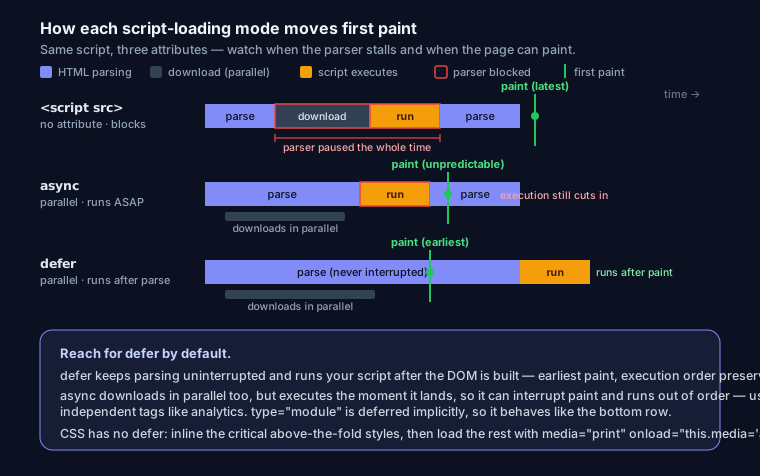
For scripts, the fix is almost always an attribute change. Here's how the three loading modes actually behave:
| Attribute | Downloads | Blocks parser? | Executes | Order preserved | Use for |
|---|---|---|---|---|---|
| (none) | immediately | Yes | as soon as fetched | yes | almost never in <head> |
async |
in parallel | no | the moment it arrives | no | independent scripts: analytics, ads |
defer |
in parallel | no | after HTML parsing, before DOMContentLoaded |
yes | app code, anything with dependencies |
type="module" |
in parallel | no | deferred by default, after parsing | yes (per graph) | modern ES modules |
<!-- Your main app bundle: order matters, wait for the DOM -->
<script src="/js/app.js" defer></script>

<!-- Fire-and-forget, no dependencies -->
<script src="https://analytics.example.com/tag.js" async></script>

<!-- ES modules are deferred automatically -->
<script type="module" src="/js/main.mjs"></script>
The mental model: reach for defer by default. Use async only when the script genuinely doesn't care about DOM readiness or execution order. Note that type="module" is deferred implicitly — adding defer to a module does nothing.
The Critical-CSS + Async-Load Pattern
CSS has no defer. The standard trick is to inline the small slice of CSS needed to render above-the-fold content, then load the full stylesheet without blocking:
<head>
  <style>/* critical, above-the-fold CSS only — header, hero, layout */</style>

  <link rel="stylesheet" href="/css/full.css"
        media="print" onload="this.media='all'">
  <noscript><link rel="stylesheet" href="/css/full.css"></noscript>
</head>
media="print" makes the browser treat the stylesheet as non-render-blocking (it's not for the screen), so it downloads without holding up paint. The onload handler flips media back to all once it arrives, applying the styles. The <noscript> fallback matters: with JavaScript disabled, onload never fires, so you'd ship an unstyled page without it.
The caveat nobody mentions: if your critical CSS is wrong or incomplete, the async stylesheet lands a moment later and restyles the page — a visible flash. Tools like critical or critters (used by some frameworks) extract above-the-fold CSS automatically. Get the critical set right or you're trading a slow paint for a janky one.
Splitting CSS by Media Query
You don't always need the async trick. The browser downloads stylesheets with non-matching media at a low priority and doesn't let them block render:
<link rel="stylesheet" href="/css/base.css">
<link rel="stylesheet" href="/css/print.css" media="print">
<link rel="stylesheet" href="/css/desktop.css" media="(min-width: 1024px)">
On a phone, desktop.css and print.css don't block the first paint. Splitting one giant styles.css into media-scoped files is a low-risk win if your CSS is already organized by breakpoint.
preload vs preconnect vs dns-prefetch
These three resource hints get confused constantly. They solve different problems:
<!-- Fetch a specific resource early, at high priority -->
<link rel="preload" href="/fonts/inter.woff2" as="font" type="font/woff2" crossorigin>

<!-- Open the full connection (DNS + TCP + TLS) to a known origin -->
<link rel="preconnect" href="https://cdn.example.com" crossorigin>

<!-- Just resolve DNS — cheap, for origins you'll touch but not immediately -->
<link rel="dns-prefetch" href="https://analytics.example.com">
preloadtells the browser to fetch this exact file now because it's needed soon (fonts, the LCP image, a critical CSS chunk). It does not block render, but it competes for bandwidth.preconnectwarms up a connection to a third-party origin so the eventual request skips the handshake — worth ~100–300 ms on a fresh TLS connection. Use it for origins you're certain you'll hit.dns-prefetchdoes only the DNS lookup. It's the lightweight fallback forpreconnecton origins that are lower priority or many in number.
Third-Party Scripts
Third-party tags — tag managers, chat widgets, A/B testing, ads — are often the biggest offenders because you don't control their size or timing. Rules that hold up:
- Load them
async, never synchronously in the head. preconnectto their origin so the request is ready.- Delay non-essential widgets (live chat, heatmaps) until user interaction or
requestIdleCallback— they don't need to run during first paint. - Self-host what you can. A self-hosted analytics snippet avoids an extra DNS + TLS round trip.
Common Mistakes
Deferring a script an inline script depends on. If you defer jQuery but keep an inline <script> that calls $(...) in the body, the inline script runs first and throws $ is not defined. Deferred scripts run after parsing; inline scripts run immediately. Either defer both or convert the inline code to a DOMContentLoaded listener.
Preloading everything. preload is a priority instruction. Preload ten things and you've told the browser nothing is more important than anything else — you'll delay your real LCP resource. Preload the one or two assets on the critical path, no more. Chrome will warn in the console when a preloaded resource isn't used within a few seconds.
Inlining too much CSS. Inlined CSS isn't cached and ships on every HTML response. Inline your full 60 KB stylesheet and every page load re-downloads it, bloating the HTML and hurting repeat visits. Keep the inline block to genuine above-the-fold styles — usually a few KB.
Before / After
<!-- BEFORE: three blocking resources in the head -->
<head>
  <link rel="stylesheet" href="/css/styles.css">
  <script src="/js/jquery.js"></script>
  <script src="/js/app.js"></script>
</head>
<!-- AFTER: nothing blocks the first paint -->
<head>
  <style>/* critical CSS */</style>
  <link rel="stylesheet" href="/css/styles.css"
        media="print" onload="this.media='all'">
  <noscript><link rel="stylesheet" href="/css/styles.css"></noscript>
  <script src="/js/jquery.js" defer></script>
  <script src="/js/app.js" defer></script>
</head>
Measuring the Win
Don't trust the score alone — measure FCP and LCP before and after. Run the page in an incognito window with the DevTools Performance panel, or re-run Lighthouse in a controlled environment (throttling on, no extensions). Field data in the Chrome UX Report is the real judge, but it lags weeks behind, so use lab numbers to iterate. Fixing render-blocking on a page that had two blocking scripts and a full stylesheet in the head commonly moves FCP by 0.3–1 s and LCP by 0.5–2 s.
If you want the framework-specific version of all this, see fixing render-blocking resources in Next.js. For the broader picture, website speed optimization and getting a Lighthouse score of 100 cover the other audits that move alongside this one.
FAQ
Does defer slow anything down? No. Deferred scripts still download in parallel during parsing; they just execute after the DOM is built. For most sites defer is strictly better than a blocking script in the head.
Should I inline all my CSS to pass the audit? No. Inline only above-the-fold critical CSS and load the rest asynchronously. Inlining everything kills caching and bloats every HTML response.
Is async faster than defer? Not meaningfully — both download without blocking. async executes sooner but in unpredictable order, which breaks dependent code. Use defer unless the script is truly independent.
Why does Lighthouse still flag a stylesheet after I split it? Check the media attribute actually doesn't match the test conditions. Lighthouse runs mobile emulation by default, so a media="(min-width: 1024px)" sheet won't block — but a plain screen stylesheet still will.