What "render-blocking" actually means in Next.js
A render-blocking resource is a CSS or JavaScript file in the document <head> that the browser must download and parse before it can paint anything. In a plain HTML site you'd hand-audit every <link> and <script>. Next.js changes the picture: the framework already eliminates most of the classic offenders for you, so when Lighthouse still flags render-blocking on a Next app, the culprit is almost always something you added — a third-party script, a font loaded the wrong way, or a giant CSS import in the root layout.
This is the Next.js-specific companion to the general guide on fixing render-blocking CSS and JavaScript. Read that one for the browser mechanics; here we go straight to what the App Router does automatically and where you still intervene.
What Next.js already does for you
With the App Router (Next 13/14) and even the older Pages Router, you get a lot for free:
- Automatic code-splitting. Each route ships only the JavaScript it needs. There's no single monolithic
bundle.jsblocking the page. - Per-route CSS. CSS imported by a route is chunked and scoped to that route, not dumped into one global stylesheet.
- Streaming and React Server Components. In the App Router, Server Components render to HTML on the server and stream to the browser. The user sees content before client JavaScript hydrates — hydration is non-blocking for first paint.
- Automatic font optimization via
next/font(more below), which self-hosts fonts and removes the render-blocking network request to Google's servers.
So a stock create-next-app project scores well out of the box. Problems creep in through the additions.
next/script: control when third-party JS loads
Third-party scripts are the usual real culprit — analytics, tag managers, chat widgets, A/B testing snippets. Dropping a raw <script src="…"> into your layout forces the browser to fetch and execute it before painting. The next/script component lets you declare when a script should load with the strategy prop.
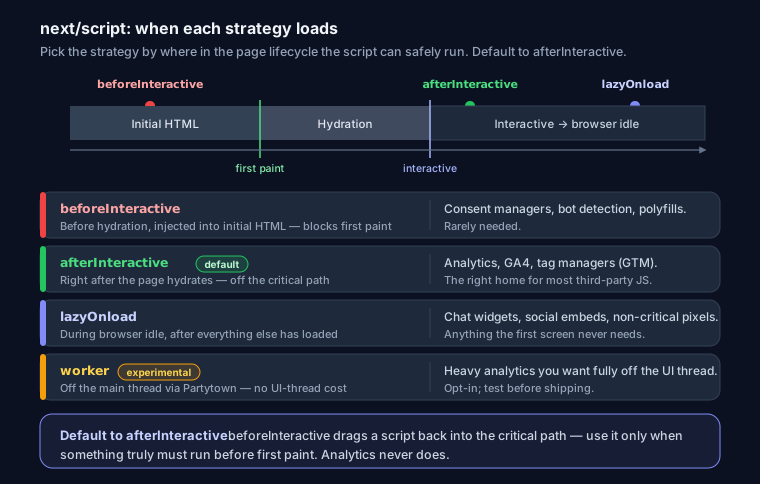
| Strategy | When it loads | Use it for |
|---|---|---|
beforeInteractive |
Before any hydration, injected into initial HTML | Consent managers, bot detection, polyfills that MUST run first. Rarely needed. |
afterInteractive (default) |
Right after the page hydrates | Analytics, tag managers (GA4, GTM) |
lazyOnload |
During browser idle time, after everything else | Chat widgets, social embeds, non-critical pixels |
worker (experimental) |
Off the main thread via Partytown | Heavy analytics you want fully off the UI thread |
A real Google Analytics 4 setup — note afterInteractive, not beforeInteractive:
import Script from 'next/script'

export default function Analytics() {
  return (
    <>
      <Script
        src="https://www.googletagmanager.com/gtag/js?id=G-XXXXXXX"
        strategy="afterInteractive"
      />
      <Script id="ga4-init" strategy="afterInteractive">
        {`
          window.dataLayer = window.dataLayer || [];
          function gtag(){dataLayer.push(arguments);}
          gtag('js', new Date());
          gtag('config', 'G-XXXXXXX');
        `}
      </Script>
    </>
  )
}
The inline config script needs an id so Next can dedupe and order it. Analytics never needs to block first paint, so beforeInteractive here would be a mistake — it would pull the script into the critical path for zero benefit.
Fonts: next/font vs. a raw Google Fonts <link>
This is the single most common self-inflicted render-blocker in Next apps. The old habit:
<!-- Render-blocking: the browser waits on Google's server -->
<link
  rel="stylesheet"
  href="https://fonts.googleapis.com/css2?family=Inter&display=swap"
/>
That <link> in <head> blocks rendering while the browser makes a round trip to fonts.googleapis.com, parses the returned CSS, then fetches the font files from fonts.gstatic.com. Two extra origins, added latency, and a Lighthouse ding.
next/font fixes all of it at build time. It downloads the font, self-hosts it from your own domain, subsets it, and injects size-adjusted fallback metrics so there's zero layout shift (good for CLS):
// app/layout.tsx
import { Inter } from 'next/font/google'

const inter = Inter({
  subsets: ['latin'],
  display: 'swap',       // show fallback text immediately, swap when ready
  variable: '--font-inter',
})

export default function RootLayout({ children }) {
  return (
    <html lang="en" className={inter.variable}>
      <body>{children}</body>
    </html>
  )
}
No external request, no render-blocking stylesheet, and display: swap means text is visible during font load instead of invisible. For local font files use next/font/local. If you must keep an external font link for some reason, at least add preconnect (see below) — but self-hosting via next/font is strictly better.
next/dynamic: defer heavy client components
Code-splitting handles routes, but a single route can still pull in a heavy client component — a charting library, a rich text editor, a map. next/dynamic lets you lazy-load it and skip server rendering when it makes sense:
import dynamic from 'next/dynamic'

const HeavyChart = dynamic(() => import('./Chart'), {
  loading: () => <div>Loading chart…</div>,
  ssr: false, // don't render on the server; ship its JS only on demand
})
The important nuance: this doesn't primarily fix render-blocking (Next already splits your bundles). It helps INP and TBT — Interaction to Next Paint and Total Blocking Time. Deferring a 200 KB chart library means the main thread isn't tied up parsing and executing it during the initial load, so the page responds to taps and clicks sooner. If your Lighthouse pain is "long tasks" or a sluggish INP rather than "eliminate render-blocking resources," next/dynamic is the tool. See the Core Web Vitals guide for how INP, LCP, and CLS relate.
Keep global CSS small
Anything imported in app/layout.tsx ships on every route and sits in the critical path. Keep globals.css to resets, variables, and truly global styles. Push component styles into CSS Modules (scoped, tree-shaken per route) or use Tailwind, whose JIT compiler only emits the classes you actually use:
// styles.module.css → scoped, only loads with the component that imports it
import styles from './card.module.css'
export default () => <div className={styles.card}>…</div>
Importing a full UI library's stylesheet (import 'some-ui-lib/dist/all.css') in the root layout is a classic mistake — you block paint with CSS 90% of pages never use.
Preconnect and preload
When you genuinely can't self-host a resource, warm up the connection so the DNS + TLS handshake isn't on the critical path. In the App Router, use the Metadata API or drop links straight in the layout <head>:
// app/layout.tsx
<head>
  <link rel="preconnect" href="https://cdn.example.com" crossOrigin="" />
  <link rel="dns-prefetch" href="https://cdn.example.com" />
</head>
Preconnect only the origins you actually use — pointing it at fonts.gstatic.com while using next/font is pointless, since there's no request to warm up.
Pages Router differences
On the older Pages Router the mechanics live elsewhere: global CSS and providers go in pages/_app.tsx, and document-level <html>/<head> structure plus beforeInteractive scripts go in pages/_document.tsx. next/font, next/script, and next/dynamic all work the same way. The App Router's streaming/RSC model is the main thing you lose.
Common mistakes
beforeInteractiveoveruse. It pulls scripts into the initial HTML and blocks. Reserve it for consent/bot-detection; default toafterInteractive.- A big UI library imported globally. One
import 'lib.css'in the layout blocks every route. - A blocking font
<link>. Thefonts.googleapis.comstylesheet is render-blocking — migrate tonext/font.
FAQ
Does Next.js automatically fix render-blocking?
For your own code, mostly yes — routing-level code-splitting and per-route CSS are automatic. Third-party scripts and fonts still need next/script and next/font.
afterInteractive or lazyOnload for analytics?
afterInteractive. You want analytics running as soon as the page is interactive so you don't lose early events. Save lazyOnload for chat and social widgets.
Does ssr: false hurt SEO?
Only if the deferred component contains content you need indexed. For interactive widgets (charts, editors) it's fine — crawlers don't need them. Keep primary content server-rendered.
How do I confirm the fix worked?
Run your URL through SEO Snapshot — it counts render-blocking scripts, checks font-display usage, and flags missing preconnect hints. Cross-check with the website speed optimization guide and, if you're chasing a perfect score, the Lighthouse 100 walkthrough.