Why This Gets Flagged So Often
Almost every SEO audit tool checks for a meta description because it's trivial to detect and common to miss. CMS themes ship without one, developers forget it on templated pages, and bulk-generated product/category pages almost never have unique descriptions. So the warning shows up everywhere — often on hundreds of URLs at once.
Here's the part most tools skip: a missing meta description is not a ranking penalty. Google has said for years the tag isn't a ranking factor. What it affects is the snippet — the gray text under your blue title link — and by extension your click-through rate. That's the whole reason to care.
What Google Actually Does When It's Missing
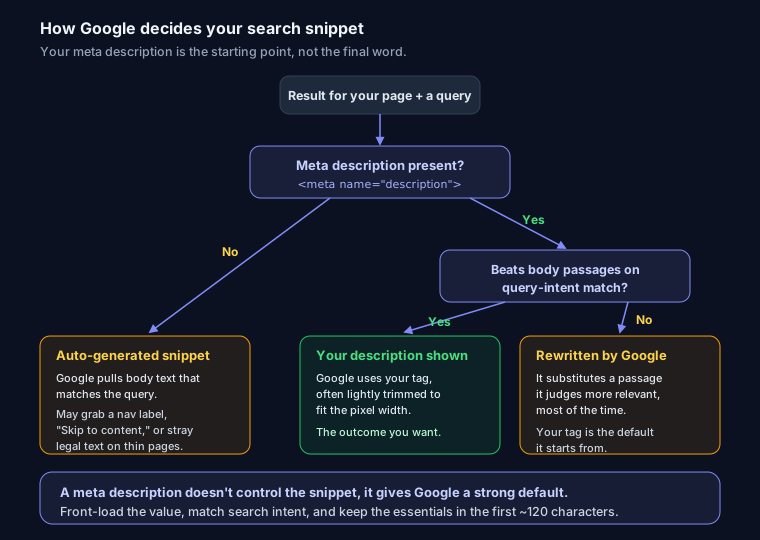
When there's no <meta name="description">, Google doesn't leave the snippet blank. It generates one, pulling text from your body that best matches the query. This is often fine — sometimes better than a hand-written description, because it adapts to the exact search. For a well-structured article with clear intro paragraphs, the machine-picked snippet reads cleanly.
The problem is when it isn't fine. On a page with a boilerplate intro, a cookie notice near the top, or thin body copy, Google can grab something awkward: a nav label, a half-sentence, "Skip to content," or stray legal text. On listing pages with little prose, the auto-snippet is often the weakest link in your search presence.
The honest complication: Google rewrites descriptions even when you provide one. Studies of live SERPs consistently find it replaces the author-written meta description more often than not — north of 60% of the time — substituting text it judges more relevant to the query. So writing one isn't about controlling the snippet. It's about influencing it and giving Google a strong default when your tag matches intent. Treat it as your best offer, not a guarantee.
How to Fix It
Add this inside your <head>:
<meta name="description" content="Front-load the value. Include the main keyword naturally. Aim for roughly 150 characters so it isn't truncated on desktop.">
That's the mechanical fix. The rest is about writing one that earns the click — and doing it across every page, not just the homepage.
Write One That Earns Clicks
A good description is an ad, not a summary. What reliably works:
- Front-load the value. The most important words go first, because mobile truncates hard. Lead with the outcome, not "Welcome to our site."
- Match search intent. If the query is "fix missing meta description," the snippet should promise the fix — steps, code, platforms — not describe your company.
- Let the keyword get bolded. Google bolds query terms in the snippet, making your result visually heavier in the list.
- Add specificity and numbers. "15 checks," "under 5 minutes," "works on WordPress and Next.js." Concrete beats vague.
- End with a soft CTA. "See the steps," "Compare the options" — a nudge, not "BUY NOW!!!"
Before and after for a category page:
<!-- Before (auto-generated by Google, ugly) -->
<!-- "Home › Shop › ... Skip to content. Filter by ..." -->

<!-- After -->
<meta name="description" content="Shop 200+ trail running shoes from Salomon, Hoka & more. Free returns, next-day delivery, and real fit reviews. Filter by terrain and drop.">
Length Is Really Pixel Width, Not Characters
The "160 character" rule is a useful approximation, but Google truncates by pixel width, not character count. Desktop snippets run to roughly 920 pixels; mobile is shorter. Wide characters (capitals, "W", "m") get cut sooner than narrow ones at the same length. Aim for about 150 characters and put anything critical in the first ~120 so it survives mobile. For the full breakdown, see meta description length and pixel width in 2026. The title tag sitting above it follows the same pixel-width logic and is the other half of the pair — write the two together. You can eyeball how both render with the SERP snippet preview tool before you ship it.
Platform-Specific Steps
WordPress (Yoast or Rank Math): Both plugins add a "Meta description" field under the editor. Fill it per post/page. Crucially, set the template for archives and taxonomies under the plugin's Search Appearance / Titles & Meta settings so category pages stop inheriting a generic default. Yoast variables like %%excerpt%% auto-fill from content when you leave a field blank.
Next.js (App Router): Set description in the metadata export, and make it dynamic for templated routes:
export async function generateMetadata({ params }): Promise<Metadata> {
  const post = await getPost(params.slug);
  return {
    description: post.summary.slice(0, 155),
  };
}
Raw HTML: Drop the <meta name="description"> tag in each page's <head>. If you build a whole meta block from scratch, the meta tag generator will scaffold the title, description, and Open Graph tags together so you don't hand-write them.
Shopify: Edit a product/collection/page, scroll to "Search engine listing," and click Edit. In themes, {{ page_description }} renders it; fall back to truncated body only when empty.
Fixing It Across Many Pages
One page is a text field. Five hundred pages is a data problem — where most of the value is.
- Templatize, then override. Generate descriptions from structured fields (product name, category, key spec, price) with a formula, then hand-write the top-traffic 20. A decent template beats an empty tag; a great hand-written one beats a template.
- Pull the full inventory. Export current descriptions with a crawler (Screaming Frog, Sitebulb) or a script, sort by "empty" and "duplicate," and fix in priority order by traffic.
- Watch for duplicates. Bulk-generating from one template can create thousands of identical descriptions — its own audit warning. Interpolate at least one unique field per URL.
Common Mistakes
- Duplicate descriptions sitewide. The same string on every page tells Google nothing and trips duplicate-meta warnings. Unique or don't bother.
- Keyword stuffing. "Cheap shoes, running shoes, buy shoes, shoes online." Google ignores it, users distrust it, and it reads like spam.
- Quotes and emoji that truncate weirdly. Straight quotes inside the
contentattribute can break the tag; use entities or single quotes. Emoji render inconsistently and can push your text into truncation. - Writing only the homepage. The homepage gets attention; the money pages — products, articles, categories — get forgotten. Those are the ones searchers actually land on.
FAQ
Will adding a meta description improve my rankings? No, not directly — it isn't a ranking factor. It can lift click-through rate, and better engagement can indirectly help, but don't expect position changes from the tag alone.
Why does Google show different text than what I wrote? Because Google rewrites the snippet when it thinks another passage matches the query better. It happens the majority of the time. Your tag is the default it starts from, not a lock.
How long should it be? Roughly 150 characters, with the essentials in the first ~120 so mobile doesn't cut them. Think in pixels, not exact character counts.
Do I need one on every single page? Every page you want to rank, yes — unique per URL. For low-value pages (paginated archives, internal utilities), letting Google auto-generate is fine.
Check Your Fix
After adding descriptions, run the URL through SEO Snapshot to confirm the tag is detected at the right length. If you're also cleaning up how pages look when shared, the Open Graph meta tags guide covers the social-card equivalent, and what a good SEO score actually means puts this warning in context with the rest of your on-page checks.