What Open Graph Tags Actually Do
Open Graph (OG) tags tell social platforms and chat apps how to build the preview card when someone shares your URL. Paste a link into Slack, LinkedIn, iMessage, or a Discord channel and the "unfurl" you see — title, blurb, thumbnail — is assembled from <meta property="og:*"> tags in your page's <head>. Leave them out and the platform guesses: it grabs the first <h1> or <title> it finds, scrapes some body text, and picks whatever image it can, which is often your logo or a random icon. The result looks broken next to competitors who set theirs correctly.
Open Graph is a protocol Facebook published in 2010, but it long outgrew Facebook. Today it's the de facto standard that LinkedIn, Slack, Discord, WhatsApp, Telegram, and Pinterest all read — so getting six tags right pays off across a dozen surfaces at once.
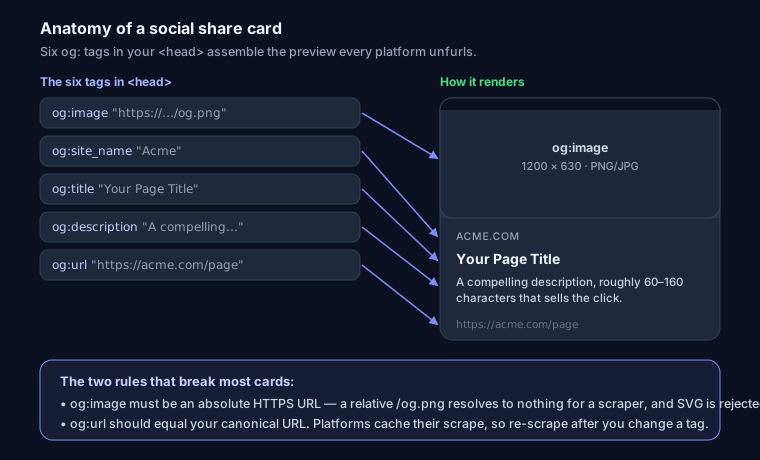
Required vs Optional Tags
The official spec lists four required properties: og:title, og:type, og:image, and og:url. In practice you want two more that platforms lean on heavily — og:description and og:site_name — so treat this block as the real baseline:
<meta property="og:title" content="Your Page Title">
<meta property="og:type" content="website">
<meta property="og:image" content="https://yoursite.com/og-image.png">
<meta property="og:url" content="https://yoursite.com/page">
<meta property="og:description" content="A compelling description, roughly 60–160 characters">
<meta property="og:site_name" content="Your Site Name">
Everything else is optional but useful:
og:locale— e.g.en_US. Only matters if you run localized pages; pair it with hreflang tags so crawlers and shares agree on language.og:image:width,og:image:height— declare1200and630. Without them a scraper that hasn't cached your image yet renders a blank or wrongly-cropped box on the first share.og:image:alt— a text description of the image for screen-reader users on platforms that expose it. Costs one line, helps accessibility.article:*— whenog:typeisarticle, you can addarticle:published_time,article:modified_time,article:author, andarticle:tag. These feed richer cards on LinkedIn and some readers.
<meta property="og:type" content="article">
<meta property="article:published_time" content="2026-07-11T09:00:00Z">
<meta property="article:author" content="Jane Dev">
<meta property="og:image:width" content="1200">
<meta property="og:image:height" content="630">
<meta property="og:image:alt" content="Chart showing OG image dimensions">
Set og:type to website for your homepage and landing pages, article for blog posts, product for e-commerce items. It changes which extra properties platforms accept.
How Each Platform Reads Them
They don't all read the same tags, and this trips people up constantly:
- Facebook and LinkedIn — pure Open Graph. LinkedIn caches aggressively (more on that below).
- X / Twitter — prefers
twitter:*tags, then falls back to OG for anything missing. Sotwitter:cardandtwitter:imagewin if present, buttwitter:titlewill fall back toog:title. You rarely need to duplicate everything — just add the card type and let the rest fall through:
<meta name="twitter:card" content="summary_large_image">
<meta name="twitter:image" content="https://yoursite.com/og-image.png">
- Slack, Discord, WhatsApp, iMessage, Telegram — all read Open Graph. Slack also respects
twitter:*as a secondary source. No proprietary tags needed.
Note twitter:* uses name=, while OG uses property=. Mixing those attributes up is a silent failure — the tag parses as nothing.
Image Rules That Actually Matter
The image is what people notice, and it's where most cards fall apart.
- Size: 1200 × 630 px (a 1.91:1 ratio). This fills the large card on every major platform. Minimum usable is 600 × 315; below ~200 px on a side the image is dropped entirely.
- URL: must be absolute and HTTPS —
https://yoursite.com/og.png, never/og.png. Scrapers don't run in your page's context, so a relative path resolves to nothing. - Format: PNG or JPG. No SVG — Facebook, LinkedIn, and X all reject it.
- File size: under 5 MB is the hard ceiling, but aim under 1 MB. Big images time out on slow scrapers and simply don't render.
- Design for mobile: the card shrinks. Text that looks fine at full size turns to mush at thumbnail scale, and platforms crop toward the center, so edge text gets cut. Keep any words large and centered. For the full breakdown of safe zones and per-platform crops, see Open Graph image size and best practices.
- Add
og:image:altfor accessibility — it's the alt text of your social card.
Why Your New Image Won't Show — Caching
This is the single most common OG complaint: "I updated the image and it still shows the old one." Platforms cache their scrape of your page, sometimes for days. Editing the tag doesn't invalidate their copy. You have to force a re-scrape:
- Facebook Sharing Debugger (
developers.facebook.com/tools/debug) — paste your URL, hit "Scrape Again". This also shows exactly what Facebook parsed and flags missing tags. WhatsApp shares the same cache, so this fixes WhatsApp too. - LinkedIn Post Inspector (
linkedin.com/post-inspector) — LinkedIn caches for roughly 7 days; the inspector forces a refresh. - X — the old Card Validator is gone. X refreshes on its own schedule, so a stale card can linger; adding a cache-busting query string to
og:image(e.g.?v=2) is the practical workaround.
If a debugger shows the right tags but the wrong preview, it's a cache issue, not a markup issue — stop editing tags and re-scrape.
Next.js Metadata Example
If you're on the App Router, don't hand-write meta tags — use the Metadata API. Next.js emits the correct property= attributes for you:
import type { Metadata } from 'next'

export const metadata: Metadata = {
  metadataBase: new URL('https://yoursite.com'),
  title: 'Your Page Title',
  description: 'A compelling description, 60–160 characters.',
  openGraph: {
    title: 'Your Page Title',
    description: 'A compelling description, 60–160 characters.',
    url: 'https://yoursite.com/page',
    siteName: 'Your Site Name',
    type: 'website',
    locale: 'en_US',
    images: [{
      url: '/og-image.png',       // resolved to absolute via metadataBase
      width: 1200,
      height: 630,
      alt: 'Descriptive alt text',
    }],
  },
  twitter: { card: 'summary_large_image' },
}
The metadataBase line is the part people forget — without it, relative image paths won't become absolute URLs and your card breaks in production.
Common Mistakes
- No
og:imageat all — the top offender. No image, no card, every share looks dead. - Relative
og:image—/og.pngresolves to nothing for a scraper. Always absolute HTTPS. og:url≠ canonical — they should point to the same URL. A mismatch confuses share counts and can split signals. If canonicals are new to you, start with canonical URLs explained.- Missing width/height — causes a blank box on the very first share before the platform caches the image.
- Text-heavy image — looks great on desktop, unreadable as a mobile thumbnail with the edges cropped off.
name=vsproperty=mixups — OG needsproperty, Twitter needsname. Swap them and the tag silently does nothing.
To catch these before they ship, SEO Snapshot's analyzer validates every OG tag and confirms your og:image URL is actually reachable — run your URL and it flags what's missing. For a quick visual check, the Open Graph card preview tool renders how your link unfurls, and the meta tag generator produces the full OG + Twitter block from a short form. While you're auditing head tags, it's worth also confirming you haven't left a meta description missing and that any JSON-LD structured data is valid — the same scrape that reads OG tags often powers rich results.
FAQ
Do I need Twitter tags if I already have OG tags?
Only twitter:card. X falls back to OG for title, description, and image, so add summary_large_image and let the rest inherit. Set twitter:image separately only if you want a different image on X.
Why does the debugger show my new image but the share still shows the old one? The platform cached its earlier scrape. Hit "Scrape Again" in the Facebook Sharing Debugger or run the LinkedIn Post Inspector to force a refresh. Editing the tag alone won't clear their cache.
Does Open Graph affect Google rankings? No — OG tags are for social previews, not search rankings. They influence click-through on shared links, which drives traffic, but Google doesn't use them as a ranking signal.