The short answer
Keep meta descriptions to roughly 120–160 characters, but treat that as a proxy. The real constraint is pixel width, not character count. Google renders your description in a specific font at a specific size and cuts it off with an ellipsis (…) when the text overflows the container — and that container is measured in pixels.
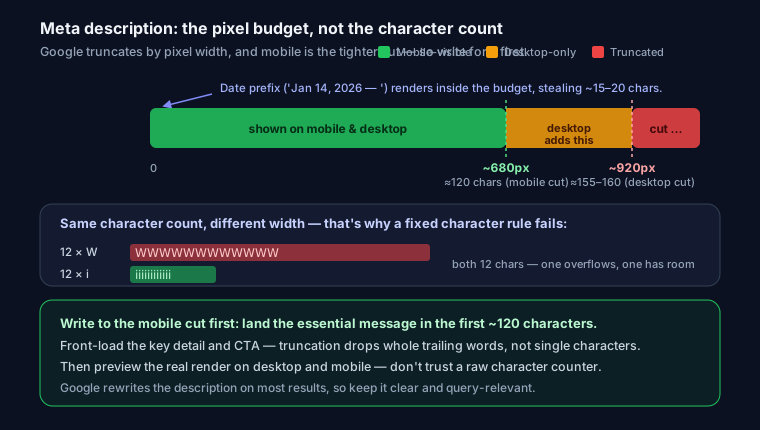
- Desktop: about 920 pixels, which works out to roughly 155–160 characters of average-width text.
- Mobile: about 680 pixels, or roughly 120 characters.
Mobile is the tighter budget, and most searches happen there, so write for the mobile cut first.
Why pixels, not characters
Two descriptions with the exact same character count can render at very different widths, because glyphs aren't equal width in Google's font. Wide glyphs like W, M, and m eat far more horizontal space than narrow ones like i, l, t, and ..
Consider these two strings, both 60 characters:
Willamette wineries welcome warm summer weekends. Wow, mmm!
illuminating little details in tidy titles, itty-bitty lines
Same count. The first is packed with W and m; the second is mostly i, l, and t. On a desktop SERP the first can overrun the pixel limit while the second still has room to spare. That's why a hard "160 characters" rule fails: a keyword-heavy line full of capitals truncates early, and a lean one full of narrow letters survives longer than you'd expect.
So don't optimize to a character number — optimize to how it renders. An analyzer that estimates pixel width per glyph, like the one at SEO Snapshot, reports both character count and estimated pixel width.
How truncation actually works
When text exceeds the pixel width, Google doesn't cut at a fixed character — it fits as many whole words as it can, then appends an ellipsis. A description 3 pixels too wide loses an entire trailing word, not three characters. That's why the last clause vanishes first, and why burying your call-to-action or key detail at the end is a mistake.
The boilerplate prefix eats your width
Google sometimes prepends a date or short boilerplate label to the snippet — Jan 14, 2026 — or Author · — pulled from your publish date or structured data. That prefix renders inside the same pixel budget. A date stamp can consume 90–120 pixels before your description even starts, shortening your usable space by 15–20 characters. If your pages show dates in search (common for blogs and news), assume less room than the raw 920/680 numbers suggest and front-load accordingly.
Google rewrites descriptions more than half the time
Here's the part people underestimate: your meta description is a suggestion, not a guarantee. Studies of large SERP samples consistently find Google rewrites or ignores the provided description well over half the time — often around 60%+ of results show text Google generated itself rather than the author's tag.
Why? Google frequently pulls a snippet from the page body that better matches the specific query typed. Search "meta description pixel width" and, if your tag only mentions character counts, Google may grab a sentence from your content that literally contains "pixel width" instead. That's usually a feature: a query-matched snippet earns more clicks.
So why write one at all? Two reasons:
- It's the default. When your description already answers the likely query, Google tends to use it as-is. A good tag is the version you control.
- It's the floor. Without a tag, Google auto-generates from whatever text it finds first — often a nav label, a cookie notice, or an awkward fragment. Writing your own removes that downside. (Seeing a blank tag flagged in an audit? Start with how to fix a missing meta description — that's about presence; this is about length.)
Don't agonize over the "perfect" 160-character line for a page Google will rewrite anyway. Make it clear, honest, and query-relevant, then move on.
Keyword bolding: scannability, not ranking
When a searcher's query terms appear in your description (or the generated snippet), Google bolds the matching words. That bolding does not directly influence ranking — meta descriptions haven't been a ranking factor for years. What it does is make your result easier to scan, which can lift click-through. Include the natural query language a searcher would use, but don't keyword-stuff; the bolding only helps when the match reads naturally.
Good, too-short, too-long
Good — reads well, front-loaded, ~150 chars:
Fix "missing meta description" in WordPress, Next.js, or plain HTML. Copy-paste snippets plus a free audit that flags length in characters and pixels.
Too short — 42 chars, wastes the snippet:
Meta description tips. Read our guide.
There's nothing wrong with a short description technically, but you're leaving free SERP real estate — and free keyword-matching surface — on the table.
Too long — 228 chars, the last third gets truncated on desktop and half of it disappears on mobile:
In this comprehensive and detailed guide we will walk you through absolutely everything you could ever possibly need to know about meta description length, pixel width, truncation behavior, and all of the many best practices to follow.
Everything after "pixel width," vanishes behind an ellipsis, and the sentence never delivers a reason to click.
A testing workflow
Don't ship on a character count. Preview the actual snippet at both widths:
- Draft to the mobile budget first. Write the essential message in the first ~120 characters (roughly 680px). If it still makes sense when cut there, the desktop version is fine too.
- Preview the render. Paste your title and description into a SERP snippet preview tool and toggle desktop vs mobile. You'll see the ellipsis land in real position, wide glyphs and all — not a guessed character count.
- Account for the date prefix. If the page shows a date in search, mentally reserve ~15 chars at the front.
- Generate clean tags. Producing the final markup for many pages? The meta tag generator outputs a correct
<meta name="description">(and matching Open Graph) so you don't hand-type quotes and encoding. - Verify live. After deploy, run the URL through SEO Snapshot — it reports character count and estimated pixel width together and warns when either the title or description will truncate on desktop or mobile.
The raw tag looks like this:
<meta name="description" content="Fix 'missing meta description' in WordPress, Next.js, or plain HTML. Copy-paste snippets plus a free length check in characters and pixels.">
While you're tuning snippets, do the same pass on your social cards — the Open Graph meta tags guide covers the equivalent length and image rules for Facebook, LinkedIn, and X. For where description length sits among your other on-page signals, see what a good SEO score actually measures.
FAQ
Is there a penalty for a description that's too long? No ranking penalty. Google just truncates it. The only cost is a weaker, cut-off snippet — and any key info past the cutoff going unread.
Should I write to 160 characters or 920 pixels? Pixels, because character count ignores glyph width. If you only have a character counter, aim lower — around 150 — to leave a safety margin for wide letters and any date prefix.
Does the pixel limit change? Google adjusts SERP layout periodically, so treat ~920px desktop / ~680px mobile as current-era estimates, not constants. Preview the render rather than trusting a fixed number.
Why did Google ignore my description entirely? It found body text that matched the searcher's query better. That's normal — happens on the majority of results. Keep your tag clear and relevant; you can't force it, only make yours the best default.
Run your URL through SEO Snapshot to see character count and estimated pixel width side by side — free, no signup.