What an SEO Score Actually Is
An SEO score is a proxy. A tool crawls your page, checks a fixed list of on-page and technical signals, weights them, and rolls the result into a single number. That number is useful — it turns "is this page healthy?" into something you can track over time — but it is not a ranking prediction. Google doesn't publish a score, and no third-party tool has access to the ranking system. A score answers "did I do the mechanical parts right?" It cannot answer "will this outrank the incumbent?"
Different tools measure different things and produce wildly different numbers for the same URL. Lighthouse's SEO audit checks about a dozen things — a title, a meta description, a valid robots.txt, crawlable links, legible font size. You can score 100 on Lighthouse SEO with a thin, backlink-free page. A full audit tool like the SEO Snapshot analyzer checks 100+ signals across meta, technical, performance, security, content, and social, so its number is stricter and more actionable. Neither is "the" SEO score — they're both proxies with different scopes.
SEO Score Ranges
| Score | Rating | Meaning |
|---|---|---|
| 90-100 | Excellent | Top-tier optimization, minimal issues |
| 75-89 | Good | Well-optimized, minor improvements possible |
| 50-74 | Needs Work | Several issues affecting visibility |
| 0-49 | Poor | Critical issues preventing indexing |
Treat these bands as a health check, not a leaderboard. A brand-new page with clean markup can hit 90 on day one and still get zero traffic for months because nobody links to it and Google hasn't decided it's worth ranking. An established page sitting at 68 might already pull thousands of visits because it earned authority years ago. The score describes the page's technical fitness, not its market position.
What Affects Your Score
SEO Snapshot checks 100 factors across 7 categories. The weights aren't arbitrary — they roughly track how much each area moves the needle on whether a page can be found, understood, and trusted.
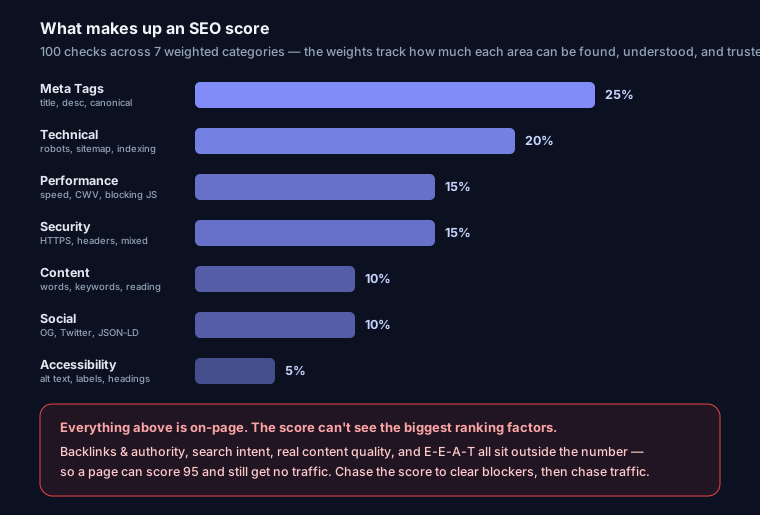
- Meta Tags (25%) — Title, description, canonical, viewport. This is the heaviest bucket because these tags are how you tell search engines and users what the page is. A missing or duplicate title, a truncated description, or a wrong canonical directly changes what shows in search results and which URL gets indexed.
- Technical (20%) — HTTPS,
robots.txt, sitemap, redirects, status codes. This measures whether the page can be crawled and indexed at all. Anoindexyou forgot to remove, or arobots.txtthat blocks your own CSS, is more damaging than any missing tag — which is why it's weighted second. - Performance (15%) — Page speed, render-blocking resources, and the lab-side signals that feed Core Web Vitals. Slow pages get crawled less and convert worse; Google uses page experience as a tiebreaker.
- Security (15%) — HTTP response headers (HSTS, CSP,
X-Content-Type-Options), cookie flags, mixed content. HTTPS is a confirmed ranking signal, and mixed-content warnings actively scare users off. - Content (10%) — Word count, keyword presence, readability. Weighted lower on purpose: a tool can count words but can't judge whether they're good. This is a floor check, not a quality verdict.
- Social (10%) — Open Graph, Twitter Card, JSON-LD. These don't rank you directly but control how links look when shared and whether you're eligible for rich results.
- Accessibility (5%) — Alt text, form labels, heading hierarchy. Overlaps with SEO (alt text and headings help both) but is the lightest bucket because most of it is indirect.
What a Score Can't Tell You
Here's where a lot of people misread the number. A perfect on-page score does not mean you'll rank, because the biggest ranking factors are things a page crawler can't see:
- Backlinks and authority. Off-page signals — who links to you and how trusted those sites are — are among the strongest ranking factors, and no on-page tool can measure them. A page scoring 100 with zero referring domains will lose to a 70-scoring page with 200 quality links every time on a competitive term.
- Search intent. You can nail every tag and still target the wrong intent. If someone searching "best running shoes" wants a comparison list and you published a single product page, no score fixes that mismatch.
- Content quality. A tool sees 1,800 words and a keyword. It can't tell whether the writing actually answers the question better than the current top result. Depth that genuinely helps is what wins — see the content depth guide.
- E-E-A-T and reputation. Experience, expertise, authoritativeness, and trust are reputation signals Google builds over time from many sources. There's no header or tag that grants it. Our E-E-A-T guide covers what actually moves it.
So: chase the score to remove blockers and quick wins, then stop treating it as the goal and start treating traffic and rankings as the goal.
How to Prioritize Fixes
Not every point is worth the same effort. Work in this order.
1. Critical and indexability issues first. Anything that stops the page from being indexed outranks every other fix. Check for a stray noindex, a robots.txt disallow on the URL, a broken canonical pointing elsewhere, or a soft 404. One of these can zero out a page no matter how clean the rest is. Confirm the page is actually indexable before touching anything cosmetic. The technical SEO audit guide walks through the full checklist.
2. High-impact on-page. Title tag, meta description, and canonical. These are the 25% bucket and they're fast. A missing meta description is usually the single biggest quick win — it's low effort and directly changes your search snippet. Generate clean tags with the meta tag generator.
3. Performance and security polish. Compress images, defer render-blocking scripts, add the security headers you're missing. Real improvements, but slower to build and lower per-point payoff than steps 1 and 2. Do them once the fundamentals are clean.
A Realistic Before/After
A client landing page scored 58/100. Not broken, just neglected. Four fixes over one afternoon:
- Removed a leftover
noindexfrom a staging config that shipped to production (this was the emergency — the page couldn't rank at all). - Wrote a proper 155-character meta description (it had none).
- Fixed a self-referencing canonical that pointed at the
http://version. - Added
Strict-Transport-SecurityandX-Content-Type-Optionsheaders.
New score: 86/100. No new content, no backlinks — just removing blockers and doing the on-page basics right. The noindex fix is what got the page back into the index; the rest earned the visible points. Rankings followed over the next few weeks because the page could finally compete on the strength it already had.
FAQ
Is a 100 SEO score worth chasing? Only to the point of removing blockers and easy wins. Past ~90, extra points come from diminishing-return tweaks. Your time is better spent on content and links, which the score can't measure.
Why does my Lighthouse SEO score differ from an audit tool's? They check different things. Lighthouse SEO tests roughly a dozen on-page basics; a full audit tool checks 100+ signals including security headers and social markup. Different scope, different number — both can be right.
My score is 90 but I get no traffic. Why? The score confirms your page is technically healthy. Traffic needs the things it can't see: matching search intent, content that beats the current results, and backlinks. Run your URL in the free SEO score checker or compare free audit tools, fix what it flags, then invest in content and authority.
What's a good score for a brand-new site? Aim for 85+ on technical and on-page from launch — that's fully in your control. Rankings will lag while Google evaluates the site. Run your URL to see your score with issues ranked by impact.