What This Checker Actually Does
Paste a URL, wait 5-15 seconds, and get a 0-100 score plus a ranked list of what's wrong and how to fix it. SEO Snapshot fetches the page like a crawler would, parses the HTML and response headers, and runs 123 individual checks against current SEO best practices. No signup, no crawl budget to configure, no PDF gate. Five free analyses per day.
The score is a shorthand — useful for tracking progress and spotting regressions — but the value is in the itemized report underneath it. A number tells you that something is wrong; the checks tell you what and where.
The 123 Checks, and Why They're Weighted the Way They Are
The checks group into 7 categories. The weights aren't arbitrary — they roughly track how much each area moves the needle on whether a page can rank at all versus how much it just polishes an already-indexable page.
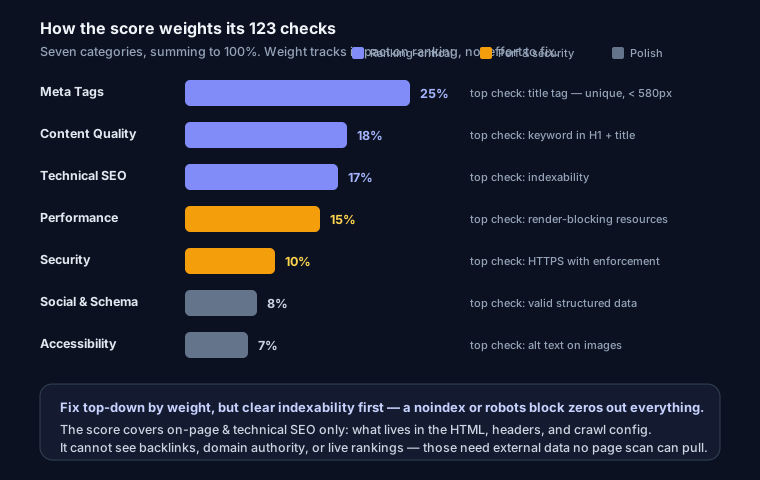
Meta Tags — 25% of score
The heaviest category, because title and description are the two things Google reads first and the two things a user sees in the search result. A missing or duplicated title tag caps your ceiling before any other factor matters.
Highest-impact check: the title tag — present, unique, and under ~580 pixels so it doesn't truncate in the SERP. After that, the meta description. If yours is missing, our guide to fixing missing meta descriptions walks through it, and the meta tag generator will produce copy-pasteable tags with live length feedback.
Content Quality — 18% of score
Weighted high because thin or off-intent content is the most common reason a technically-perfect page still doesn't rank. This category checks word count, readability, keyword placement in the title/H1/URL, heading diversity, and E-E-A-T signals like an author byline, an about page, and contact info.
Highest-impact check: keyword presence in the H1 and title together — the cheapest signal to get right and the one most often missed on template-generated pages.
Technical SEO — 17% of score
This is the "can Google even reach and trust this URL" category: HTTPS enforcement, a valid robots.txt, a discoverable sitemap.xml, redirect-chain and loop detection, URL structure, and hreflang validation. It's weighted just below content because a single misconfiguration here — say, a robots.txt that disallows your whole site — can zero out everything else.
Highest-impact check: indexability. A page blocked by robots rules or buried behind a redirect chain can't rank no matter how good the rest is.
Performance — 15% of score
TTFB, gzip/brotli compression, render-blocking CSS and JS, lazy loading, Cache-Control headers, page weight, and request count. Core Web Vitals are a real (if modest) ranking factor, and performance affects real users regardless of rankings.
Highest-impact check: render-blocking resources, because they're usually the single largest, most fixable drag on Largest Contentful Paint (the "good" threshold is under 2.5s).
Security — 10% of score
HTTPS (a confirmed ranking signal), seven security headers including HSTS and CSP, cookie security flags, and mixed-content detection — rolled into a security grade from A+ to F. Weighted lower than the ranking-critical categories because most of these headers don't directly move rankings, but they protect users and are trivially cheap to add.
Highest-impact check: HTTPS with proper enforcement. Everything else in this category is hardening on top of it.
Social & Schema — 8% of score
Open Graph tags, Twitter Card tags, and JSON-LD structured-data validation. Lower weight because it mostly affects how your page looks when shared and whether you qualify for rich results — valuable, but not what gets you indexed. The schema generator produces valid JSON-LD you can drop straight into <head>.
Highest-impact check: valid structured data on eligible page types (articles, products, FAQs), since that's your ticket to rich snippets.
Accessibility — 7% of score
Form-input labels, image alt text, heading hierarchy, and the lang attribute. The lowest weight, but there's meaningful overlap with SEO: alt text feeds image search, heading order helps parsing, and lang supports internationalization.
Highest-impact check: alt text on content images — it's both an accessibility requirement and an image-SEO signal.
Score Ranges
| Range | Rating | Meaning |
|---|---|---|
| 90-100 | Excellent | Top-tier on-page optimization |
| 70-89 | Good | Solid foundation, minor improvements |
| 50-69 | Needs Work | Real issues holding you back |
| 0-49 | Poor | Major problems, likely not ranking |
For the longer version of what these bands mean and how they map to real-world results, see what counts as a good SEO score — no point repeating it here.
How to Read Your Results and What to Fix First
Don't fix things top-to-bottom. Fix them in order of consequence. A page with a great title but a noindex tag is invisible; a page with a broken CSS request but perfect indexability is merely slow. Work the list like this:
Critical and indexability first. Is the page actually crawlable and indexable? Check for accidental
noindex, arobots.txtdisallow, broken canonicals pointing elsewhere, or redirect loops. These are ceiling-setters — nothing below matters until they're clean.High-impact on-page. Missing or truncated title, missing meta description, no H1 or multiple H1s, keyword absent from the title. These are fast wins that directly change how you appear in search. This is where a missing meta description or a duplicated title gets fixed.
Performance and security. Kill render-blocking resources, turn on compression, add the security headers you're missing. Bigger effort, real but incremental payoff.
Polish. Open Graph tags, Twitter Cards, structured data, alt-text gaps, accessibility cleanup. Do these once the fundamentals are solid.
Every issue in the report carries an impact score, so when two things compete for your afternoon, you can see which one buys more points. Fix, re-run the same URL, watch the number move.
What This Score Does and Doesn't Include
Be honest about what a checker can see. This one measures on-page and technical SEO — everything in the page's HTML, its response headers, and its crawl configuration. That's the part you fully control.
What it does not measure: backlinks, domain authority, brand signals, or your actual keyword rankings. Those depend on external data (other sites linking to you, Google's index) that no page-level scan can pull. So a 95 here means your page is technically excellent — not that it will outrank a competitor with ten years of links. On-page SEO is the necessary condition: get it right and you're eligible to rank; off-page decides the race among eligible pages.
If you want the full manual process behind these automated checks, the complete technical SEO audit guide covers it, and if you're comparing options, we benchmarked the free audit tools for 2026.
FAQ
How accurate is the SEO score? It accurately reflects on-page technical SEO — the checks are deterministic and run against the real fetched page. It intentionally excludes backlinks and domain authority, which need external data no scanner can access.
What score do I need to rank on Google? There's no threshold. Fixing anything that puts you under 50 is essential; below that you usually have an indexability or critical on-page problem. Most well-optimized pages land in the 80s or 90s, but the score is a hygiene check, not a ranking prediction.
Why did my score change when nothing on the page changed? Response-header checks (compression, cache, security headers) and response time can shift with server config, CDN behavior, or deploys. If you're on Vercel, Cloudflare, or nginx, a config change upstream can move performance and security points without touching your HTML.
How often should I check? Monthly, and after any significant change — a redesign, a migration, a new CMS plugin, or a CDN switch. Re-run the exact URL each time so the comparison is apples to apples.
Ready to see yours? Run your URL through the analyzer — it's free.