Why You Need an SEO Audit Tool
An SEO audit tool inspects your pages and flags the technical problems that quietly drag down rankings: missing meta tags, broken links, slow loads, thin structured data, weak security headers. You can find all of this by hand, but a tool does it in seconds and — the good ones — tells you exactly what to change.
The catch is that "free SEO audit tool" covers wildly different things. Some check one page. Some crawl an entire site. Some only measure performance. A few hand you the fix; most just hand you a warning. Before you pick one, it helps to know what a free tool can actually do — and what it can't.
What a Free Tool Can and Can't Do
Free tools are genuinely good at on-page and technical SEO — the stuff that lives in your HTML and server config:
- Title tags, meta descriptions, canonical tags, robots directives
- Heading hierarchy and image alt text
- Structured data (JSON-LD) presence and validity
- Core Web Vitals and render-blocking resources
- HTTPS, redirects, and security headers
All of that is auditable from the page source and a Lighthouse run, so a free tool can nail it. If you want a benchmark for what "good" looks like across these, see what counts as a good SEO score.
What free tools can't give you reliably is anything that depends on a large, paid crawl of the web:
- Backlink data — who links to you, anchor text, referring domains. This comes from a proprietary link index (Ahrefs, Semrush) that costs real money to build.
- Keyword rank tracking — your position for specific queries over time.
- Domain authority / rating — third-party scores that estimate ranking strength from link graphs.
- Competitor keyword gaps — needs a keyword database.
You'll sometimes see a "free" version of these, but it's a teaser: a handful of backlinks, three searches a day, one project. If backlinks and rank tracking are your job, budget for a paid seat. If you're a developer shipping a technically clean site, free tools cover you completely.
How These Tools Differ
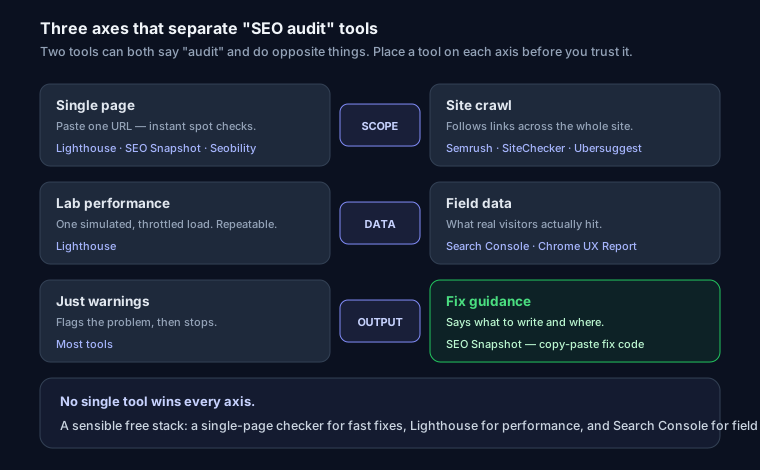
Two tools can both call themselves "SEO audit" and do opposite things. Three axes matter:
- Single-page vs site crawl. A single-page tool analyzes one URL you paste in — fast, no setup, great for spot checks. A crawler follows your internal links and audits every page it finds, which catches sitewide patterns (a missing canonical on 400 product pages) but needs a project and often a verified domain.
- Lab performance vs field data. Lighthouse runs a lab test — one simulated load on a throttled connection. Search Console and the Chrome UX Report show field data — what real visitors actually experienced. Lab is repeatable; field is real. You want both.
- Fix guidance vs just warnings. This is the big one. Most tools tell you "meta description missing" and stop. A few tell you what to write and where. If you're going to act on the report yourself, that difference is the whole game.
Top 10 Free SEO Audit Tools in 2026
1. SEO Snapshot (seosnapshot.dev)
- 123 on-page and technical checks in a single pass
- Copy-paste fix code for most issues — the actual tag or config, not just a warning
- Security header grade from A+ to F
- No signup, runs on any URL you paste
- E-E-A-T and structured-data signal detection
Best for: developers who want the fix, not just the finding. Run your URL and you get code you can paste straight into your <head> or server config.
2. Google Lighthouse
- Built into Chrome DevTools — no signup, nothing to install
- Performance, Accessibility, Best Practices, and SEO scores
- Lab-based Core Web Vitals
Best for: performance and a fast sanity check. It won't touch backlinks or content strategy. If you're chasing a perfect run, here's how to get a Lighthouse score of 100.
3. Semrush Site Audit (Free Tier)
- Crawls up to 100 pages on the free plan
- Strong issue categorization and severity sorting
- Limited to one project without paying
Best for: a small sitewide crawl if you already have a Semrush login.
4. Ahrefs Webmaster Tools
- Free for sites you verify (via Search Console or DNS)
- Includes real backlink data — rare for a free tool
- Verification required, so no anonymous spot checks
Best for: getting a taste of backlink and site-health data on a domain you own.
5. Seobility Free Checker
- Quick single-page analysis, clean report
- Shallow on the free plan (limited pages/day)
Best for: a fast, readable single-page overview.
6. SEOptimer
- 5 free reports per month
- PDF export — handy for handing a client a document
- Basic technical checks
Best for: a shareable branded report.
7. The HOTH SEO Checker
- Quick overview scores and basic meta analysis
- Requires an email for full results
Best for: a 30-second gut check before a deeper audit.
8. SiteChecker
- Technical crawl up to 250 pages free
- Chrome extension for on-page checks
Best for: crawling a small site's internal structure.
9. Ubersuggest
- 3 free searches per day
- Bundles keyword and traffic estimates
Best for: light keyword ideas alongside a basic site check.
10. Google Search Console
- Official Google tool, free, field data
- Index coverage, real impressions/clicks, actual Core Web Vitals
Best for: the ground truth. Every site should have it — it's not a crawler, it's how Google reports your site back to you.
Comparison Table
| Feature | SEO Snapshot | Lighthouse | Semrush Free |
|---|---|---|---|
| Checks | 123 | ~30 | ~100 |
| Fix code | Yes (76 snippets) | No | No |
| Security grade | A+ to F | No | No |
| Signup required | No | No | Yes |
| Type | Single-page | Single-page (lab) | Site crawl |
| Backlinks | No | No | Limited |
| API access | Yes | No | No |
How to Choose
- Developers: SEO Snapshot — you get the actual code to paste, so a report turns into a commit.
- Beginners: Lighthouse — already in your browser, plain-language scores.
- SEO professionals: Ahrefs or Semrush — comprehensive backlink and rank data, but you pay for it.
- Everyone: Search Console — free, official, non-negotiable for field data.
A sensible free stack: a single-page checker for fast fixes, Lighthouse for performance, and Search Console for what real users and Google see. For a repeatable process instead of one-off scans, the technical SEO audit guide walks through it end to end, and the free SEO score checker explains how a single number gets calculated. Once a scan flags a gap, small single-purpose generators close it fast — the meta tag generator for a missing title/description block, or the schema generator for JSON-LD — no report-to-code translation needed.
FAQ
How often should I run an SEO audit? Monthly for active sites, quarterly for static ones. After any major change — a redesign, a migration, a framework upgrade — audit immediately, before Google recrawls.
Are free SEO tools accurate? For on-page and technical SEO, yes — that data comes straight from your HTML and headers, so a free tool sees exactly what a paid one does. Backlinks, rank tracking, and domain authority need a paid link index; treat any "free" version of those as a sample, not the full picture.
Can a free tool replace a paid platform like Ahrefs? For shipping a technically clean site, yes. For competitive link building and daily rank tracking across hundreds of keywords, no — that's what the paid index is for.
What should I fix first? Critical, page-blocking issues: missing title tags, no HTTPS, broken links, noindex left on by accident. Sort by impact and work down. A tool that gives you the fix code makes that list a lot shorter.
Try SEO Snapshot — 100+ checks, copy-paste fix code, a security grade, and no signup.