What "Discovered — currently not indexed" means
Open the Pages report in Google Search Console, expand "Why pages aren't indexed", and you find a bucket labeled Discovered - currently not indexed. It sounds like an error. It isn't. It's a status about timing.
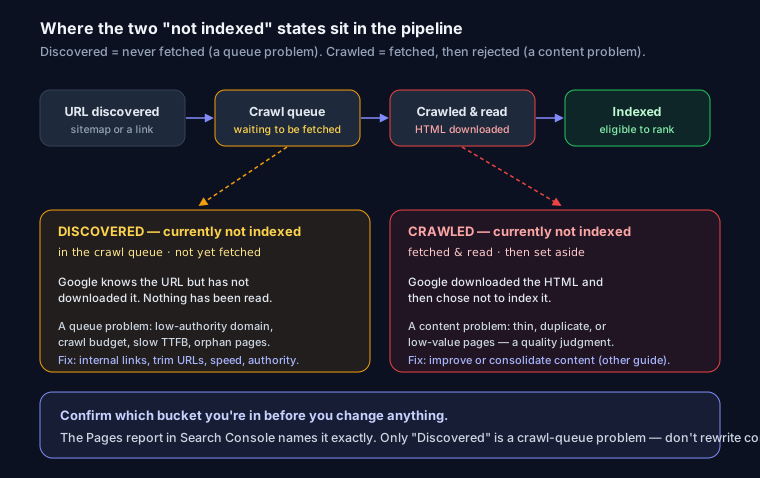
Here's the precise meaning: Google knows your URL exists. It found the address — usually in your sitemap, sometimes from a link — and added it to the crawl queue. But it hasn't fetched the page yet. No crawl has happened. Googlebot hasn't downloaded your HTML, hasn't seen your content, hasn't made any indexing decision. The URL is sitting in line waiting to be crawled.
That queue distinction is the whole point, and it's why this status is often confused with a different one.
Not the same as "Crawled — currently not indexed"
These two live next to each other in the report and mean opposite things:
- Discovered — currently not indexed: Google knows the URL but has not fetched it. Nothing has been read. It's queued.
- Crawled — currently not indexed: Google did fetch the page, read the content, and then chose not to index it. That's a quality/duplication judgment, not a queue problem.
If your URLs are in the "Crawled" bucket, crawl budget isn't your issue — content quality, thin pages, or duplication is, and the fix is different. Work through the Crawled — currently not indexed fix instead. The rest of this article assumes the "Discovered" status: Google hasn't looked yet.
Why Google delays the crawl
Google doesn't crawl every discovered URL immediately. It rations crawling based on how much it trusts a site and how much value it expects. A few things push your URLs to the back of the line:
A new or low-authority domain. The most common cause, and the most frustrating because there's often nothing wrong with the page. Google crawls sites it trusts more aggressively. A domain registered three weeks ago with two backlinks gets a small crawl allowance, and Google spends it carefully. On a brand-new site, this status frequently just means wait — the page is fine, the domain hasn't earned frequent crawling yet.
Crawl budget and priority. Every site gets a rough crawl allowance based on its size, health, and authority. On a large site — tens of thousands of URLs — Google won't crawl all of them on every pass. It prioritizes, and pages that look low-value get deferred.
A bloated URL space. Crawl budget's silent killer. Faceted navigation and parameters (?color=red&sort=price&page=3) can generate thousands of near-identical URLs. Google discovers them all, queues them all, and burns its crawl allowance on junk. Your important URL is stuck behind 4,000 filter combinations.
Slow server or 5xx errors. Googlebot watches your response times. If the server is slow to respond or throws 500s, Google backs off to avoid overloading it — that's by design. A consistently slow time to first byte (TTFB) directly shrinks how many pages Google will pull per visit.
Poor internal linking or orphan pages. Google found the URL in your sitemap, but if nothing on your site links to it, it looks unimportant. A page's internal links are Google's strongest signal of priority. An orphan page — in the sitemap, linked from nowhere — often sits in "Discovered" indefinitely.
Thin or duplicate URLs. If a URL pattern has produced low-value pages before, Google may deprioritize similar ones preemptively, based on what it has learned about the rest of your site.
Diagnosis: figure out which cause is yours
Before you change anything, narrow it down.
Check server response time and health. Slow TTFB and intermittent 5xx are the causes people miss because the site "feels fine" in a browser. Pull up Settings → Crawl stats in Search Console. A rising average response time or any meaningful share of 5xx tells you the server is the bottleneck. You can also check response time and server health for a specific URL by running it through the analyzer at seosnapshot.dev.
Check internal links to the URL. Ask a blunt question: how many pages on your site link to this one, and how many clicks from the homepage is it? If the answer is "zero links" or "six clicks deep", that's your problem. The analyzer flags orphan and deeply-buried URLs.
Check the sitemap. Open your sitemap.xml. Every URL in it should be a canonical, indexable, 200-status page. If your sitemap is stuffed with redirects, noindex pages, or non-canonical duplicates, you're diluting the priority signal and wasting crawl attention. The XML sitemap guide covers what belongs in there.
Look at the scale of the queue. Thousands of URLs sitting in "Discovered" means a URL-space or crawl-budget problem, not a per-page one. A handful on a small site is more likely authority and time.
Fixes, ranked by impact
Start at the top. The early items move the needle most.
1. Improve internal linking to the affected URLs. This is the single most actionable fix. Link to the stranded pages from relevant, already-indexed pages — category hubs, your top-traffic articles, contextual body links. Get them within two or three clicks of the homepage. A page with real internal links reads as "important" to Google, and importance is what moves it up the crawl queue.
2. Speed up TTFB and fix an overloaded server. If Crawl stats shows a slow average response or 5xx spikes, fix that. Cache aggressively, put a CDN (Cloudflare, Vercel's edge) in front, tune your database, or move off oversubscribed shared hosting. Faster responses let Google crawl more per visit.
3. Trim your low-value URL space. If parameters and facets are generating thousands of thin URLs, cut them out of the crawl path. Use robots.txt to disallow infinite parameter patterns, or noindex on pages that must exist but shouldn't be indexed. This concentrates the crawl budget on pages that matter — see the robots.txt guide for crawl-budget patterns, and generate the rules with the robots.txt generator.
4. Keep the sitemap clean and honest. Only canonical, indexable, 200 URLs. Set lastmod to the real last-modified date — don't fake a fresh timestamp on every URL to trick Google into recrawling, because it learns to distrust the signal and ignores your lastmod entirely. Regenerate a correct file with the sitemap generator.
5. Earn a few links and build authority. On a new domain this is the real unlock. A launch that brings in a handful of legitimate backlinks — a directory listing, a mention, a partner link — raises how much Google trusts the domain, and trusted sites get crawled more often and more deeply. You're not just chasing rankings; you're buying crawl frequency, and that quietly fixes "Discovered" across a whole site at once.
6. Request indexing for priority pages. For a few important URLs, use the URL Inspection tool and click "Request Indexing" to push them toward the front of the queue. This works for individual pages. It does not scale to thousands, and spamming it won't help — it's a nudge, not a fix.
7. On a new site: be patient. If the domain is young, the pages are fine, and internal links are in place, the honest answer is time. Keep publishing, keep earning links, and the crawl allowance grows on its own.
If you suspect the problem is broader than one status — server health, sitemap hygiene, and internal linking all at once — a full technical SEO audit will surface the pattern faster than fixing URLs one at a time.
FAQ
How long until a discovered URL gets crawled? On an established, healthy site, days to a couple of weeks. On a new or low-authority domain it can take considerably longer — sometimes over a month — and there's no fixed SLA. If a URL has been stuck for many weeks and has no internal links or a slow server behind it, that's a fixable cause, not just slow luck.
Will requesting indexing force a crawl? It moves that specific URL up the queue and usually gets it crawled sooner. It doesn't guarantee indexing afterward, and it won't help at scale. Fix internal linking and crawl budget for the bulk; use Request Indexing for the few pages you need now.
Is "Discovered — currently not indexed" a penalty? No. It's a scheduling state, not a manual action or a quality strike. Google simply hasn't gotten to the page. If Google had crawled it and rejected it, you'd see "Crawled — currently not indexed" instead.