What "Crawled — currently not indexed" means
You submitted a page, waited, checked the URL Inspection tool, and got this: Crawled - currently not indexed. Googlebot came, read the page, and walked away without adding it to the index. No error, no penalty banner, nothing broken. Just a quiet no.
That's the frustrating part. This status isn't a technical failure you can patch and forget. It's a judgment call. Google fetched your HTML, evaluated it, and decided the page wasn't worth a slot in the index right now. Fixing it means changing that decision.
What the status actually means
Two GSC statuses get confused constantly, and telling them apart is the first diagnostic step:
- Discovered - currently not indexed: Google knows the URL exists but hasn't crawled it yet. That's a crawl-budget and scheduling problem — Google is deprioritizing the fetch, often on large or slow sites.
- Crawled - currently not indexed: Google did fetch the page and then chose not to index it. That's a quality and priority problem.
If you're on "Crawled," the raw fetch worked. Your robots.txt is fine, the server returned 200, the page rendered. What failed is the value assessment. Google looked at the content and concluded it either duplicates something already indexed, adds nothing new, or isn't worth the storage given how much it trusts your domain.
Treat it as feedback, not a bug report.
The real causes, roughly in order of how often they're the culprit
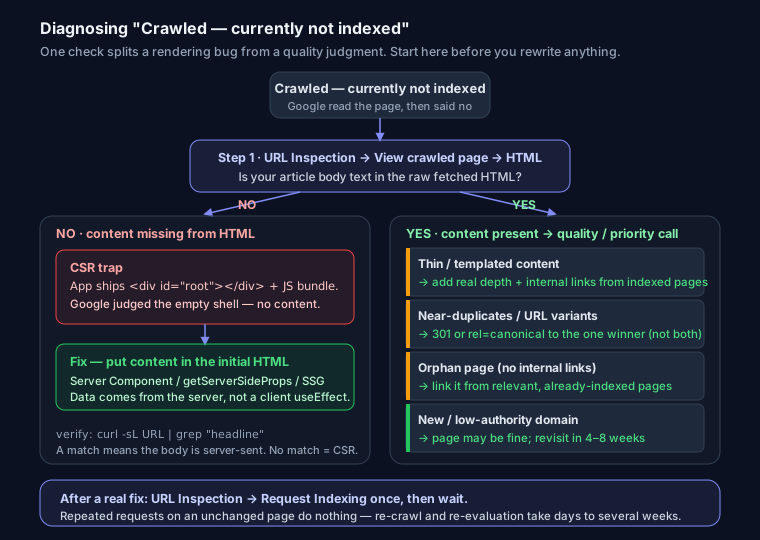
Thin or templated content. The page technically has words, but they're boilerplate — a product page that's 90% shared template and 40 words of unique text, a tag archive that just lists three posts, a location page spun from a template with the city name swapped in. Google sees the pattern and passes. This is the single most common cause, and content depth in SEO is usually the fix.
Near-duplicate pages competing for the same intent. You have /blog/nextjs-seo, /blog/seo-for-nextjs, and /tag/nextjs all targeting roughly the same query. Google indexes one and leaves the others as "crawled, not indexed." This is keyword cannibalization showing up in the index-coverage report. It also happens with URL variants — trailing slashes, query strings, ?utm= parameters — that resolve to the same content.
A new or low-authority domain. On a site launched a few months ago, Google is deliberately conservative. It'll index your homepage and a handful of pages, then throttle the rest until it trusts you more. Sometimes the page is completely fine and the only thing wrong is that your domain is young. This one genuinely does resolve with time.
Client-side-rendered pages that ship near-empty HTML. This is the one developers cause and miss. Your React or Vue app returns a <div id="root"></div> and a bundle. You see a full page in your browser because JS runs. Google can render JS, but rendering is queued and expensive, and if the initial HTML is a shell, Google may evaluate the near-empty version and decide there's nothing to index. From its first look, your page had no content.
Soft-404-ish pages. The page returns HTTP 200 but reads like an empty state — "No results found," an out-of-stock product with no description, a filtered category with zero items. Google's heuristics flag these as effectively contentless even though the status code says OK.
Orphan pages with no internal links. If nothing on your site links to a URL and it only exists in the sitemap, Google gets a strong signal that even you don't think it matters. Internal links are how you vote for your own pages.
Mass-produced or AI-spun content caught by the Helpful Content system. Hundreds of near-identical pages generated from a template or a model, with no first-hand value, get filtered at scale. If you published a large batch and most of it landed in "Crawled - not indexed," this is likely why.
Diagnosing each cause
Start in GSC URL Inspection. Paste the URL, then open View crawled page → HTML. This shows the HTML Google actually fetched. Read it. Is your article body in there, or just a script tag and an empty container? If the content is missing, you have a rendering problem, not a content problem — and you've just saved yourself from rewriting a page that was fine.
Confirm it outside GSC with a raw fetch — this is what a bot sees before any JavaScript runs:
curl -sL https://example.com/your-page | grep -i "your unique headline text"
No match means your content isn't in the server-sent HTML. That's the CSR trap.
For duplication, run a site: search for the target phrase (site:example.com "your exact heading") and see how many of your own URLs surface. If several near-identical pages show up, you've found the cannibalization. For thinness, be honest about word count and originality — would this page help someone who already read the top three results? You can also drop the URL into the analyzer at seosnapshot.dev to check whether the content is actually present in the HTML and to flag thin or duplicate signals before you guess.
The fixes
If it's thin or templated: add substantial, genuinely useful content that isn't in the template — real detail, specifics, something only you would write. Then add internal links from related, already-indexed pages so Google has a path in and a reason to re-evaluate.
If it's duplicates: consolidate. Pick the strongest URL, 301-redirect the losers to it, or set rel="canonical" on the variants pointing at the winner. Canonical URLs explained walks through the difference and when to use which. Don't canonical and noindex the same page — pick one signal.
If it's client-side rendering: get your content into the initial HTML. On Next.js, render the page in a Server Component (App Router) or use getServerSideProps / static generation (Pages Router) instead of fetching data in a client-only useEffect. The test is simple — curl the URL and confirm the body text is in the response, not injected later.
// Pages Router — content is in the HTML Google first sees
export async function getServerSideProps({ params }) {
  const post = await getPost(params.slug);
  return { props: { post } };
}
If pages shouldn't be indexed at all: stop making them compete. Thin utility pages — internal search results, faceted filters, thank-you pages, paginated tag archives — should carry noindex so they don't dilute your quality signal or eat crawl attention. Generate the right tags with the robots meta / X-Robots-Tag generator. Fewer, stronger pages beat a pile of mediocre ones.
After any real fix: use URL Inspection → Request Indexing. This nudges Google to re-crawl sooner. Don't spam it — request once per meaningful change. And run a proper technical SEO audit if a whole section of the site is affected, since the cause is usually structural rather than page-by-page.
Will it fix itself?
Sometimes — specifically on new domains where the only problem was trust and time. If the page is solid and your site is young, revisiting in four to eight weeks may show it indexed with no action from you.
But if the cause is thin content, duplication, or empty rendered HTML, waiting does nothing. Google already made its call; it won't change its mind about the same page. After a real fix, expect anywhere from a few days to several weeks for re-crawl and re-evaluation. New domains sit at the slow end of that range.
FAQ
How long until Google indexes it after I fix the page? Usually days to a few weeks. Requesting indexing speeds up the re-crawl but doesn't override the quality assessment — if the fix was superficial, the status comes back.
Does requesting indexing repeatedly help? No. Repeated requests on an unchanged page do nothing and can look like impatience. Fix the underlying issue, request once, then wait.
Can a strong internal link get a page indexed on its own? It helps a lot, especially for orphan pages, because it signals the page matters and gives Google a crawl path. But a great internal link into a thin page won't override a content-quality judgment — you still need something worth indexing at the other end.