Next.js Does Not Ship a Sitemap — You Add One
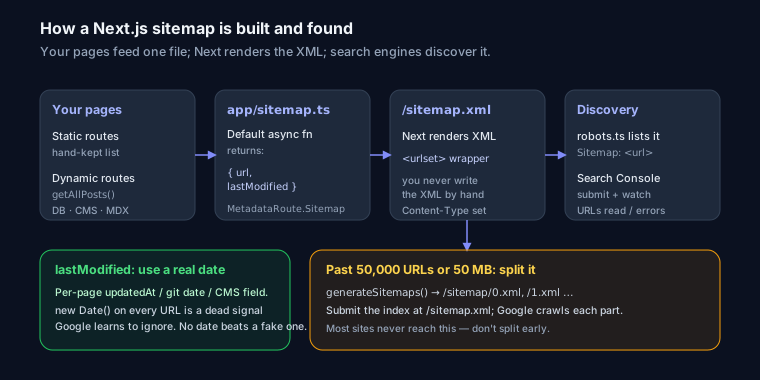
There's no config flag to flip. Next.js won't generate a sitemap.xml for you, and no plugin runs by default. But the App Router gives you a clean, first-party way to build one: a single file at app/sitemap.ts that exports a function returning your URLs. Next handles the XML formatting, the Content-Type header, and the route. You just describe the pages.
This guide is the App Router way first (Next 13.3+, current through 14 and 15), then the Pages Router fallback if you're on an older setup.
The Minimal app/sitemap.ts
Create the file at the root of your app directory. It exports a default function that returns an array of URL objects typed as MetadataRoute.Sitemap.
import type { MetadataRoute } from 'next'

export default function sitemap(): MetadataRoute.Sitemap {
  return [
    {
      url: 'https://example.com',
      lastModified: new Date('2026-06-01'),
    },
    {
      url: 'https://example.com/about',
      lastModified: new Date('2026-05-12'),
    },
    {
      url: 'https://example.com/pricing',
      lastModified: new Date('2026-06-20'),
    },
  ]
}
Two things to get right immediately. First, import type { MetadataRoute } — the type keyword means it's erased at build time, and MetadataRoute.Sitemap gives you autocomplete plus a compile error if you misspell lastModified or return the wrong shape. Second, URLs must be absolute. /about on its own produces an invalid sitemap. Always include the full origin.
Visit http://localhost:3000/sitemap.xml and Next renders proper XML with the <urlset> wrapper. You never write the XML by hand.
Static Plus Dynamic Routes
Real sites have a handful of hardcoded pages and a pile of database- or CMS-driven ones. Make the function async and fetch the dynamic slugs. This is where a sitemap earns its keep.
import type { MetadataRoute } from 'next'
import { getAllPosts } from '@/lib/posts'

const BASE_URL = 'https://example.com'

export default async function sitemap(): Promise<MetadataRoute.Sitemap> {
  // Static routes you maintain by hand
  const staticRoutes: MetadataRoute.Sitemap = [
    { url: BASE_URL, lastModified: new Date('2026-06-01') },
    { url: `${BASE_URL}/about`, lastModified: new Date('2026-05-12') },
    { url: `${BASE_URL}/blog`, lastModified: new Date() },
  ]

  // Dynamic routes from your data source
  const posts = await getAllPosts()
  const postRoutes: MetadataRoute.Sitemap = posts.map((post) => ({
    url: `${BASE_URL}/blog/${post.slug}`,
    lastModified: new Date(post.updatedAt),
  }))

  return [...staticRoutes, ...postRoutes]
}
getAllPosts() can be a Prisma query, a fetch to a headless CMS, or a filesystem read of your MDX files — whatever backs your content. The pattern is identical: map each record to { url, lastModified }. Because this runs at build time (or on-demand if the route is dynamic), the sitemap stays in sync with your content without a separate generation step.
lastModified Done Right
This is the field developers get wrong, and it quietly makes the sitemap useless. The instinct is to write lastModified: new Date() on every entry. Every build stamps every URL with "modified right now."
Google is not fooled by this for long. When every page in your sitemap claims to change on every deploy, the signal carries no information, and crawlers learn to ignore your dates entirely. The point of lastModified is to tell Google which pages actually changed so it can prioritize recrawling them. Feed it a real per-page timestamp — the updatedAt column from your database, the git log date of the MDX file, the CMS "last published" field. Pages that genuinely haven't changed should keep showing an old date. That's the whole value.
If you truly have no per-page timestamp, omitting lastModified is better than faking it with new Date().
What About changeFrequency and priority?
The MetadataRoute.Sitemap type also accepts changeFrequency ('daily', 'weekly', etc.) and priority (0.0 to 1.0). You can include them:
{
  url: `${BASE_URL}/blog/${post.slug}`,
  lastModified: new Date(post.updatedAt),
  changeFrequency: 'monthly',
  priority: 0.7,
}
Be honest about what they do: Google has said publicly it largely ignores both. priority was never a ranking signal, and changeFrequency is treated as a hint at best. They don't hurt, but don't spend time tuning priority values expecting a payoff — put that effort into accurate lastModified instead. The deeper rationale for every field lives in the XML sitemap guide.
Large Sites: Splitting Past 50,000 URLs
A single sitemap file is capped at 50,000 URLs and 50 MB uncompressed. Cross that and you need a sitemap index pointing at multiple files. Next handles this with generateSitemaps.
import type { MetadataRoute } from 'next'
import { getProductCount, getProductsPage } from '@/lib/products'

const BASE_URL = 'https://example.com'

export async function generateSitemaps() {
  const total = await getProductCount()
  const pages = Math.ceil(total / 50000)
  return Array.from({ length: pages }, (_, id) => ({ id }))
}

export default async function sitemap({
  id,
}: {
  id: number
}): Promise<MetadataRoute.Sitemap> {
  const products = await getProductsPage(id, 50000)
  return products.map((product) => ({
    url: `${BASE_URL}/products/${product.slug}`,
    lastModified: new Date(product.updatedAt),
  }))
}
Next now serves /sitemap/0.xml, /sitemap/1.xml, and so on. Point Search Console at the index (/sitemap.xml) and it discovers the rest. Don't reach for this until you're actually near the limit — most sites never do.
Reference It in app/robots.ts
Search engines find your sitemap two ways: you submit it, and you list it in robots.txt. Do both. The App Router has a matching app/robots.ts:
import type { MetadataRoute } from 'next'

export default function robots(): MetadataRoute.Robots {
  return {
    rules: { userAgent: '*', allow: '/' },
    sitemap: 'https://example.com/sitemap.xml',
  }
}
That emits a Sitemap: directive at /robots.txt. If you're customizing crawl rules beyond this, the robots.txt guide covers the directive and its edge cases.
Verify It Actually Works
Before you submit anything, load the file and read it:
- Visit
/sitemap.xmlin production. It should return valid XML with a<urlset>(or<sitemapindex>for split sites), not a 404 or an HTML error page. - Check the URLs are absolute —
https://example.com/about, never/about. This is the most common breakage. - Confirm only canonical, indexable pages are listed. No
noindexpages, no redirects, no?utm=variants, no staging URLs. A page in your sitemap but markednoindexsends Google mixed signals. - Watch for trailing-slash mismatches. If your canonical URLs end in
/, your sitemap entries should too.
Once it's live, run the URL through the SEO Snapshot analyzer to confirm the sitemap is detected and parses cleanly — a fast sanity check before you hand it to Search Console. Then in Google Search Console, go to Sitemaps, enter sitemap.xml, and submit. Google will report how many URLs it read and flag parse errors.
While you're in the codebase, the technical SEO audit guide covers the other crawlability checks worth doing in the same pass, and if the site feels slow, fixing render-blocking resources in Next.js is the usual first win.
Pages Router Alternative
On the older pages/ directory there's no MetadataRoute helper. Two options.
Generate XML in a route with getServerSideProps:
// pages/sitemap.xml.tsx
import type { GetServerSideProps } from 'next'

function generateXml(urls: string[]) {
  return `<?xml version="1.0" encoding="UTF-8"?>
  <urlset xmlns="http://www.sitemaps.org/schemas/sitemap/0.9">
    ${urls.map((u) => `<url><loc>${u}</loc></url>`).join('')}
  </urlset>`
}

export const getServerSideProps: GetServerSideProps = async ({ res }) => {
  const urls = ['https://example.com', 'https://example.com/about']
  res.setHeader('Content-Type', 'text/xml')
  res.write(generateXml(urls))
  res.end()
  return { props: {} }
}

export default function Sitemap() {
  return null
}
Or install next-sitemap, which crawls your build output and writes files automatically. It's the standard Pages Router answer. You do not need it on the App Router — the built-in app/sitemap.ts covers everything it does.
FAQ
Does Next.js generate a sitemap automatically?
No. There's no default sitemap. You add app/sitemap.ts (App Router) or generate one yourself (Pages Router). Next only handles the XML rendering once you supply the URLs.
Why is my sitemap at /sitemap/0.xml instead of /sitemap.xml?
You're using generateSitemaps, which splits output into numbered files. That's expected for large sites. Submit the index at /sitemap.xml and Google follows the links to each part.
Do I need the next-sitemap package?
Not for the App Router — app/sitemap.ts is built in and does the job. next-sitemap is worth it on the Pages Router or when you want automatic crawling of a large static export.
If you're on a non-Next stack, or you just want a one-off file without touching code, the XML sitemap generator builds a valid sitemap.xml from a list of URLs in seconds.