Three Stages, Three Failure Points
Getting a page into Google is three separate stages, and a page can fail at any one of them. Knowing which stage failed tells you exactly which fix applies — most "why isn't my page indexed" confusion comes from mixing them up.
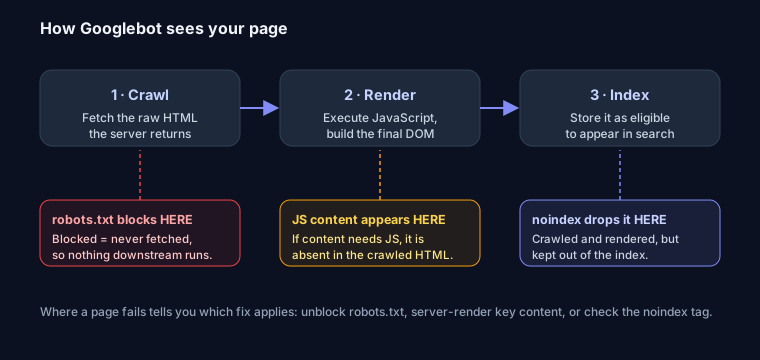
1. Crawl — fetch the raw HTML
Googlebot requests the URL and downloads whatever the server returns. This is the raw HTML, before any JavaScript runs. If robots.txt blocks the path, this stage never happens — nothing downstream can run, which is why a robots.txt block is not a way to remove a page (Google can't see any signal on a page it never fetched). Check a path with the robots.txt tester.
2. Render — run the JavaScript
Google then renders the page: it executes JavaScript and builds the final DOM, the way a browser does. This is where client-side content appears. The catch: if your main content is injected by JavaScript, it is absent from the crawled HTML and only exists after render — which Google does, but on its own schedule and less reliably than server-rendered content. The safe rule is to make sure your important content is in the server response, not added later by JS. (This is also why a hydration mismatch can matter for SEO.)
3. Index — store it for search
Finally Google decides whether to store the page as eligible to appear in results. A noindex tag drops the page here — it is crawled and rendered, but deliberately kept out of the index. That's why noindex requires the page to stay crawlable: Google has to reach stage 3 to see the tag. Build one with the meta robots noindex generator.
Diagnosing Your Page
- Page not fetched at all → check for a
robots.txtblock. - Fetched but content missing → your content depends on JavaScript; server-render it.
- Fetched, rendered, still not in search → look for a
noindex, a canonical pointing elsewhere, or a quality/authority issue.
FAQ
Q: Does Google run my JavaScript? Yes, Googlebot renders JavaScript. But it crawls the raw HTML first and renders later on its own schedule, so content that only exists after JS runs is indexed less reliably. Put important content in the server response.
Q: Why is my page crawled but not indexed?
It passed crawl and render but Google chose not to store it — common causes are a noindex tag, a canonical pointing to another URL, thin content, or (on a new site) low authority.
Q: Does robots.txt stop indexing? No. It stops crawling, which happens at stage 1. A blocked URL can still be indexed from external links (without content), and the block prevents Google from ever seeing a noindex. Use noindex, not robots.txt, to keep a page out of search.