What the Error Means
React (and frameworks built on it, like Next.js) render your page twice: once on the server to produce the initial HTML, and again in the browser to "hydrate" it into an interactive app. When the browser's first render produces different markup than the server sent, React throws Text content does not match server-rendered HTML (you may also see "Hydration failed because the initial UI does not match what was rendered on the server"). React then discards the server HTML for that subtree and re-renders it on the client.
Common Causes
- Time and locale.
new Date().toLocaleString(), "2 minutes ago" timestamps, orDate.now()produce one value on the server and another in the browser. This is the single most common cause. - Random values.
Math.random(), generated IDs, or shuffles that run during render. - Browser-only APIs in render. Reading
window,localStorage, ornavigatorduring the initial render — they don't exist on the server, so the output differs. - Invalid HTML nesting. A
<div>inside a<p>, or a<p>inside another<p>. The browser silently "fixes" the structure, which then no longer matches the server's. - Browser extensions that mutate the DOM before hydration.
The Fixes
Defer client-only values until after mount:
const [mounted, setMounted] = useState(false);
useEffect(() => setMounted(true), []);
return <span>{mounted ? new Date().toLocaleTimeString() : null}</span>;
Or suppress the warning for a single, genuinely unavoidable mismatch like a live timestamp:
<time suppressHydrationWarning>{new Date().toLocaleTimeString()}</time>
And fix invalid nesting by auditing the HTML structure — this one is easy to miss because the page looks fine but still errors.
What It Means for SEO
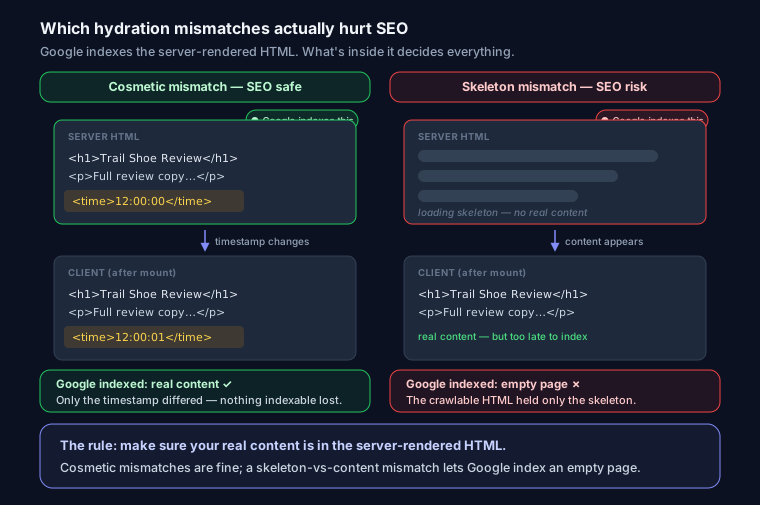
Here's the part almost nobody covers. Googlebot renders JavaScript, but it crawls the server HTML first, and that's what ships fastest and most reliably. A hydration mismatch usually does not hurt SEO, because the server HTML already contains your real content, and that's what Google indexes.
It becomes an SEO problem when the mismatch is between real content and an empty or fallback state — for example, the server renders a loading skeleton and the client renders the content. Then the crawlable HTML is the skeleton, and Google can index an empty page. The rule: make sure your actual content is in the server-rendered HTML, and keep any hydration mismatches limited to cosmetic things like timestamps. Confirm what Google receives with the SEO analyzer or the URL Inspection tool's rendered-HTML view.
FAQ
Q: Does a hydration error hurt my Google ranking? Usually not — Google indexes the server-rendered HTML, which contains your content. It only becomes an SEO problem when the server renders an empty or fallback state and the real content appears only after hydration.
Q: Is suppressHydrationWarning safe? For a single, genuinely unavoidable mismatch like a live timestamp, yes. Don't use it to paper over structural bugs like invalid nesting or browser APIs in render — fix those instead.
Q: How do I see what Googlebot renders? Use the URL Inspection tool in Search Console and view the rendered HTML, or run the page through a JavaScript-executing crawler. Confirm your main content is present in the initial server response.