The One Setting Everyone Misses
If @astrojs/sitemap runs but produces no sitemap-index.xml, or an empty one, the cause is almost always the same: the site option is missing from astro.config.mjs. The integration needs your production URL to build absolute links, and without it, it silently generates nothing.
import { defineConfig } from 'astro/config';
import sitemap from '@astrojs/sitemap';

export default defineConfig({
  site: 'https://example.com', // required — the sitemap is empty without it
  integrations: [sitemap()],
});
Then build with astro build and check dist/sitemap-index.xml and dist/sitemap-0.xml. The sitemap is generated at build time, not on the dev server.
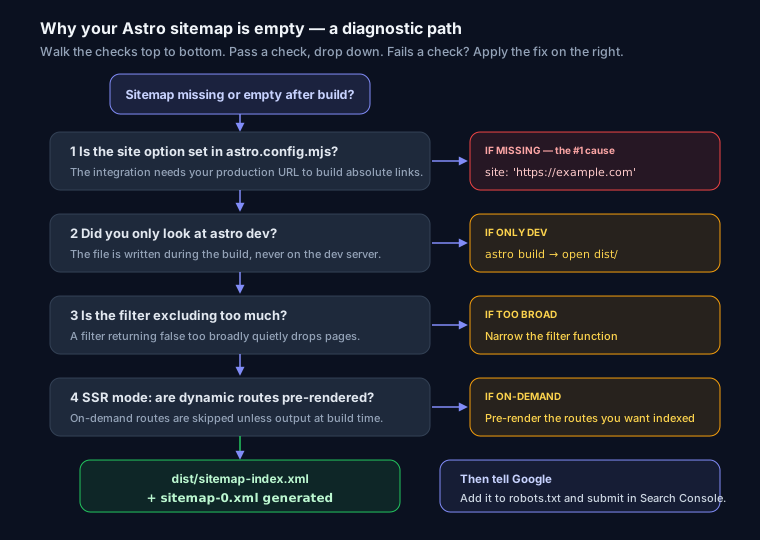
Why It's Empty or Missing
- No
siteoption — the number-one cause, above. - You checked
astro dev— the sitemap only exists afterastro build. It will not appear on the dev server. - Pages excluded by
filter— a filter function returningfalsetoo broadly. - Dynamic routes not pre-rendered — in SSR mode, only pre-rendered pages land in the sitemap. On-demand routes won't appear unless you output them at build.
Excluding Pages
Use the filter option to keep specific pages out:
sitemap({
  filter: (page) => !page.includes('/thank-you'),
})
Then Tell Google
The sitemap lives at https://example.com/sitemap-index.xml. Reference it in robots.txt and submit it in Search Console. Validate the output first with the XML sitemap generator or the SEO analyzer.
FAQ
Q: Why is my Astro sitemap empty?
Almost always because site is missing from astro.config.mjs. The integration needs your production URL to build the sitemap; without it the file is empty or absent.
Q: I don't see a sitemap on the dev server.
That's expected. @astrojs/sitemap generates the file during astro build, not in astro dev. Build and check the dist folder.
Q: My dynamic pages aren't in the sitemap. In SSR mode, only pre-rendered pages are included. Pre-render the routes you want indexed, or generate their URLs at build time.