What a Canonical Tag Does
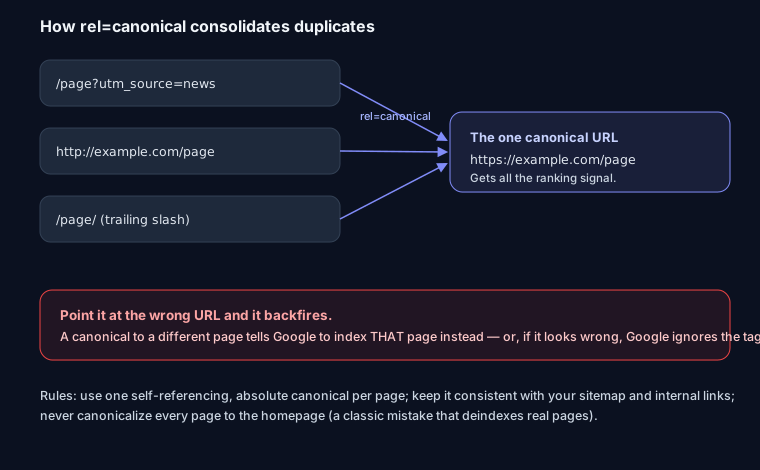
When the same content is reachable at several URLs — with tracking parameters, on http and https, with and without a trailing slash — you want Google to treat one of them as the real one and give it all the ranking signal. That's the job of rel=canonical: it names the preferred URL, and Google consolidates the duplicates onto it.
The Right Way
- Self-reference by default. Every page should carry a canonical pointing at its own clean URL. This is the single most common fix for duplicate-content confusion.
- Use absolute URLs.
https://example.com/page, not/page. A relative canonical is a frequent mistake Google may ignore. - Stay consistent. The canonical should match what you list in your sitemap and link to internally. Contradicting signals make Google pick for you.
- One per page. Two canonical tags (often one from a plugin and one from custom code) cancel each other out.
Build a correct tag — as HTML, Next.js metadata, or an HTTP header — with the canonical tag generator.
How It Backfires
The canonical is a hint about which URL, so a wrong one does real damage:
- Canonical to the wrong page → Google indexes that page instead of the one you meant. A template bug that points every product at the category page can quietly deindex the whole catalog.
- Everything canonicalized to the homepage → a classic mistake that tells Google every page is "really" the homepage, dropping your actual content from the index.
- Canonical plus noindex on the same page → conflicting signals; Google tends to ignore the canonical, and results get unpredictable.
If pages are disappearing from the index, viewing the source and checking the canonical is one of the first things to rule out. The SEO analyzer flags wrong or missing canonicals automatically.
FAQ
Q: Should every page have a canonical tag? Yes — a self-referencing one pointing at its own clean URL. It prevents duplicate-content issues from parameters, protocols, and slashes, and costs nothing.
Q: Is a canonical a redirect? No. A canonical is a hint that consolidates ranking signal while both URLs stay reachable. A 301 actually moves users and bots to the new URL. Use a redirect when the old URL should go away; use a canonical when duplicates should coexist but only one should rank.
Q: My pages are dropping out of Google — could the canonical be the cause? Very possibly. Check whether the canonical points at a different URL (or the homepage) than the page itself. A wrong canonical is a common, silent cause of deindexed pages.