Does Framer Handle Canonicals Automatically?
By default, Framer gives each published page a self-referencing canonical tag pointing at its own URL. For most sites that's exactly right and you don't need to touch anything. You only need a custom canonical when two URLs serve the same or near-duplicate content and you want to consolidate them onto one. The classic cases are CMS collection items reachable from more than one path, or a campaign page that duplicates an existing one.
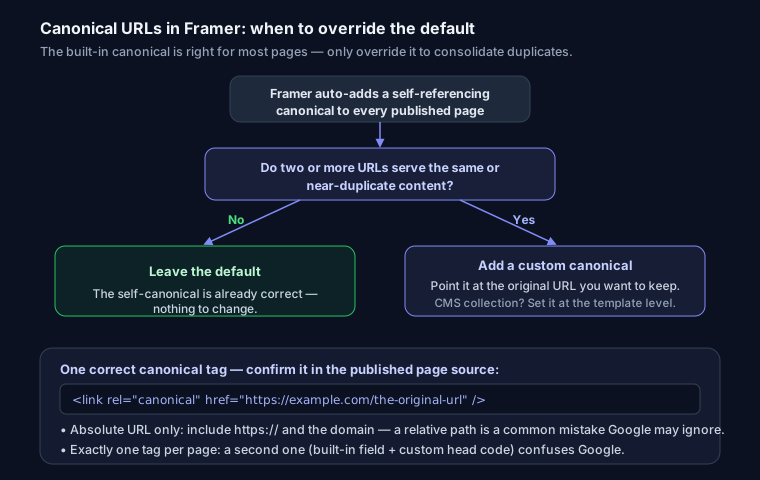
When You Need a Custom Canonical
Point a canonical somewhere other than the page itself when:
- A CMS collection item is accessible under multiple slugs or filtered paths.
- You publish a near-duplicate page (a landing variant, a print version) that should defer to the original.
- Content is syndicated and the original should keep the ranking signal.
How to Set It
Framer exposes SEO settings per page. Open the page's settings and set the canonical URL to the absolute URL you want Google to treat as the original. For CMS content, set it at the collection or template level so every item outputs a correct canonical.
When you need finer control than the built-in field allows, Framer lets you add custom code to the page <head>. Put a canonical link tag there:
<link rel="canonical" href="https://example.com/the-original-url" />
Always use an absolute URL, with the protocol and domain, never a relative path — a relative canonical is a common mistake that Google may ignore. If you're unsure of the exact format, build one with the canonical tag generator.
Verify It
After publishing, view the page source and confirm exactly one <link rel="canonical"> is present and points to the intended URL. Two canonical tags, or one pointing at the wrong URL, will confuse Google — run the page through the SEO analyzer to catch duplicates and mismatches.
FAQ
Q: Does Framer add a canonical tag by default? Yes. Each published page gets a self-referencing canonical pointing at its own URL. You only override it to consolidate duplicate or near-duplicate pages onto a single URL.
Q: Can I set a canonical on a Framer CMS page? Yes. Set it at the collection or template level so every item outputs a correct canonical, or use custom head code for per-item control.
Q: My canonical isn't working — why? The two usual causes are a relative URL (use an absolute https URL) and two canonical tags on the same page, one from the built-in field and one from custom code. Keep exactly one, pointing at the intended URL.