What "Missing field image" Means
When the Rich Results Test says Missing field "image", your structured data is missing a field the schema type needs to be eligible for a rich result. image is the most common one because Article, Product, Recipe, and several other types all recommend or require it. The image is what makes the enhanced listing look like anything at all.
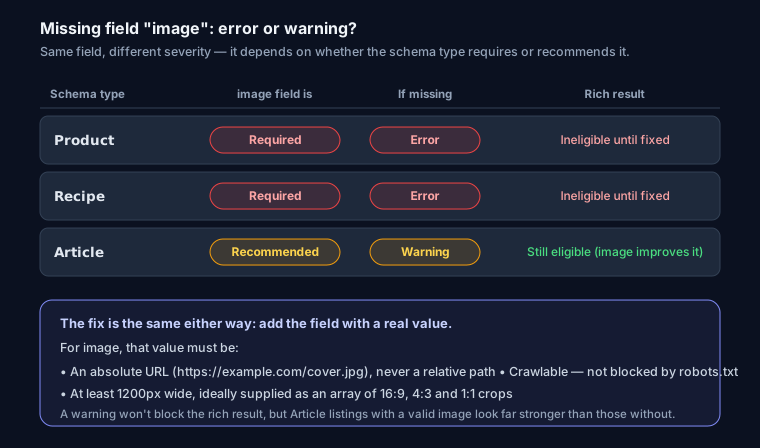
Google splits these into two levels. Required fields must be present or the item is ineligible (reported as an error). Recommended fields improve the result but won't block it (reported as a warning). image sits in different buckets depending on the type: required for Recipe and Product rich results, recommended for Article.
The Fix
Add the field with a real, crawlable image URL. Use an absolute URL, not a relative path, and make sure it isn't blocked by robots.txt.
<script type="application/ld+json">
{
  "@context": "https://schema.org",
  "@type": "Article",
  "headline": "Your Headline",
  "image": "https://example.com/cover.jpg",
  "author": { "@type": "Person", "name": "Jane Doe" },
  "datePublished": "2026-07-18"
}
</script>
Google prefers images at least 1200px wide, ideally in multiple aspect ratios (16:9, 4:3, 1:1) as an array:
"image": [
  "https://example.com/cover-16x9.jpg",
  "https://example.com/cover-4x3.jpg",
  "https://example.com/cover-1x1.jpg"
]
The "Missing field X" Family
The same fix pattern applies to every Missing field message: add the named field with a real value.
| Message | Type | Add |
|---|---|---|
| Missing field "image" | Article, Product, Recipe | image (absolute URL) |
| Missing field "author" | Article | author with @type and name |
| Missing field "datePublished" | Article | ISO 8601 date |
| Missing field "aggregateRating" / "review" | Product | one commercial signal (see the offers or review fix) |
| Missing field "priceCurrency" | Offer | ISO 4217 currency code |
Generate a valid block with the JSON-LD schema generator or the Article schema generator, then re-test.
FAQ
Q: Is "Missing field image" an error or a warning?
It depends on the type. For Product and Recipe rich results it's an error (ineligible until fixed); for Article it's a warning (still eligible, but adding an image improves the result).
Q: Can I use a relative image URL?
No. Google needs an absolute, crawlable URL, and the image must not be blocked by robots.txt.
Q: Does the image have to be visible on the page? It should represent the page's content and, ideally, appear on the page. Marking up an unrelated image risks being treated as misleading.