What This Status Means
Indexed, though blocked by robots.txt in Search Console means Google indexed a URL it wasn't allowed to crawl. It sounds contradictory and it catches people off guard, but it follows directly from one rule most people get wrong: robots.txt controls crawling, not indexing.
If enough other pages link to a URL, Google can decide it's worth indexing based on those links alone, even though your robots.txt told it not to fetch the page. The result is an indexed URL with no description (or a generic one), because Google never read the content.
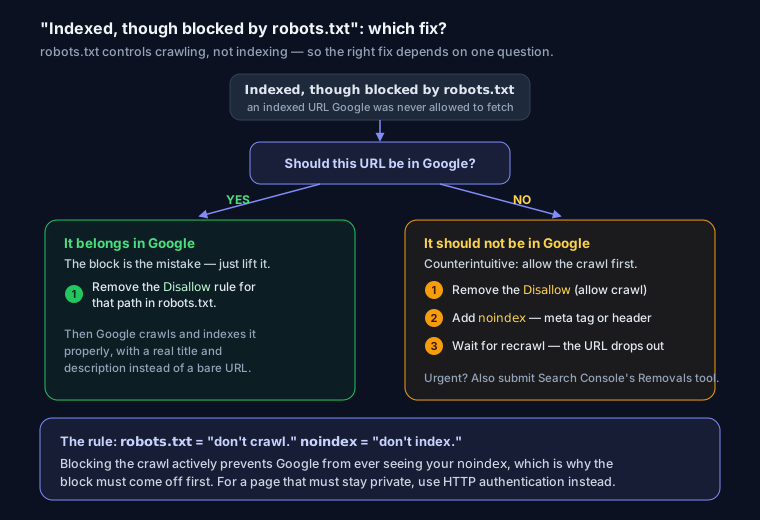
First, Decide What You Want
This status is only a problem if the wrong thing happened. Ask one question: should this URL be in Google?
If YES, it should be indexed: the block is the mistake. Remove the Disallow rule so Google can crawl and properly index the page with a real title and description. Confirm which line is blocking it first with the robots.txt tester.
If NO, it should not be in Google: this is the important case, and the fix is counterintuitive. To remove a page from search, Google has to crawl it to see a noindex signal. But your robots.txt block prevents that crawl, so the noindex is never seen. You have to:
- Remove the
robots.txtDisallowfor that path (yes, allow crawling). - Add a
noindexvia a meta tag orX-Robots-Tagheader. Build one with the meta robots noindex generator. - Wait for Google to recrawl. The page drops out once it reads the
noindex.
For anything urgent, also submit a removal in Search Console's Removals tool while you wait.
The Rule to Remember
robots.txt means "don't crawl." noindex means "don't index." They are not interchangeable, and blocking crawling actively prevents the noindex from working. If a page must stay private, use HTTP authentication instead. That keeps it out of the index and off the open web entirely.
FAQ
Q: Why is a page indexed if robots.txt blocks it? Because robots.txt only stops crawling. Google can still index a URL from external links without fetching it, which is exactly what produces this status, usually with a missing description.
Q: How do I actually remove it from Google?
Allow crawling (remove the Disallow), then add a noindex meta tag or X-Robots-Tag. Google has to crawl the page to see the noindex, so the block must come off first.
Q: Will fixing this happen instantly? No. Google recrawls on its own schedule, usually days to a few weeks. Use the URL Inspection tool to request a recrawl, and the Removals tool for anything urgent.